Payroll · เงินเดือน
The Payroll menu (8 Payroll) pays your employees monthly, twice a month or weekly. Panya computes each employee's social security contributions and the tax withheld from the salary (s.50(1) of the Revenue Code), prorates the pay of a joiner or leaver, posts the payroll entry, puts the tax on the month's ภ.ง.ด.1, prints the payslips and the social security contribution list, and gives each employee the annual 50 ทวิ certificate.
This chapter covers:
- who can see payroll;
- setting up payroll, your workplaces (social security branches) and your employees, with the allowances they claim and any pay from an earlier employer;
- starting Panya's payroll in the middle of a year, with the year to date of your earlier program;
- the social security rates, and the area rates of some provinces;
- a payroll run, step by step, with a worked example;
- semi-monthly and weekly pay, part-period pay, and daily pay with the minimum wage;
- how the withholding tax is computed, pay on leaving and salaries in a foreign currency included;
- the journal entry a run posts;
- paying social security and the tax to the authorities, and the due dates and their extensions;
- deductions ordered by others: student loans (กยศ.) and court orders attaching the pay;
- the Workmen's Compensation Fund;
- payslips, the social security report and the employee's 50 ทวิ;
- what Panya does not do yet.
The Payroll menu#
The menu items appear in this order:
| Menu item | ภาษาไทย | Code | Use it to |
|---|---|---|---|
| Payroll runs | จ่ายเงินเดือน | PY | Run a month's payroll, post it, print the payslips, cancel a run posted by mistake. |
| Employees | พนักงาน | — | Keep each employee's pay, social security, tax details and allowances; see the year to date and print the annual 50 ทวิ. |
| Social security report | รายงานประกันสังคม | — | List the month's contributions for the payment to the Social Security Office. |
| Workmen's compensation | กองทุนเงินทดแทน | — | See the year's contribution to the Workmen's Compensation Fund and its dates, and keep the rate notified, the estimate and the payments. |
| Deductions to remit | เงินหักนำส่ง | — | List the month's student loan deductions for the Student Loan Fund's e-PaySLF and the pay attached by court orders, with their due dates, and record the remittances. |
| Payroll settings | ตั้งค่าเงินเดือน | — | Choose the accounts a run posts to and the employer's provident fund rate; keep your workplaces; see the social security rate in force. The same page is the Payroll tab of 7 Setup. |
A posted run is numbered PY{BB}{MM}{####}, for example PY69100001 for the first run of October 2569. You can change the format in 7 Setup → Document numbering (see Setup).
Who can do what#
Salaries are private, so payroll is open to owners, admins and accountants only. Staff, read-only users and Panya support sessions do not have the View payroll permission: for them 8 Payroll is not in the menu, the Payroll tab is not in 7 Setup, a payroll page opened from a link says You do not have access to payroll., and the API refuses every payroll request.
| Action | Accountant | Admin, Owner | Staff, Read-only |
|---|---|---|---|
| See employees, runs, payslips and the social security report | Yes | Yes | No |
| Add and change employees | Yes | Yes | No |
| Create, save and post runs | Yes | Yes | No |
| Cancel a posted run | Yes | Yes | No |
| Change the payroll settings | Yes | Yes | No |
The tax withheld from salaries is on the PND.1 and PND.1ก tabs of the withholding tax report (see Reports). Those tabs show each employee's pay, so for staff and read-only users they leave the payroll rows out and say how many, and their RD Prep files are refused: an owner, admin or accountant files them.
Keyboard#
| Key | Does |
|---|---|
Alt+A | New employee or new payroll run, on the list screens |
Enter | Next field |
Ctrl+S / ⌘S | Save the employee, create the run, or save the draft run and compute it again |
F9 | Save & post the draft run; save the employee |
Alt+P | Print / PDF on a run, the payslips, the 50 ทวิ and the social security report |
Payroll settings#
Open 8 Payroll → Payroll settings (or 7 Setup → Payroll) before the first run. You need the Manage settings permission to change it.
| Field | ภาษาไทย | What it is |
|---|---|---|
| Salaries and wages | เงินเดือนและค่าจ้าง | Debited with the gross pay. Default 5210 เงินเดือนและค่าจ้าง. |
| Social security expense | เงินสมทบประกันสังคม (นายจ้าง) | Debited with the employer's contribution. Default 5211 เงินสมทบประกันสังคม. |
| Social security payable | เงินประกันสังคมค้างจ่าย | Credited with both contributions until you pay them. Default 2135 เงินสมทบประกันสังคมค้างจ่าย. |
| Provident fund expense | เงินสมทบกองทุนสำรองเลี้ยงชีพ (นายจ้าง) | Debited with the employer's provident fund contribution. Default 5212 เงินสมทบกองทุนสำรองเลี้ยงชีพ. |
| Provident fund payable | เงินกองทุนสำรองเลี้ยงชีพค้างจ่าย | Credited with both provident fund contributions until you pay the fund. Default 2136 กองทุนสำรองเลี้ยงชีพค้างจ่าย. |
| Other deductions | รายการหักอื่นจากเงินเดือน | Credited with what you deduct from the pay, such as a loan instalment. Default 1190 เงินให้กู้ยืมแก่พนักงาน. |
| Student loans payable | เงินกู้ยืมเพื่อการศึกษาค้างนำส่ง | Credited with the student loans deducted until you remit them (see Student loans). Default 2137 เงินกู้ยืมเพื่อการศึกษาค้างนำส่ง. |
| Workmen's compensation expense, payable | เงินสมทบกองทุนเงินทดแทน, เงินสมทบกองทุนเงินทดแทนค้างจ่าย | Debited and credited with the contribution each run accrues (see The Workmen's Compensation Fund). Default 5213 and 2139. |
| Business type | ประเภทกิจการ | The Workmen's Compensation Fund's business type: its rate is the contribution's. |
| Attachments payable | เงินอายัดค้างนำส่ง | Credited with the pay attached by court orders until you remit it (see Court orders). Default 2138 เงินอายัดค้างนำส่ง. |
| Employer's provident fund % | เงินสมทบกองทุนสำรองเลี้ยงชีพของนายจ้าง (%) | The employer's contribution, as a percentage of the salary, for every employee who contributes. 0 when you have no fund. At most 15%. |
| Employer account no. | เลขที่บัญชีนายจ้าง | Your 10-digit employer account with the Social Security Office, one for all your workplaces. Needed for the contribution file. |
| Attendance of a monthly run | ช่วงข้อมูลการทำงานของงวดรายเดือน | Which days' approved leave, absence and overtime a monthly run reads: The run's own month, or Up to day 25 of the month (any day 1–28). See Leave, absence and overtime from HR. |
| Absent days are not paid | ไม่จ่ายค่าจ้างในวันขาดงาน | Tick only when your work rules or employment contracts say that absent days are not paid: employees paid by the month, half-month or week then lose a day's wage for each day absent on an approved timesheet. Daily-paid employees are never paid for days absent. |
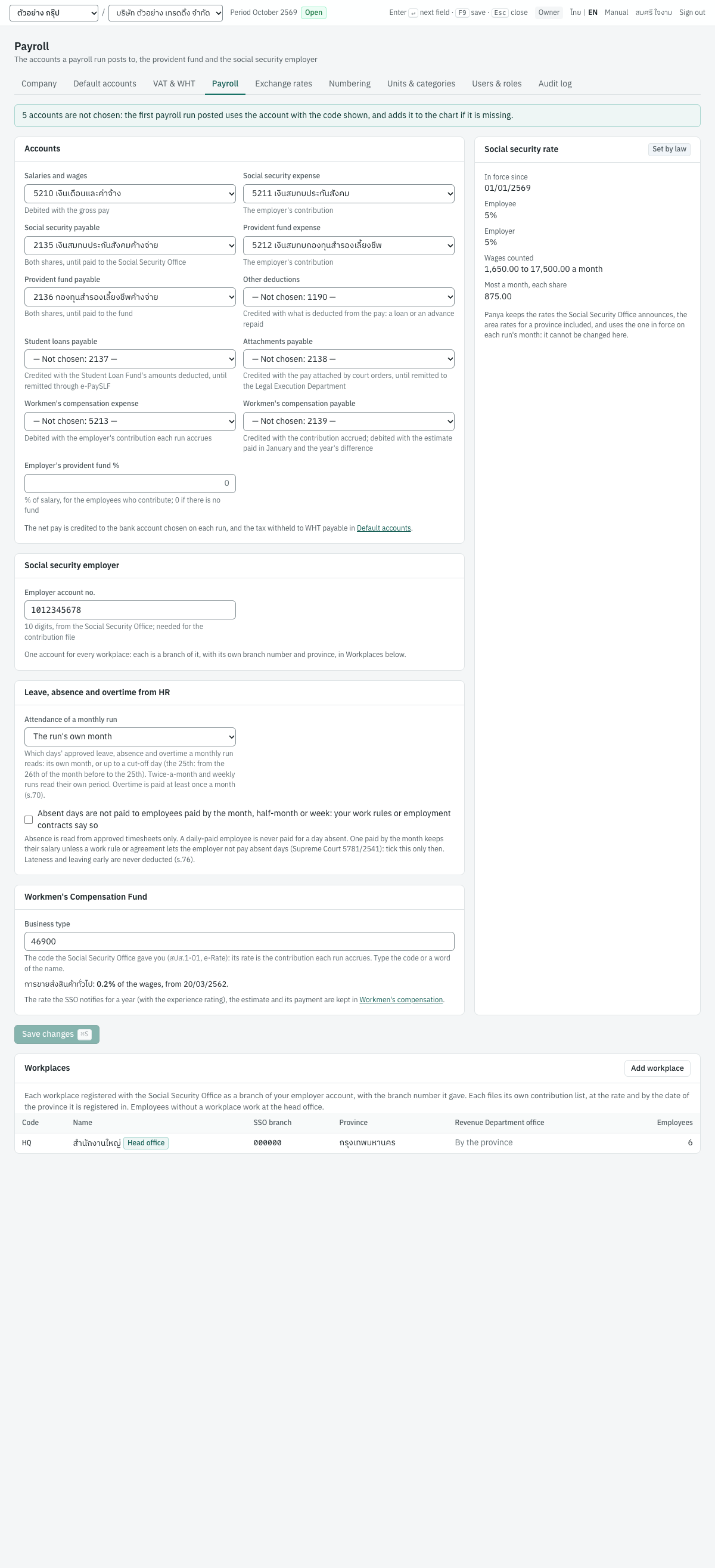
You do not have to choose the accounts. An account left as Not chosen is filled in by the first run you post, with the account of the code shown, and Panya adds that account to the chart if it is missing. Only active posting accounts can be chosen, not groups or control accounts. The net pay is credited to the bank account chosen on each run, and the tax withheld to the WHT payable account of 7 Setup → Default accounts (2130 ภาษีเงินได้หัก ณ ที่จ่ายค้างจ่าย).
The Social security rate card shows the rate in force today for your head office's province. It is set by law and cannot be changed here; when an area rate applies, the card says so under the rates. See Social security rates.
Workplaces#
Each place your employees work that is registered with the Social Security Office is a branch of your one employer account, with the branch number (ลำดับที่สาขา) the office gave it on the สปส.1-01 or สปส.6-15: 000000 for the head office. The Workplaces card of the payroll settings lists them; click one to change it, or Add workplace for a new one.
| Field | ภาษาไทย | What it is |
|---|---|---|
| Code | รหัส | Your own short code, such as HQ or HY. Unique in the company. |
| SSO branch | ลำดับที่สาขา | The branch number, 6 digits, as the Social Security Office registered it. Unique in the company. |
| Name | ชื่อ | The workplace's name, such as สาขาหาดใหญ่. |
| Province | จังหวัด | The province the workplace is registered in with the Social Security Office. An area rate in force there replaces the national rate for its employees (see Area rates), and its due dates follow that province's extensions. Leave it Not chosen for the national rate and dates. |
| Revenue Department office | สำนักงานสรรพากรพื้นที่ | For the head office: the office you file your withholding returns with. The list shows the offices of the Province chosen: its area offices, and for นครศรีธรรมราช and สุราษฎร์ธานี their branch offices too. Choose it there: an extension can name branch offices rather than the whole province (see Revenue Department branch offices); elsewhere leave it Not chosen: the province decides. For another workplace: only when it pays its own staff and files its own ภ.ง.ด.1 at that office; leave it Filed with the head office otherwise. |
| District | อำเภอ | Shown for a province some of whose districts have a minimum wage of their own (เชียงใหม่, สงขลา, สุราษฎร์ธานี): the workplace's district, or Elsewhere in the province. |
| Business, for the minimum wage | ประเภทกิจการ (ค่าจ้างขั้นต่ำ) | Hotel (types 2 to 4) or Service establishment (สถานบริการ) when the workplace is one: their minimum wage is 400 a day everywhere. Otherwise Any other business. See The minimum wage. |
| Active | ใช้งาน | Untick when the workplace closes. The head office stays active, and a workplace with active employees cannot be made inactive: move them first. |
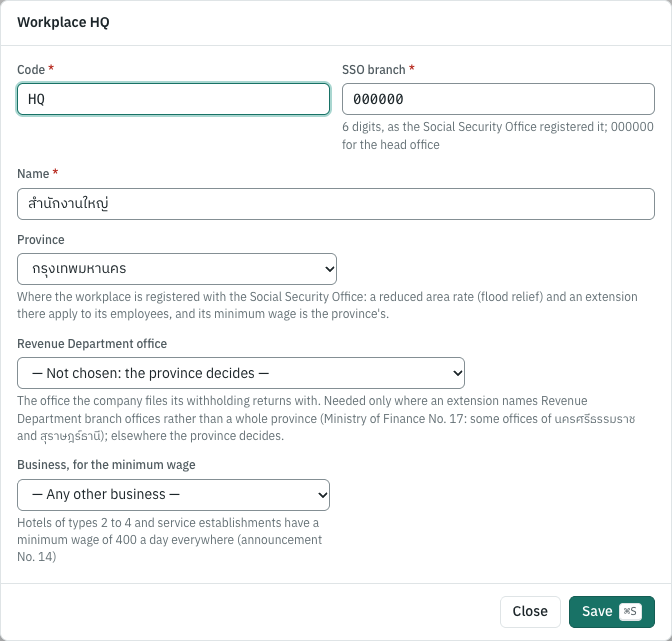
Every company has its head office. A company that used payroll before workplaces existed has it from its earlier settings (the branch, the province and the Revenue Department office), with the code HQ, and its employees work there.
Each employee works at one workplace, chosen on the employee (see Entering an employee). For the employees of a workplace:
- social security is at the rate in force in the workplace's province (an area rate there), on the month's wages as usual;
- each workplace files its own contribution list (สปส.1-10) with its own due date, and has its own contribution file (see The social security report);
- the ภ.ง.ด.1 is filed by the office that pays (the PND.1 instructions: at the area office where the payer's office that paid is): the head office's for everyone, unless a workplace has its own Revenue Department office, when the posted run shows the due date of that workplace's own ภ.ง.ด.1 too.
Each payroll line keeps the workplace it was paid for: an employee who moves later stays in the earlier months' report under the workplace that paid them.
Employees#
The employee list#
8 Payroll → Employees lists your employees by code. Search by code, name or tax ID, and choose Active employees, Inactive (left) or All employees. Paid shows how often each one is paid (Monthly, Semi-monthly or Weekly) and Pay per period the pay of one period. The Notes column flags an employee who is inactive, not insured under social security, not a Thai tax resident, or approved for the 3% rate.
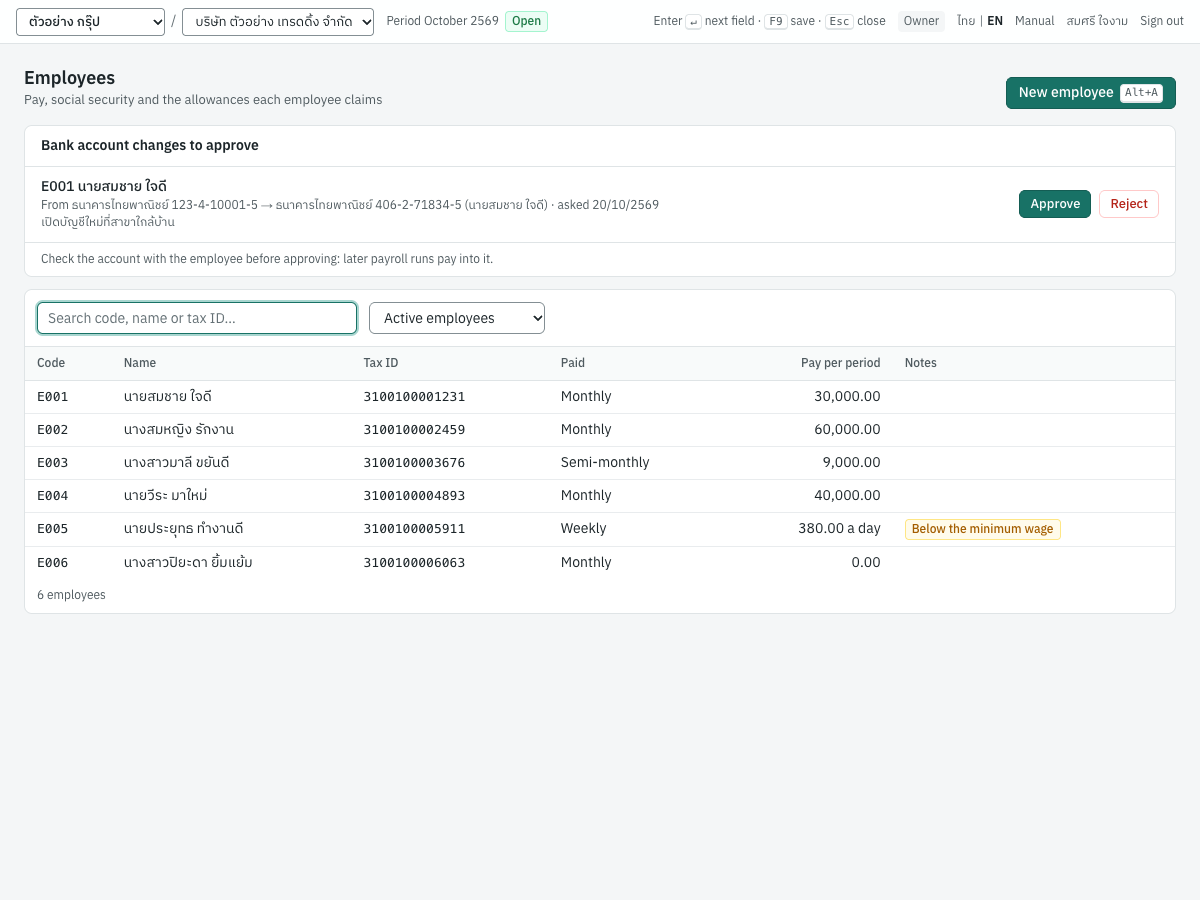
Click a row (or Tab to it and press Enter) to open the employee. New employee (Alt+A) opens an empty form.
When an employee with self-service asks to be paid into another bank account, Bank account changes to approve appears above the list, with the account they have and the one they ask for. Check the account with the employee, then Approve (the employee record takes it, and later runs pay into it) or Reject; it needs Manage master data as well as View payroll. See Employee self-service.
Entering an employee#
The form has four cards. Code, First name, Last name, Start date and the pay (Monthly salary, Pay per half-month or Pay per week) are required.
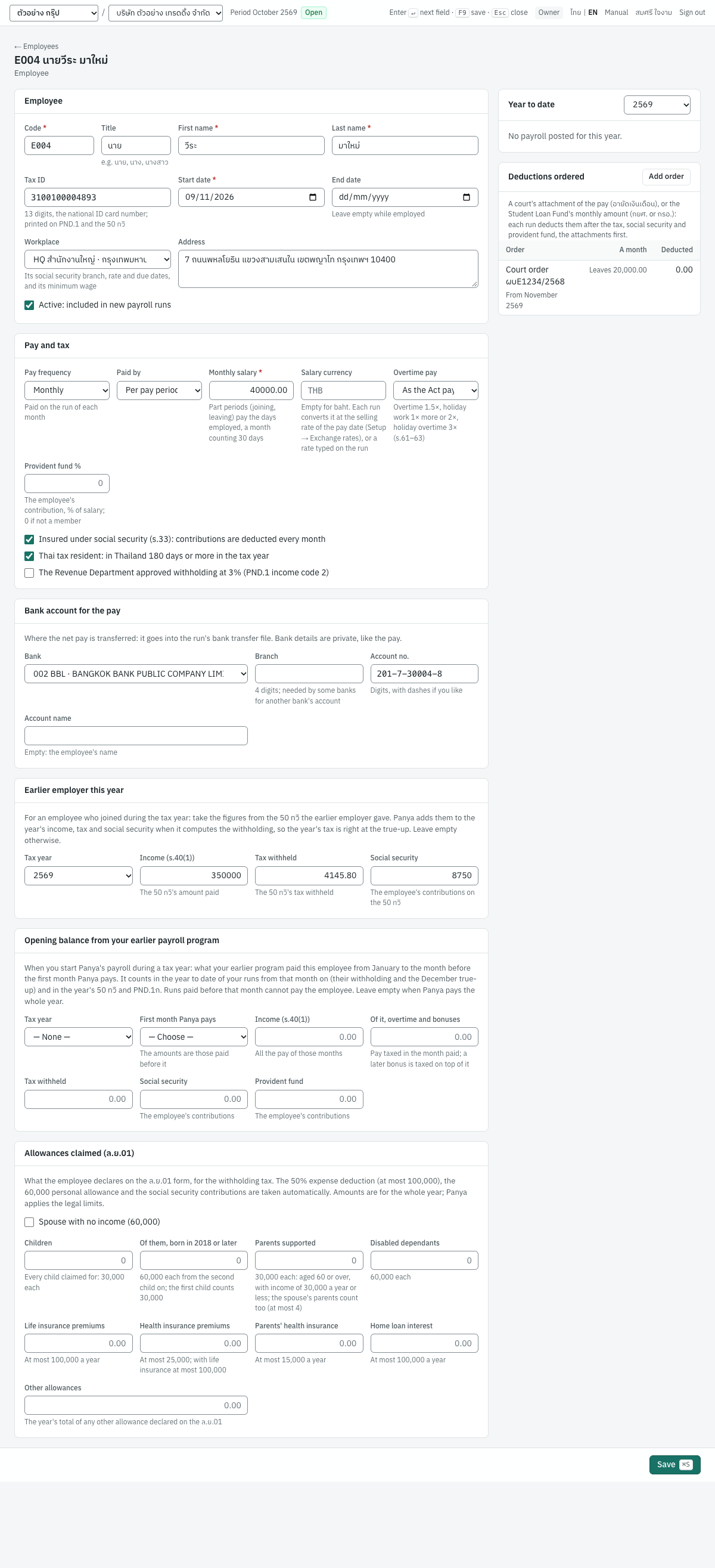
Employee · ข้อมูลพนักงาน
| Field | ภาษาไทย | What to enter |
|---|---|---|
| Code | รหัสพนักงาน | Your own code, for example E001. Unique in the company. |
| Title | คำนำหน้าชื่อ | นาย, นาง, นางสาว (or Mr., Ms.). A Thai title is printed against the name: นายสมชาย ใจดี. |
| First name, Last name | ชื่อ, นามสกุล | As on the ID card. |
| Tax ID | เลขประจำตัวผู้เสียภาษี | The 13-digit national ID number. It is printed on the ภ.ง.ด.1 and the 50 ทวิ. Panya checks that it has 13 digits and warns when the check digit does not match. |
| Start date | วันที่เริ่มงาน | The first day of work. It decides the part of the first period paid (see Part-period pay), how many payments the employee gets in the year (see Salaries and regular pay) and the years of service for severance. |
| End date | วันที่พ้นสภาพ | The last day of work, when the employee leaves; the last period is paid up to it. Leave it empty while employed. |
| Workplace | สถานประกอบการ | Where the employee works: the workplace's social security branch, rate and due dates apply (see Workplaces). The head office by default. |
| Address | ที่อยู่ | Printed on the 50 ทวิ. |
| Active | ใช้งาน | Untick when the employee has left: a new run no longer includes them. |
Pay and tax · เงินเดือนและภาษี
| Field | ภาษาไทย | What to enter |
|---|---|---|
| Pay frequency | รอบการจ่าย | Monthly (the default), Semi-monthly (the 1st–15th and the 16th to the end of each month) or Weekly (7 days). A run pays the employees of one frequency; see Pay frequencies. |
| Paid by | ประเภทค่าจ้าง | Per pay period (the default): a salary for each period of the frequency. Per day: a daily rate, paid for the days paid in each period (see Daily pay). |
| Monthly salary, Pay per half-month, Pay per week | เงินเดือน (บาทต่อเดือน), ค่าจ้างต่อครึ่งเดือน, ค่าจ้างต่อสัปดาห์ | The pay for one period of the frequency, which a new run starts from. A part period pays the days employed (see Part-period pay). You can change the amount on each run. |
| Daily rate | ค่าจ้างต่อวัน | Paid per day: the pay for a day of normal working time, in place of the period's pay. |
| Work days | วันทำงาน | Paid per day: Mon – Sat (the default), Mon – Fri or Every day, the days a new run counts as paid. |
| Salary currency | สกุลเงินของเงินเดือน | Empty for baht. For a salary agreed in a foreign currency, its three-letter code, such as USD: the pay is then in that currency. Not for an employee paid per day. See Salaries in a foreign currency. |
| Overtime pay | ค่าล่วงเวลา | As the Act pays (the default), or one of the employees of s.65 who are not paid overtime unless you agreed otherwise: Acts for the employer (s.65(1)), Sells for a commission (s.65(2)), Work of s.65(3)–(9). See Overtime and holiday work. |
| Provident fund % | กองทุนสำรองเลี้ยงชีพ (%) | The employee's own contribution, as a percentage of the salary. 0 when not a member. At most 15%. |
| Bank account for the pay: Bank, Branch, Account no., Account name | บัญชีรับเงินเดือน: ธนาคาร, สาขา, เลขที่บัญชี, ชื่อบัญชี | Where you transfer the net pay: the bank from the Bank of Thailand's list of codes, its branch (4 digits, which some banks need for another bank's account), the account number and the account's name (the employee's when empty). An account number of an unusual length for the bank is warned of. The bank's name is printed on the payslip, and the run's transfer file is made from them (see Paying the net pay). |
| Insured under social security (s.33) | ผู้ประกันตนตามมาตรา 33 | Ticked by default: the run deducts the contribution every month. Untick for someone not insured, such as a director who is not an employee. |
| Thai tax resident | ผู้อยู่ในประเทศไทย | In Thailand 180 days or more in the tax year. See Non-resident employees. |
| The Revenue Department approved withholding at 3% | ได้รับอนุมัติจากกรมสรรพากรให้หักภาษีในอัตราร้อยละ 3 | Only with the Revenue Department's approval letter: enter its number in Approval letter no. See Income codes 2 and 3. |
| Pay on leaving first paid in | เริ่มจ่ายเงินเพราะเหตุออกจากงานในปีภาษี | Shown once the employee has an End date. Choose a tax year only when another payer, such as the provident fund, paid money on leaving this job before your runs did: pay on leaving of a later tax year is then not taxed apart. See Pay on leaving. |
Save with Save (Ctrl+S or F9). You need the Manage master data permission. Employees are not deleted: when one leaves, enter the End date and, after their last run, untick Active.
An earlier employer this year#
When an employee joins during the tax year, the year's tax covers what an earlier employer paid them too. The Earlier employer this year card takes the figures from the 50 ทวิ that employer gave:
| Field | ภาษาไทย | What to enter |
|---|---|---|
| Tax year | ปีภาษี | The year of the 50 ทวิ. Required when an amount is entered. The figures count in that year only. |
| Income (s.40(1)) | เงินได้ (มาตรา 40(1)) | The amount paid on the 50 ทวิ |
| Tax withheld | ภาษีที่หักไว้ | The tax withheld on the 50 ทวิ. Cannot be more than the income. |
| Social security | เงินสมทบประกันสังคม | The employee's contributions on the 50 ทวิ |
Panya adds the income and the social security to the year's when it computes the withholding, and takes the tax already withheld off the year's tax before spreading it over your payments. The December true-up does the same, so the year's tax comes out right over both employers (see The December true-up). Leave the card empty for an employee with no earlier employer in the year.
The Revenue Department's instructions annualise only your own payments, and do not ask you to count an earlier employer; payroll programs commonly do, so that the employee does not owe tax at the end of the year. Panya never withholds less than it would on your pay alone: withholding too little exposes you (s.54), while too much is reclaimed by the employee on their own return.
The Year to date card and the employee's 50 ทวิ show only what you paid: the earlier employer's pay stays on its own 50 ทวิ, which the employee files with yours.
Starting in the middle of the year#
When your company starts Panya's payroll during a tax year, the months before were paid by your earlier payroll program, but they are your pay all the same: the year's withholding, the December true-up, the employee's 50 ทวิ and your ภ.ง.ด.1ก cover the whole year. Enter what the earlier program paid each employee, from its year-to-date report, in the Opening balance from your earlier payroll program card:
| Field | ภาษาไทย | What to enter |
|---|---|---|
| Tax year | ปีภาษี | The year the figures are for. They count in that year only. |
| First month Panya pays | เดือนแรกที่จ่ายในระบบ | The month of the pay date of the first run you pay the employee in Panya, February to December. The figures are those paid before it. |
| Income (s.40(1)) | เงินได้ (มาตรา 40(1)) | All the employee's pay of those months: salary, overtime, bonuses and other income. |
| Of it, overtime and bonuses | ในจำนวนนี้ ค่าล่วงเวลาและโบนัส | The part of it taxed in the month it was paid rather than with the salary (see Bonuses and other irregular pay). Cannot be more than the income. |
| Tax withheld | ภาษีที่หักไว้ | The tax withheld from that pay, as filed on those months' ภ.ง.ด.1. Cannot be more than the income. |
| Social security | เงินสมทบประกันสังคม | The employee's contributions. |
| Provident fund | กองทุนสำรองเลี้ยงชีพ | The employee's contributions. |
Panya adds the opening balance to the year to date of every run paid from that month on. A bonus is taxed on top of the year's earlier bonuses, and the December true-up computes the tax on everything paid in the year and takes off what both programs withheld. The Year to date card, the payslip's year to date, the employee's 50 ทวิ and the PND.1ก tab include it; the monthly PND.1 tab does not, since the earlier program's months were filed with its own ภ.ง.ด.1. Unlike an earlier employer's pay, which stays on that employer's 50 ทวิ, the opening balance is your own pay and is on your certificate.
A run paid before the first month Panya pays cannot pay the employee: creating or saving it is refused with employee E001: the opening balance stands for the pay before …. An opening balance whose first month comes after a run already posted for the employee is refused too.
For example, E001 (30,000.00 a month) moves to Panya in July 2569. The earlier program paid him 30,000.00 a month from January to June and a bonus of 60,000.00 in March: enter income 240,000.00, of it 60,000.00 overtime and bonuses, tax 3,987.48 (6 × 164.58 + 3,000.00 on the bonus) and social security 5,250.00, with July as the first month.
- July to November withhold 164.58 a month, as before.
- A bonus of 30,000.00 in October is withheld 1,500.00 more: the year with 90,000 of bonuses is taxed 6,475.00, with March's 60,000 alone 4,975.00.
- December withholds 6,475.00 − 3,987.48 − 5 × 164.58 − 1,500.00 = 164.62, and the 50 ทวิ shows the year's 450,000.00 and 6,475.00. Without the opening balance, December would see only 210,000 paid and withhold nothing.
Allowances (ล.ย.01)#
The Allowances claimed (ล.ย.01) card holds what the employee declares on the ล.ย.01 form, for the withholding tax. Enter amounts for the whole year. Panya applies the legal limits itself, so you can enter what the employee paid.
Some deductions are always taken and need nothing here: the standard expenses (50% of the pay, at most 100,000 a year), the personal allowance of 60,000, the social security contributions and the provident fund contributions.
| Field | ภาษาไทย | Allowance |
|---|---|---|
| Spouse with no income | คู่สมรสไม่มีเงินได้ | 60,000 |
| Children | บุตร | Every child claimed for, 30,000 each |
| Of them, born in 2018 or later | ในจำนวนนี้ เกิดตั้งแต่ปี 2561 | 60,000 each from the second child on; the first child counts 30,000. Cannot be more than Children. |
| Parents supported | บิดามารดา | 30,000 each, for a parent aged 60 or over with income of 30,000 a year or less, the spouse's parents included; at most 4 |
| Disabled dependants | ผู้พิการหรือทุพพลภาพในความอุปการะ | 60,000 each |
| Life insurance premiums | เบี้ยประกันชีวิต | Up to 100,000 a year |
| Health insurance premiums | เบี้ยประกันสุขภาพตนเอง | Up to 25,000; with life insurance, up to 100,000 together |
| Parents' health insurance | เบี้ยประกันสุขภาพบิดามารดา | Up to 15,000 a year |
| Home loan interest | ดอกเบี้ยเงินกู้ยืมเพื่อที่อยู่อาศัย | Up to 100,000 a year |
| Other allowances | ค่าลดหย่อนอื่น | The year's total of any other allowance declared, taken as entered |
The provident fund contributions count in two parts: the first 10,000 a year is an allowance, and the rest is exempt up to 15% of the year's salary and 500,000 in all. Social security contributions count as paid, up to 10,500 for 2569 (12 × 875).
When the employee hands in a new ล.ย.01 during the year, change the card: the next runs use the new figures, and the year's last run evens out the tax (see The December true-up).
Year to date#
The employee's page shows the Year to date card for the tax year you choose: the income paid (s.40(1)), the tax withheld, and the employee's social security and provident fund contributions, from the posted runs and the year's opening balance (see Starting in the middle of the year). 50 ทวิ for the year opens the annual certificate; see The employee's 50 ทวิ.
Social security rates#
Employees insured under s.33 of the Social Security Act and their employer each pay a percentage of the month's wages. The wages counted are at least a minimum and at most a ceiling (the national rates; see Area rates for the provinces with a reduced rate):
| From | Employee | Employer | Wages counted | Most each a month |
|---|---|---|---|---|
| Before 2569 | 5% | 5% | 1,650 to 15,000 | 750 |
| 1 January 2569 (2026) | 5% | 5% | 1,650 to 17,500 | 875 |
| 1 January 2572 (2029) | 5% | 5% | 1,650 to 20,000 | 1,000 |
| 1 January 2575 (2032) | 5% | 5% | 1,650 to 23,000 | 1,150 |
So a salary of 30,000 counts 17,500, and the employee and the employer each pay 875 a month. A salary of 12,345 pays 617 each; a salary of 1,000 counts the minimum, 1,650, and pays 83 each.
- Wages are the pay for normal working time: the salary, and other income paid every month. Overtime, bonuses and severance are not wages and pay no contribution.
- Each contribution is rounded to the baht: 50 satang and more up, less down.
- Panya keeps the rates as dated data and uses the one in force in the run's month. When the ceiling is raised, Panya adds the new rate; you do not change anything.
- An employee whose Insured under social security box is unticked pays nothing, and neither do you for them.
- The minimum, the ceiling and the rounding are the month's. When a month is paid in several runs (semi-monthly or weekly pay), each run withholds the contribution on the month's wages so far less what the month's earlier runs withheld, so the month never pays more than 875 each; see the example. The month is the month of each run's pay date, whatever its frequency: a monthly run of October paid on 5 November counts in November's contributions.
The contributions are due to the Social Security Office by the 15th of the next month, unless the date is extended; see Paying social security and the tax.
Area rates#
The government sometimes lowers the contributions for workplaces in some provinces for a time, such as after floods. Panya keeps these area rates as dated data, as it does the national ones. The one in force now:
| Wage months | Provinces | Employee | Employer |
|---|---|---|---|
| December 2568 to May 2569 | ตรัง, นครศรีธรรมราช, นราธิวาส, ปัตตานี, พัทลุง, ยะลา, สงขลา, สตูล, สุราษฎร์ธานี | 3% | 3% |
(The Labour Ministry's announcement of 7 January 2569 on flood relief, Royal Gazette 8 January 2569. The province where the employer is registered decides, not the damage.) Choose each workplace's Province in Workplaces. A run then uses, for the employees of each workplace, the area rate in force for its wage month in that workplace's province, with the national minimum and ceiling: a salary of 30,000 counts 17,500 and pays 525 each instead of 875. The rate card of the payroll settings (the head office's) and the social security report of the workplace show the area rate's note while it is in force, and the workplace's contribution file carries the area rate (0300 for 3%). Without a province, or in a month the area rate does not cover, the national rate applies. The same provinces have later due dates for the contributions too; see Due dates and extensions.
A payroll run#
8 Payroll → Payroll runs lists the runs of the year chosen. Filter them by Status and by pay frequency; Paid shows each run's frequency and Period its month, or the first and last day of a half-month or a week.
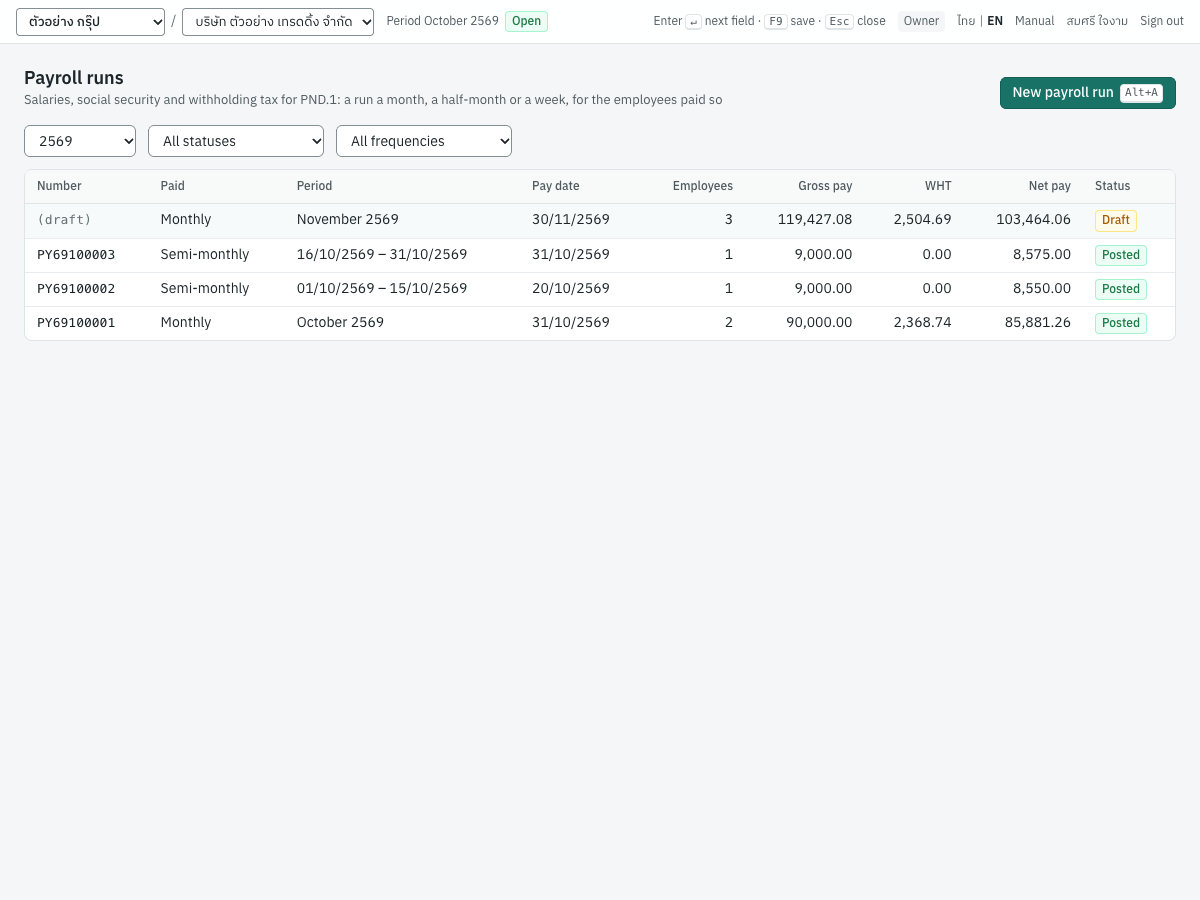
Creating the run#
- Open 8 Payroll → Payroll runs and click New payroll run (
Alt+A). - Choose the Pay frequency first: the run pays only the employees paid at that frequency.
- Choose the period:
- Monthly: the Month the salaries are for.
- Semi-monthly: the Month and the Half of the month, the 1st–15th or the 16th to the month's last day.
- Weekly: the day the week starts in Week starting; Week ending shows the 7th day.
- Check the Pay date. It defaults to the last day of the period. The pay date is the date of the journal entry and of the withholding tax: the tax goes on the ภ.ง.ด.1 of the pay date's month, and the tax year is the year of the pay date.
- Choose the account the pay comes from in Paid from.
- Click Create draft (
Ctrl+S).
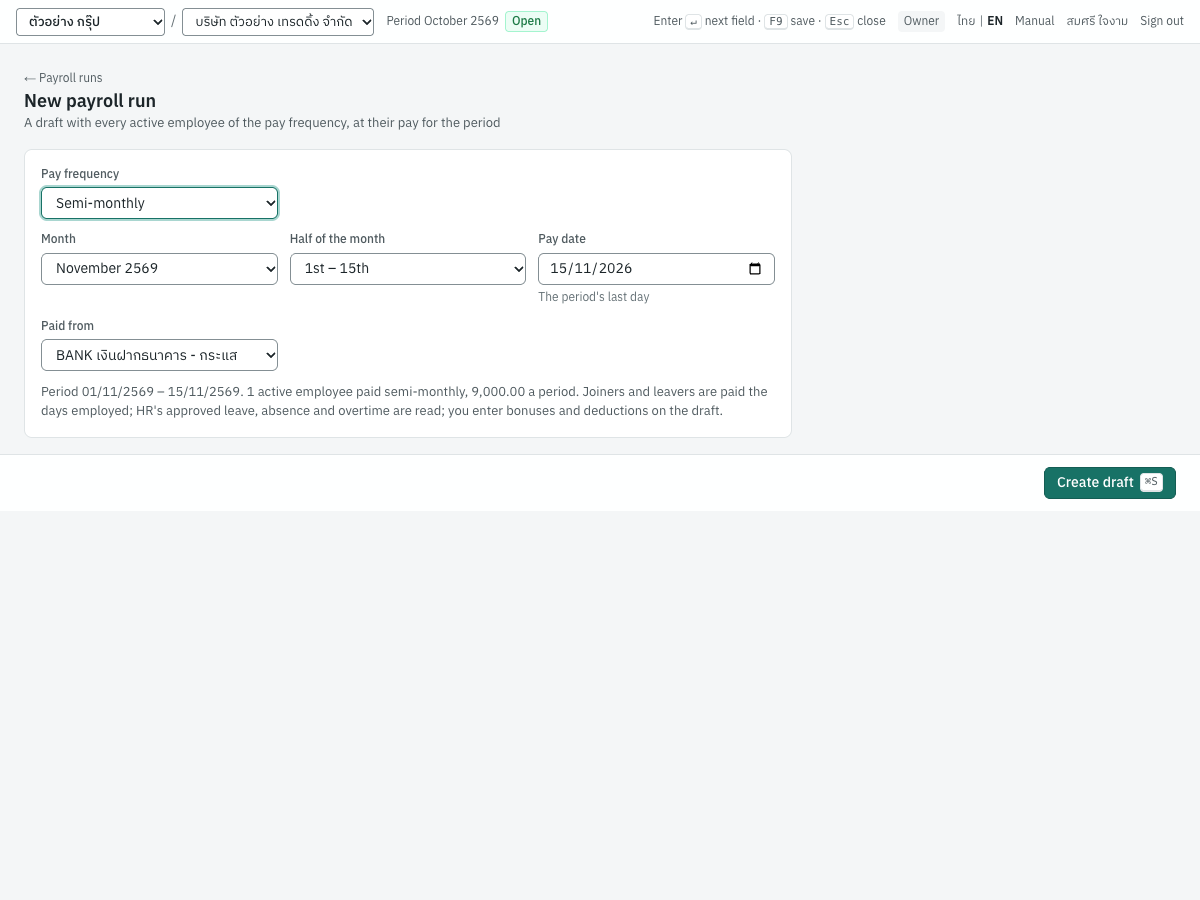
Panya creates a draft with a line for each employee of the frequency employed in the period (started by its last day and not left before its first day) at their pay for the period, prorated for a joiner or leaver, already computed, and opens it. There is one run for each frequency and period: a second run for the same month (half-month, week) is refused unless the first is cancelled.
The draft#
The draft has one line per employee. You type into the white columns; the grey ones are computed by Panya when you save.
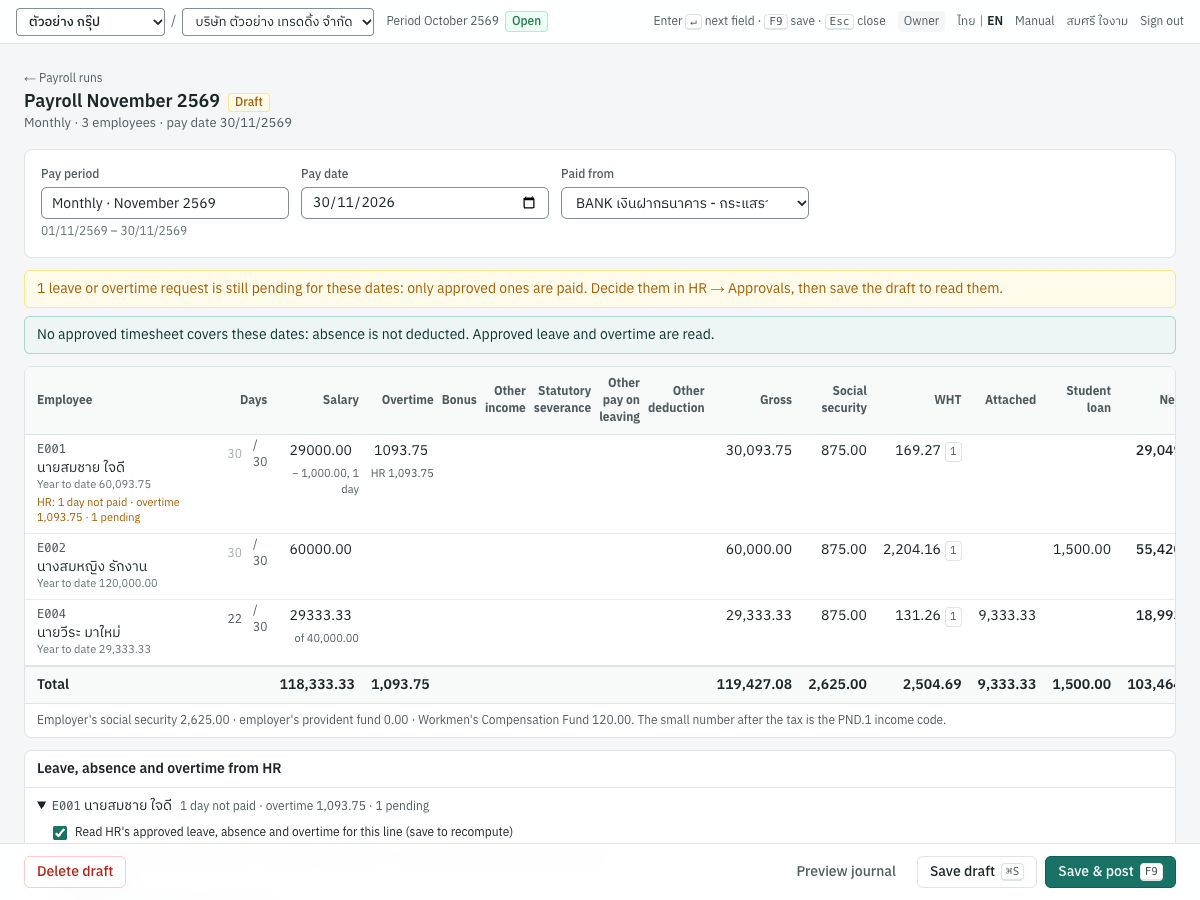
| Column | ภาษาไทย | What it is |
|---|---|---|
| Employee | พนักงาน | Code and name, the year to date with this run, and under them, HR: what the line read of HR (see Leave, absence and overtime from HR) |
| Days | วันทำงาน | The days paid of the period's calendar days, such as 22 / 30. Empty is the whole period; a joiner or leaver shows the days employed. Type a number to pay part of the period; see Part-period pay. |
| Salary | เงินเดือน | The period's salary paid. For a part period it is prorated, with the full period's salary under it (of 40,000.00); the days not paid of HR's leave and absence come off it (− 1,000.00, 1 day). You can type another amount. |
| Overtime | ค่าล่วงเวลา | Overtime and holiday pay: that of HR's approved requests (HR 1,375.00 under it), and what you type above it, which is added |
| Bonus | โบนัส | A bonus paid this month |
| Other income | เงินได้อื่น | Any other pay. Tick Every month under it for pay that comes every month, such as a position allowance: it is then taxed with the salary and counts as wages for social security. Unticked, it is taxed in this month like a bonus. |
| Statutory severance | ค่าชดเชยตามกฎหมาย | The severance pay the Labour Protection Act requires, all of it. Under it, Exempt: the part free of tax when the employer ends the employment (not on retirement or at the end of a fixed term), at most 400 days of the final wage and 600,000 baht. See Pay on leaving. |
| Other pay on leaving | เงินอื่นที่จ่ายเพราะออกจากงาน | Any other pay made once because the employee leaves, such as ex gratia pay. Under it, with any pay on leaving, Years of service (empty: counted from the start date, a part year of 183 days or more counting as a year). |
| Other deduction | รายการหักอื่น | Deducted from the net pay, such as a loan instalment or an advance repaid |
| Gross | รวมเงินได้ | Salary, overtime, bonus, other income and pay on leaving |
| Social security | ประกันสังคม | The employee's contribution. Point at it to see the employer's. |
| Provident fund | กองทุนสำรองฯ | The employee's contribution; shown only when someone contributes |
| WHT | ภาษีหัก ณ ที่จ่าย | The tax withheld, followed by its ภ.ง.ด.1 income code (1, 2 or 3) |
| Net pay | เงินได้สุทธิ | Gross less social security, provident fund, tax and other deductions: what you transfer |
The Total row adds up every column. Below the table Panya shows the employer's social security and provident fund contributions. When a line's pay on leaving is taxed with the month's pay rather than apart, the line says why under the employee's name: fewer than 5 whole years of service, or first paid in an earlier tax year.
After you change a figure, the computed columns turn grey and the note reads Changed: save (⌘S) to recompute social security, provident fund, tax and net pay. Press Ctrl+S (Save draft): Panya computes every line again and shows the new figures. Posting computes the lines once more, with the year so far as it is then. You can also change the Pay date and Paid from on the draft; the Pay period shows the frequency and the period's dates.
Preview journal saves the draft and shows the entry the run will post, from its totals and the payroll accounts. Delete draft removes the run.
If the deductions of a line come to more than its pay, saving is refused with the deductions (…) are more than the pay (…): lower the other deduction.
Posting#
Click Save & post (F9). Panya saves what is on the screen, numbers the run (PY69100001) and:
- posts the journal entry in the payments book (see What posting records);
- writes a withholding tax record for each employee with tax, on the ภ.ง.ด.1 of the pay date's month;
- fixes each employee's year to date, which the next runs build on.
Runs post in order of month within a tax year, because each month's tax builds on the months before. Panya refuses to post a month while a later month of the same year is posted, and to cancel a month while a later one is posted.
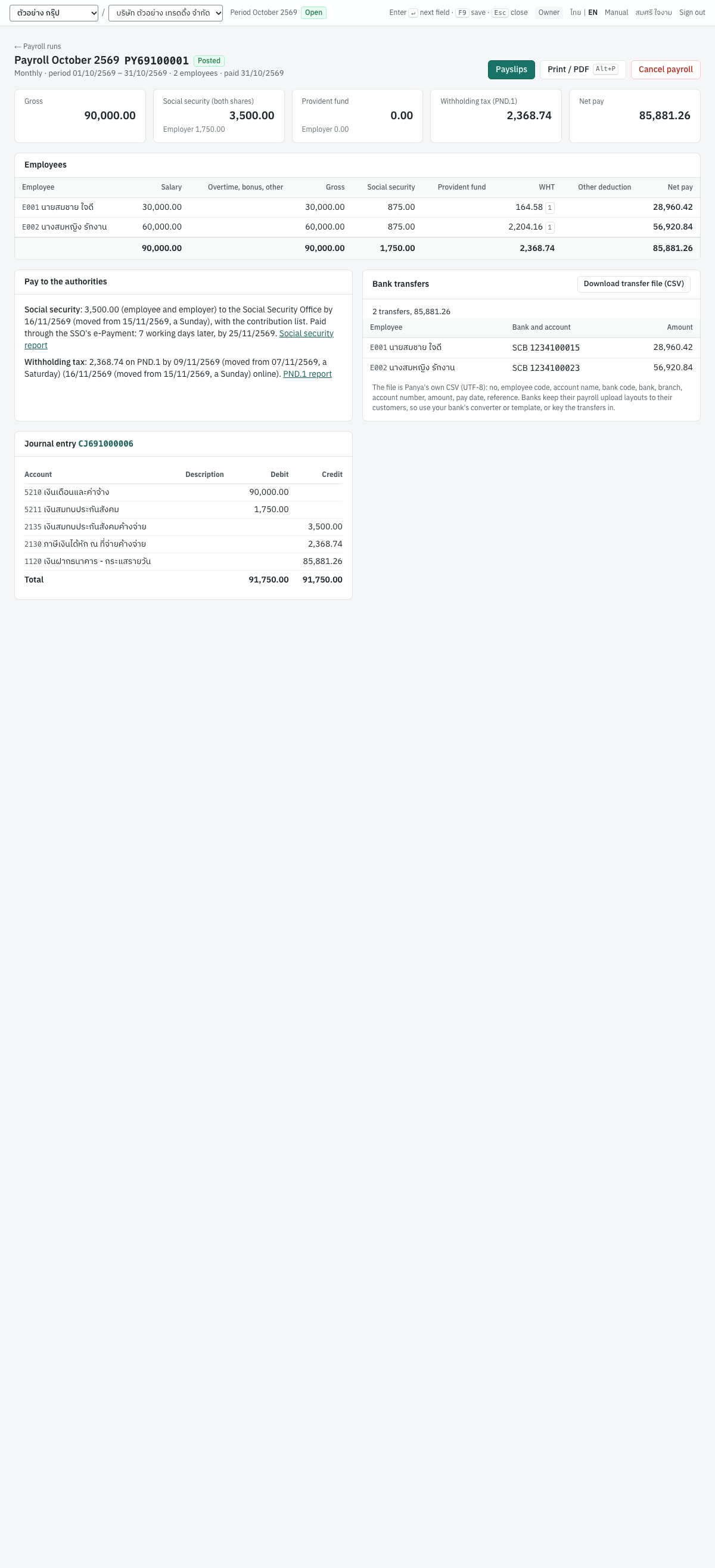
The posted run shows the frequency, the period's dates and the pay date under its title; totals for gross pay, social security (both shares), provident fund, withholding tax and net pay; the lines (with Days and the full salary when a line is prorated); the Bank transfers (see Paying the net pay); what to pay to whom and by when, with the due dates in force for your workplaces' provinces (see Due dates and extensions), each workplace's social security on its own line when the run pays several; and the Journal entry. Its buttons are Payslips, Print / PDF (Alt+P) and Cancel payroll.
Paying the net pay#
The posted run's Bank transfers card lists the net pay of each employee by the bank account in Bank account for the pay on the employee: the bank (by the Bank of Thailand's three-digit code), the branch, the account number and the account's name (the employee's when empty). An employee without a bank or an account number is listed apart, to pay otherwise; an account number whose length is not the usual one for the bank (KBank's table of them) is flagged, not refused.
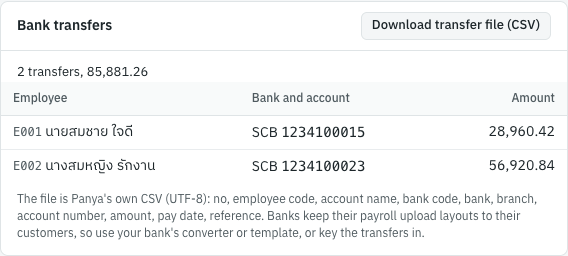
Download transfer file (CSV) (with the Export permission) makes the posted run's transfers as a CSV file named PAYROLL_ and the run's number, UTF-8 with a byte order mark, a header row and Windows line ends, one line per employee with a bank account and pay to transfer:
| Column | What it holds |
|---|---|
| No | 1, 2, 3, … |
| Employee code | The employee's code |
| Account name | The account's name, or the employee's |
| Bank code | The Bank of Thailand's code, such as 014 |
| Bank | The bank's short name, such as SCB |
| Branch | 4 digits, or empty |
| Account number | Digits only |
| Amount | The net pay, 2 decimals, no separators |
| Pay date | YYYY-MM-DD |
| Reference | The run's number |
No Thai bank publishes its payroll upload layout in full: Krungthai's manual gives its Excel columns but not their lengths, and the others keep theirs in their business banking (KBank's and SCB's templates, Bangkok Bank's manual, Krungsri's per-customer format, ttb's converter). So Panya makes this file in its own columns: map them in your bank's template or converter, or key the transfers in. Record nothing more: posting already credited the net pay to the run's Paid from account.
Worked example#
In October 2569 the company pays two employees on 31/10/2569 from 1120 เงินฝากธนาคาร - กระแสรายวัน. Both started before 2569, are insured under social security, are Thai residents and are not in a provident fund.
E001นายสมชาย ใจดี, salary 30,000.00, no allowances claimed.E002นางสมหญิง รักงาน, salary 60,000.00, with a spouse who has no income.
- New payroll run: Month October 2569, Pay date
31/10/2569, Paid from1120. Create draft. - The draft shows the two lines, computed:
| Employee | Salary | Gross | Social security | WHT | Net pay |
|---|---|---|---|---|---|
| E001 นายสมชาย ใจดี | 30,000.00 | 30,000.00 | 875.00 | 164.58 1 | 28,960.42 |
| E002 นางสมหญิง รักงาน | 60,000.00 | 60,000.00 | 875.00 | 2,204.16 1 | 56,920.84 |
| Total | 90,000.00 | 90,000.00 | 1,750.00 | 2,368.74 | 85,881.26 |
The employer's social security is 1,750.00 as well (875.00 for each).
- The tax of
E001: 30,000 × 12 = 360,000 a year; less 50% expenses (at most 100,000) 100,000, the personal allowance 60,000 and social security 875 × 12 = 10,500, net income is 189,500. The first 150,000 is taxed at 0% and the next 39,500 at 5%: 1,975.00 a year, or 164.58 a month. - The tax of
E002: 720,000 − 100,000 − 60,000 − 60,000 (spouse) − 10,500 = 489,500. 150,000 at 0%, 150,000 at 5% = 7,500, 189,500 at 10% = 18,950: 26,450.00 a year, or 2,204.16 a month. - Press
F9. The run becomesPY69100001and posts the entry shown in What posting records. The ภ.ง.ด.1 of October 2569 lists both employees under income code 1. - Click Payslips and print them; transfer the net pay to each employee.
- By 15 November 2569, pay 3,500.00 of social security; by 7 November (15 November online), file and pay the ภ.ง.ด.1 with 2,368.74 of tax.
Pay frequencies#
Each employee has a Pay frequency, and a run pays the employees of one frequency:
| Frequency | A run covers | Payments a year (s.50(1)) |
|---|---|---|
| Monthly | A calendar month | 12 |
| Semi-monthly | The 1st–15th, or the 16th to the end of a month | 24 |
| Weekly | 7 days from the day chosen | 52 (also in a year with 53 pay days) |
The employee's pay is for one period of their frequency, and the withholding follows the ภ.ง.ด.1 instructions: the regular pay of a payment × the payments a year stands for the year's income (see Salaries and regular pay). Social security is the month's, across the runs paid in the month, whatever their frequency. The pay periods of a frequency cannot overlap, and its runs post and cancel in order of their periods within a tax year. The year's last run of a frequency, whose next period would be paid in the next year, is the December true-up.
Example: social security over two half-months#
E003 นางสาวมาลี ขยันดี is paid 9,000.00 a half-month (18,000 a month), insured under social security.
- The run for 1–15 October 2569 pays 9,000.00. The month's wages so far are 9,000, so the contribution is 5% = 450.00 each.
- The run for 16–31 October 2569 pays 9,000.00 again. The month's wages are now 18,000, which counts the ceiling, 17,500: the month's contribution is 875.00, and the first half withheld 450.00, so this run withholds 425.00 each.
- The social security report for October 2569 shows
E003with wages of 18,000.00, 17,500.00 counted and 875.00 from each side: within the monthly ceiling, as for an employee paid monthly.
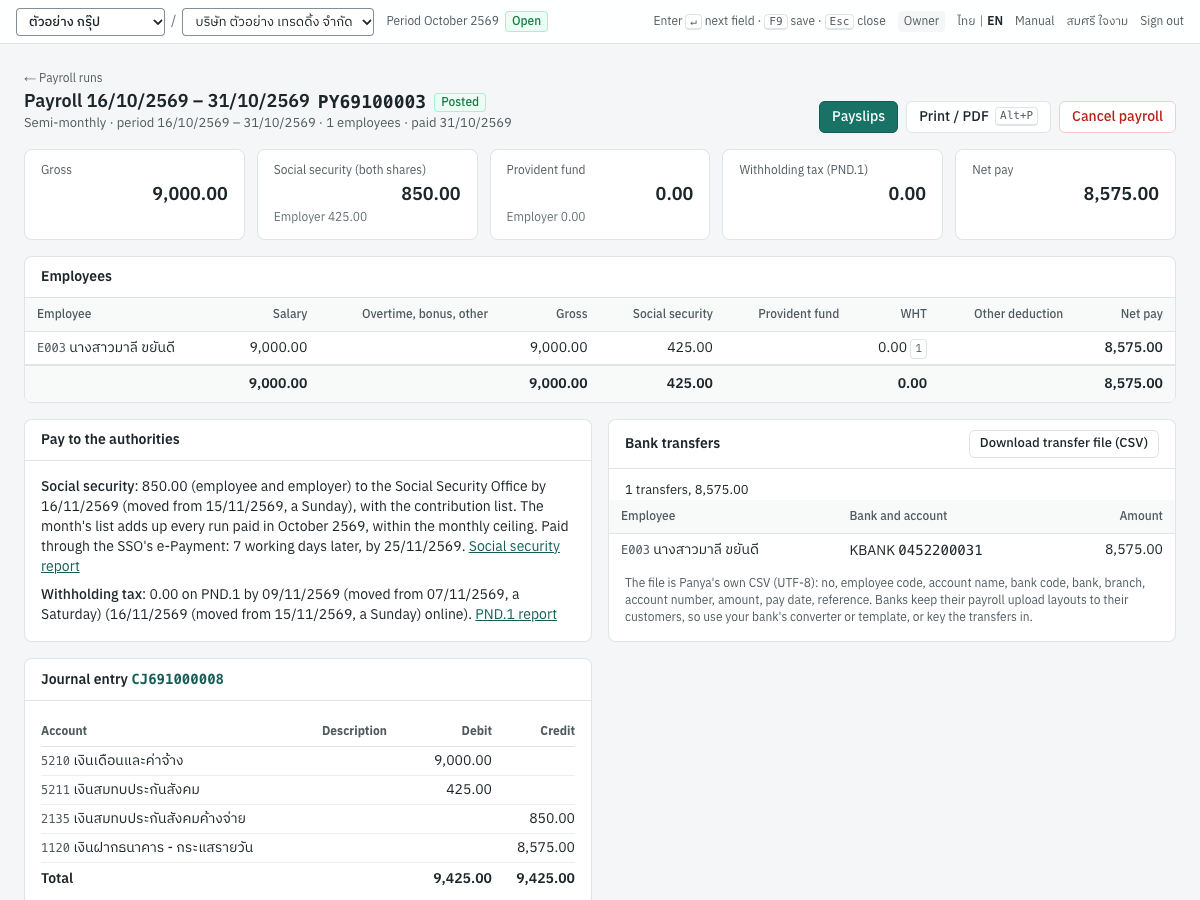
Her tax: 9,000 × 24 = 216,000 a year; less 100,000 expenses, 60,000 personal allowance and 10,500 of social security, 45,500 is below the 150,000 taxed at 0%, so nothing is withheld.
Part-period pay#
An employee who starts or leaves during a period is paid for the days they are employed in it: a day's wage for each, the month's salary ÷ 30 (÷ 15 for a half month, ÷ 7 for a week), or the period's pay × the days employed ÷ the period's calendar days when that is more, never more than the period's pay, to the satang. The Act sets no rule; the Civil and Commercial Code counts a month as 30 days, and the Department of Labour Protection and Welfare's opinion รง 0505/2652 pays 10 days of 18,000 a month 6,000, and 30 days of a 31-day month the whole salary. Panya counts the days from the Start date and the End date; the draft shows them in Days. For example, E004 starts on 9 November 2569 at 40,000.00 a month: November has 30 days and he is employed 22 of them, so November's run pays 40,000 × 22 ÷ 30 = 29,333.33. Someone employed 16 days of October's 31 at 30,000 is paid 16 × 1,000 = 16,000.00; 14 days of February's 28, half the salary, 15,000.00.
Unpaid leave and absence recorded in 9 HR come off the salary by themselves (see Leave, absence and overtime from HR). To pay part of a period for another reason, type the days paid in Days and save: the salary is prorated to them. Empty the box to go back to the days employed. You can also type the Salary paid yourself; it is then kept as typed.
The withholding treats the part period's salary as that period's regular pay, and a joiner's payments in the year count from the period they start in (see Salaries and regular pay). Social security counts the salary paid: a part month below the minimum counts the minimum, 1,650.
Daily pay#
An employee paid by the day (ลูกจ้างรายวัน) has a Daily rate instead of a period's salary: choose Per day in Paid by on the employee, with the Work days. Daily-paid employees are paid on the runs of their Pay frequency, weekly, semi-monthly or monthly, with everyone else paid at that frequency:
- A new run counts the days of the employee's Work days in the part of the period they are employed: Monday to Saturday of a week is 6 days, of October 2569 27 days; Monday to Friday of a week 5.
- The line's Salary is the daily rate × the days, with × 380.00 a day under it: 6 days at 380.00 is 2,280.00.
- The days absent on an approved timesheet and HR's unpaid leave come off by themselves (see Leave, absence and overtime from HR). For anything else, type the days actually paid in Days and save: the salary follows them. Count the days worked and the paid days off: a daily-paid employee is paid for the traditional holidays and for paid leave, but not for the weekly holiday (Labour Protection Act s.56). You can also type the Salary yourself.
The withholding and social security treat the period's pay as any salary: the tax is annualised by the payments a year of the frequency (52 on weekly runs) and worked out again on each run's pay, as the Revenue Department's order ป.96/2543 does for pay that changes, the year's last run evening it out; social security is on the month's actual wages, at least 1,650 (a week of 1,520.00, the month's first, pays 83; the month's next runs pay the rest of the month's contribution). For severance, a day's wage is the daily rate and a month's 30 days.
The minimum wage#
The minimum wage is a daily rate the Wage Committee sets for each province, some districts and some businesses, for a day of normal working time (8 hours, or 7 for hazardous work), however few hours are worked that day. The place of work decides. Panya keeps the rates in force since 1 January 2568:
| From | Rates a day | Announcement |
|---|---|---|
| 1 January 2568 | 337 to 400 by province, 372 in กรุงเทพมหานคร; อำเภอเมืองเชียงใหม่ and อำเภอหาดใหญ่ 380, อำเภอเกาะสมุย 400 | No. 13 of the Wage Committee |
| 1 July 2568 | the same, with กรุงเทพมหานคร 400, and 400 for hotels of types 2 to 4 and service establishments in every province | No. 14, still in force |
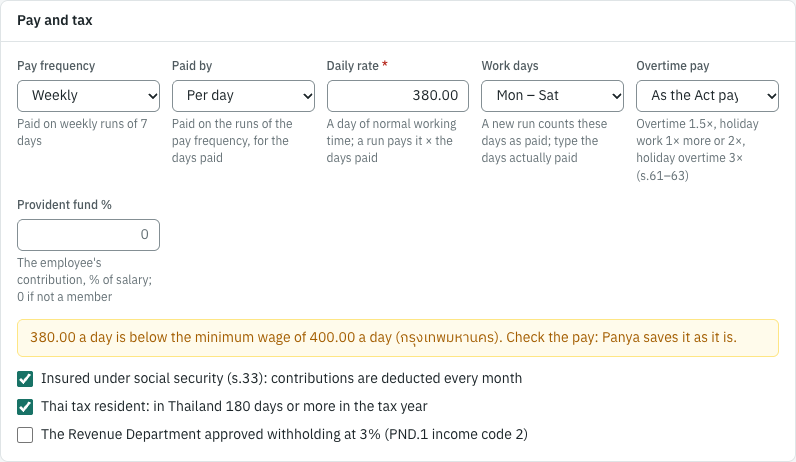
A workplace's minimum wage is the highest of those for its Province, its District and its Business, for the minimum wage (see Workplaces). Panya compares the employee's pay as a day's with it: the daily rate, or a salary as a month's ÷ 30. A rate below it is warned of, not refused: on the employee form as you type, with a Below the minimum wage badge in the employee list, and under the employee's name on a run, for the minimum wage in force on the period's last day. A workplace without a province is not checked.
For example, E005 is paid 380.00 a day at the head office in กรุงเทพมหานคร, where the minimum wage is 400 a day: the form says 380.00 a day is below the minimum wage of 400.00 a day (กรุงเทพมหานคร). A monthly salary of 10,000.00 there is 333.33 a day, below it too.
Leave, absence and overtime from HR#
A run reads what 9 HR approved for each employee (see HR): their leave, the absence on their approved timesheets, and their overtime and holiday work. You do not type them: the draft works them out, shows where each figure comes from, and stays editable.
Which days a run reads#
A monthly run reads its own month, unless you set a cut-off in Payroll settings → Attendance of a monthly run: with the 25th, October's run reads from 26 September to 25 October and November's from 26 October. Overtime worked after the cut-off is then paid the next month, which the Labour Protection Act allows: overtime and holiday pay are paid at least once a month (s.70). Semi-monthly and weekly runs read their own period.
Each line reads on from the day after what the employee's previous run read, so a day is never read twice or skipped when you change the cut-off. A joiner's line starts on the start date; a leaver's reads to the end date, so the final pay includes everything (s.70).
Only approved records count:
- leave approved in 9 HR → Leave requests;
- absence, lateness and leaving early from approved timesheets only;
- overtime approved in 9 HR → Overtime.
What is still waiting is named on the line and above the table, never paid as if decided: 1 leave or overtime request is still pending for these dates, the timesheets of E006 are drafts, days without an approved timesheet. Decide them in 9 HR → Approvals, approve the timesheets, then save the draft: it reads HR again.
Days not paid#
These come off the salary:
| What | Days not paid |
|---|---|
| Unpaid leave (your own type, no pay) | Every day it counts |
| Leave beyond its paid days: sick leave over 30 working days a year (s.57), maternity leave after the employer's 60 days (s.59), personal business leave over 3 days (s.57/1) | The days beyond |
| Leave paid at less than the full wage: continued childcare leave at 50% (s.59/1) | Half of each day |
| Absent on an approved timesheet (ขาดงาน): a daily-paid employee | The days absent |
| Absent on an approved timesheet: an employee paid by the month, half-month or week | The days absent, only when Absent days are not paid is ticked in Payroll settings |
The employee has no right to wages for these days, so not paying them is not a deduction from pay, which s.76 restricts (the Department of Labour Protection and Welfare's opinion รง 0505/3764). An employee paid by the month is the exception for absence: the Supreme Court held (5781/2541) that without an agreement or a work rule letting the employer do so, the full salary is due even for days absent. Tick Absent days are not paid only if your work rules or employment contracts say so; until then the absent days are shown, and paid.
Leave paid in full changes nothing. A daily-paid employee loses the daily rate for each day not paid. An employee paid by the month loses a day's wage for each: the salary ÷ 30, whatever the month's length, since the Act sets no rule and the Civil and Commercial Code counts a month as 30 days (s.193/6; the Department's opinions รง 0504/00683 and รง 0505/2652); by the half-month ÷ 15, by the week ÷ 7. The deduction never takes more than the salary, and a month wholly on unpaid leave pays nothing, whatever its length. Leave counted in working days (sick, personal business, your unpaid leave unless you count it in calendar days) leaves the holidays inside it paid; maternity leave counts every day, holidays included (s.41), so its unpaid days do too.
For example, มาลี is paid 30,000 a month and starts 120 days of maternity leave on 17 August 2569. The employer pays the first 60 days, to 15 October:
| Run | Days not paid | Salary |
|---|---|---|
| August, September | none | 30,000.00 |
| October | 16 (16–31 October) × 1,000 | 14,000.00 |
| November | every day | 0.00 |
| December | 14 (1–14 December), and 4 days of childcare leave at 50%: 2 | 14,000.00 |
The Social Security Office pays her its own maternity benefit; social security counts the pay actually paid, so a month paid nothing has no contribution, and the social security report still lists her, with no wages, as the SSO's form สปส.1-10 asks.
The salary column shows what came off it: − 16,000.00, 16 days. If you type another salary, yours is kept and the days not paid are only shown; type the salary back as it was computed (or empty the change) to follow HR again.
Overtime and holiday work#
The line's Overtime is the pay of the approved requests, HR 1,375.00 under it, and whatever you type above that is added. The hourly wage is a day's wage ÷ the normal hours of the employee's working day (s.68): their work schedule's working hours on average, breaks left out, 8 without a schedule. A daily wage pays at most 8 of them: a daily-paid employee's longer normal day is paid more for the hours beyond 8 (Ministerial Regulation No. 13), which you add yourself. 30,000 a month on an 8-hour day is 125 an hour; 400 a day is 50.
| Kind | When | Paid | Section |
|---|---|---|---|
| Overtime | On a working day, outside the shift's hours | 1.5 × the hourly wage | s.61 |
| Holiday work | Within the normal hours of a day off | 1 × more for an employee paid for the day off; 2 × for one who is not: a daily-paid employee on a weekly holiday | s.62, s.56 |
| Holiday overtime | Beyond the normal hours of a day off | 3 × | s.63 |
Everyone is paid for the traditional holidays (s.56), so their holiday work is 1 × more for daily-paid employees too. An extra day off your company gives beyond its announced holidays (Extra day off in 9 HR → Company holidays) is paid as a holiday: 1 × more for those paid by the period, 2 × for those paid by the day. The Act's holiday pay strictly covers weekly, traditional and annual holidays; the Department treats an extra weekly day off as a weekly holiday, and has not said how other extra days are paid, so Panya pays the higher reading.
Some employees are not paid these unless you agreed otherwise. Choose it in Overtime pay on the employee (8 Payroll → Employees):
| Overtime pay | ภาษาไทย | Who | Paid |
|---|---|---|---|
| As the Act pays | ตามกฎหมาย | Everyone else | As above |
| Acts for the employer (s.65(1)) | มีอำนาจทำการแทนนายจ้าง (มาตรา 65 (1)) | Has the authority, personally, to act for the employer in hiring, rewarding or dismissing; a job title alone is not enough | Nothing for overtime, holiday work or holiday overtime (s.65, s.66) |
| Sells for a commission (s.65(2)) | งานขายที่ได้ค่านายหน้า (มาตรา 65 (2)) | Canvasses or sells goods for a commission | Nothing for overtime or holiday overtime; holiday work as above |
| Work of s.65(3)–(9) | งานตามมาตรา 65 (3)–(9) | Railway work, sluice gates, water levels, fire fighting, work outside the premises without fixed hours, standing guard not part of their normal work | Overtime and holiday overtime hours at the hourly wage (1 ×); holiday work as above |
Overtime and holiday pay are taxed in the month they are paid, like a bonus (the Revenue Department's order ป.96/2543), and are not wages for social security or the Workmen's Compensation Fund: those count pay for normal working time.
Lateness and leaving early#
Panya never deducts for lateness or leaving early: the line reports the minutes on the approved timesheets, and pays them. The Labour Protection Act forbids fines and restricts what may be deducted from pay (s.76), and the Department of Labour Protection and Welfare's latest opinion (รง 0505/2331, 2568) is that an employer cannot deduct pay for arriving late or leaving early, for monthly and daily-paid employees alike, and should deal with it under its work rules instead. Earlier opinions accepted not paying for the time not worked under a work rule; as they disagree, Panya does not.
Reading the draft#
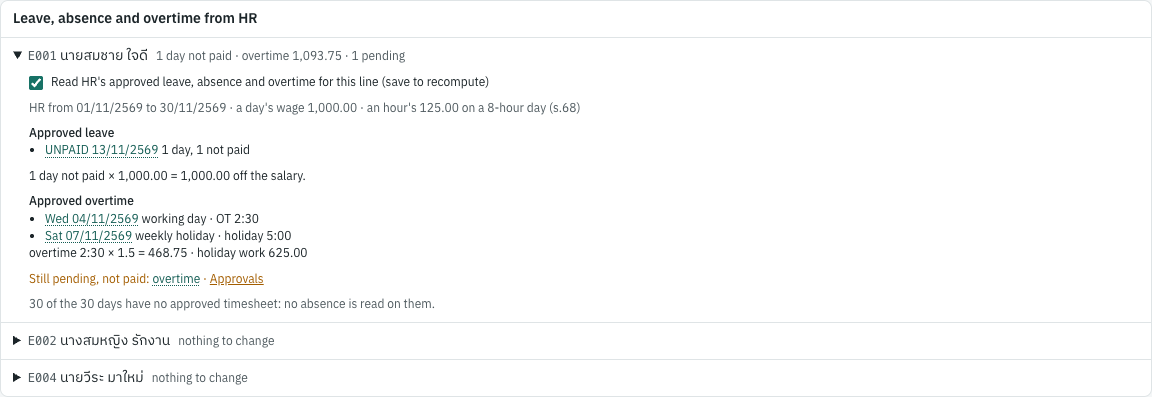
Under each employee's name, HR says in a line what it read: 1 day not paid · overtime 1,375.00 · 1 pending. The card Leave, absence and overtime from HR below the table opens each employee's breakdown: the dates read, the day's and the hour's wage, each leave request with its days and unpaid share, the days absent with their timesheet, each overtime request with its minutes by kind and the pay of each section. Click a request or a timesheet to open it; from there you can approve it, then save the draft.
To pay a line entirely by hand, untick Read HR's approved leave, absence and overtime for this line in its breakdown and save: the line reads nothing from HR.
Posting keeps what the draft read. A posted run pays what it paid even if HR changes afterwards: cancel a leave request or an overtime request after posting, and the next run does not read those days again; correct the pay on the next run if you need to.
How the withholding tax is computed#
Salaries are withheld under s.50(1) of the Revenue Code. Panya follows the method of the ภ.ง.ด.1 instructions: it treats the regular pay as if it were paid all year, computes the year's tax on it, and spreads that tax over the year's payments. The tax scale on net income is: 0% up to 150,000; 5% to 300,000; 10% to 500,000; 15% to 750,000; 20% to 1,000,000; 25% to 2,000,000; 30% to 5,000,000; 35% above.
Salaries and regular pay#
Every month, for each employee:
- The regular pay (the salary and other income paid every month) is multiplied by the number of payments the employee gets in the year: 12 for monthly pay, 24 semi-monthly, 52 weekly, or fewer for someone who starts or leaves during the year (the periods from the one the start date falls in to December, or to the one the end date falls in). Pay from an earlier employer in the year is added (see An earlier employer this year).
- From that year's income Panya deducts the standard expenses (50%, at most 100,000), the allowances of the employee's ล.ย.01 card, the year's social security contributions (an earlier employer's included) and the provident fund deduction.
- It computes the year's tax on what is left, takes off the tax an earlier employer withheld in the year, divides the rest by the number of payments and rounds down to the satang. The few satang left over are taken in the year's last payment (see The December true-up).
The method gives the same tax every month while the pay does not change. When the salary changes, the next run computes the tax on the new salary.
Bonuses and other irregular pay#
Overtime, bonuses and other income not paid every month are taxed in full in the month they are paid: Panya computes the year's tax with them and without them, and withholds the difference on top of the month's regular tax. Irregular pay earlier in the year is counted in both, so a second bonus is taxed at the employee's higher rate.
For example, if E001 (30,000 a month) is also paid a bonus of 60,000 in October: the year without the bonus is taxed 1,975.00, the year with it (420,000 − 100,000 − 60,000 − 10,500 = 249,500) 4,975.00. The bonus is withheld 3,000.00, so October's tax is 164.58 + 3,000.00 = 3,164.58. Social security does not change: a bonus is not wages.
The December true-up#
The year's last payment to an employee is the monthly run with a pay date in December, the semi-monthly or weekly run whose next period would be paid in the next year, or the run of the period the employee leaves in (their End date is in it). The law allows the employer to settle the year's tax in that payment without requiring it; Panya always does. In that run Panya does not use the monthly method: it computes the tax on what the employee was actually paid in the year, this run and an earlier employer's pay included, and withholds that less what was withheld already, by you and by the earlier employer.
For E001, paid 30,000.00 every month of 2569 with no bonus, January to November withhold 11 × 164.58 = 1,810.38. The year's tax is 1,975.00, so December withholds 1,975.00 − 1,810.38 = 164.62.
When more was withheld during the year than the year's tax (a salary cut, or a new allowance claimed late), the last payment withholds nothing. Panya does not refund the excess: the employee claims it back on their own return (ภ.ง.ด.90 or ภ.ง.ด.91).
Income codes 2 and 3#
The ภ.ง.ด.1 lists income under codes (ประเภทเงินได้). Payroll lines use three of them; the code is the small number after the tax.
- Code 1: salaries and wages in general, computed as above.
- Code 2: the employee's income is withheld at a flat 3% because the Revenue Department approved it. Tick the approval box on the employee and enter the letter's number and date. Panya then withholds 3% of the month's income, with no annual computation and no true-up. The law has no 3% rate for salaries: the Director-General approves it case by case, on your written request through the area revenue office of your head office, typically for temporary daily workers who come and go often. Without the letter, the employee is on code 1.
- Code 3: pay made once because the employee leaves, taxed apart from the salary under s.48(5); see Pay on leaving. The pay on leaving taxed apart has its own line on the ภ.ง.ด.1 under code 3, apart from the employee's other pay under code 1.
Enter the employee's End date before you run their last month, so that run is their true-up.
Pay on leaving#
Pay made once because an employee leaves has its own rules (s.48(5) of the Revenue Code and ประกาศอธิบดีฯ ฉบับที่ 45). Enter it on the employee's last run, in two columns:
- Statutory severance (ค่าชดเชยตามกฎหมาย): the severance pay the Labour Protection Act requires, all of it, with its Exempt part under it. When the employer ends the employment, up to 400 days of the final wage and 600,000 baht is free of tax (กฎกระทรวง ฉบับที่ 394); a day's wage is the month's salary ÷ 30, the half-month's ÷ 15 or the week's ÷ 7. Severance paid on retirement or at the end of a fixed term is not exempt: enter it with no exempt part.
- Other pay on leaving (เงินอื่นที่จ่ายเพราะออกจากงาน): anything else paid once because the employee leaves, such as ex gratia pay.
The taxable pay on leaving is the statutory severance above its exempt part and the other pay. Panya taxes all of it apart from the salary (income code 3; it cannot be split) when both of these hold:
- The employee has 5 whole years of service: 4 years and 319 days is not 5.
- It is paid in the first tax year in which pay on leaving this job is paid. Pay on leaving paid by one of your posted runs in an earlier tax year counts, and so does a payment by another payer, such as the provident fund, which you enter on the employee in Pay on leaving first paid in. A later year's pay on leaving is not taxed apart.
Otherwise all of it is taxed with the month's pay like a bonus (code 1), and the line says why under the employee's name. Taxed apart:
- The deductions are 7,000 for each year of service and half of what remains of the base. The base is the taxable statutory severance in full, and the other pay up to the final monthly salary × the years of service.
- The final salary counted is at most the average monthly salary of the 12 months before leaving plus 10% (ประกาศอธิบดีฯ ฉบับที่ 45, as amended by ฉบับที่ 73), so a raise just before leaving does not enlarge the deductions.
- What remains is taxed on the scale from the first baht, without the 0% band of the first 150,000.
- Pay on leaving taxed apart by an earlier run of the same tax year is taxed together with it: the run withholds the tax on all of it less what was withheld before.
The years of service count a part year of 183 days or more as a year in the deductions. Panya counts them from the Start date. Type other years in Years only as the Revenue Department allows: service with an earlier employer counts when the employee joined you within a year and moved their provident fund to yours (or you rehired them within a year), and not the service before a job whose pay on leaving they chose to have taxed apart. Taxing apart is not allowed only once: an employee who chose it on leaving an earlier job can choose it again.
Worked example. E005 leaves on 31 October 2569 after 20 years, on a salary of 60,000.00. You pay statutory severance of 400 days' wages, 800,000.00, of which 600,000.00 is exempt (400 days would be 800,000, but the exemption stops at 600,000), and 1,500,000.00 of other pay on leaving.
- Taxable: 200,000 of statutory severance and 1,500,000 of other pay: 1,700,000.
- The base: the 200,000 in full, and the other pay up to 60,000 × 20 = 1,200,000: 1,400,000.
- The deductions: 7,000 × 20 = 140,000, and half of 1,400,000 − 140,000 = 630,000: 770,000.
- Taxed: 1,700,000 − 770,000 = 930,000. 5% of 300,000 = 15,000, 10% of 200,000 = 20,000, 15% of 250,000 = 37,500 and 20% of 180,000 = 36,000: 108,500.00, on the ภ.ง.ด.1 under code 3.
Had the 1,700,000 been capped together, the base would be 1,200,000 and the tax 130,000.00: the statutory severance keeps its full base.
A raise before leaving: 800,000.00 of other pay on leaving after 10 years, with a final salary of 80,000 and an average of 50,000. The salary counted is 55,000, so the base is 550,000 and the deductions 70,000 + half of 480,000 = 310,000. 490,000 is taxed: 5% of the first 300,000 = 15,000 and 10% of 190,000 = 19,000, 34,000.00 in all.
Non-resident employees#
An employee who is in Thailand fewer than 180 days in the tax year is not a Thai tax resident. Their salary for work in Thailand is still Thai income, withheld under s.50(1). Panya computes their tax the same way as for a resident. Untick Thai tax resident on the employee so that your records show it. If the employee does not claim allowances, leave the ล.ย.01 card empty: the personal allowance and the standard expenses are still taken.
Salaries in a foreign currency#
A salary agreed in a foreign currency is entered in it: the Salary currency (such as USD) and the pay in that currency. Each run converts it to baht, and everything after is in baht: the tax, social security, the provident fund, the entry, the ภ.ง.ด.1 and the 50 ทวิ.
- The rate is baht per unit at the selling rate of the pay date: the Revenue Department converts pay in a foreign currency at a commercial bank's selling rate of the day paid, or the Bank of Thailand's average selling rate, used consistently (Revenue Code s.9; the Director-General's order ป.132/2548). Panya takes the selling rate of 7 Setup → Exchange rates on or before the pay date, so keep one source there; a pay date on a weekend takes the last rate before it.
- On the draft, the line shows the salary in its currency and the rate under the baht salary: USD 2,000.00 × 36.5432 gives 73,086.40. Type another rate there for this run (a bank's rate of the day, say): it is kept until you empty it. Without a rate on or before the pay date the run is refused with no USD rate on or before …: add it in Setup or enter the rate.
- Changing the pay date of a draft takes the rate of the new date, unless you typed one. Posting keeps the draft's rate.
- A part period is prorated in baht, after the conversion; overtime, bonuses and the other pay of the line are entered in baht.
What posting records#
A posted run makes one journal entry in the payments book (CJ…), dated on the pay date:
| Account | Debit | Credit |
|---|---|---|
| 5210 เงินเดือนและค่าจ้าง (Salaries and wages) | Gross pay | |
| 5211 เงินสมทบประกันสังคม (Social security expense) | Employer's social security | |
| 5212 เงินสมทบกองทุนสำรองเลี้ยงชีพ (Provident fund expense) | Employer's provident fund | |
| 2135 เงินสมทบประกันสังคมค้างจ่าย (Social security payable) | Employee's and employer's social security | |
| 2136 กองทุนสำรองเลี้ยงชีพค้างจ่าย (Provident fund payable) | Employee's and employer's provident fund | |
| 2130 ภาษีเงินได้หัก ณ ที่จ่ายค้างจ่าย (WHT payable) | Tax withheld | |
| 1190 เงินให้กู้ยืมแก่พนักงาน (Other deductions) | Other deductions | |
| 2137 เงินกู้ยืมเพื่อการศึกษาค้างนำส่ง (Student loans payable) | Student loans deducted | |
| 2138 เงินอายัดค้างนำส่ง (Attachments payable) | Pay attached by court orders | |
| 5213 เงินสมทบกองทุนเงินทดแทน (Workmen's compensation expense) | The contribution accrued | |
| 2139 เงินสมทบกองทุนเงินทดแทนค้างจ่าย (Workmen's compensation payable) | The contribution accrued | |
| The Paid from account | Net pay |
The accounts are those of Payroll settings. For PY69100001 of the worked example, the entry is:
| Account | Debit | Credit |
|---|---|---|
| 5210 เงินเดือนและค่าจ้าง | 90,000.00 | |
| 5211 เงินสมทบประกันสังคม | 1,750.00 | |
| 2135 เงินสมทบประกันสังคมค้างจ่าย | 3,500.00 | |
| 2130 ภาษีเงินได้หัก ณ ที่จ่ายค้างจ่าย | 2,368.74 | |
| 1120 เงินฝากธนาคาร - กระแสรายวัน | 85,881.26 |
The run also writes a withholding tax withheld record for each employee with tax, form ภ.ง.ด.1, with the income code. These records make up the PND.1 tab of the withholding tax report and its RD Prep file, next to the s.40(1)/(2) income you pay through payments (see Reports). An employee whose tax is 0 has no record.
Paying social security and the tax#
Each month, after posting the month's runs:
- Social security. Open 8 Payroll → Social security report for the month (see The social security report); it adds up every run of the month, whatever the frequency. File the contribution list (สปส.1-10) and pay both shares through the Social Security Office's e-Service, at a branch or at a bank, by the due date: the 15th of the next month unless it is extended. Record the payment with a journal voucher: debit
2135เงินสมทบประกันสังคมค้างจ่าย, credit the bank account. - Withholding tax. Open 6 Reports → All reports → Withholding tax, the PND.1 tab, for the pay date's month. File ภ.ง.ด.1 by the 7th of the next month (the 15th online) unless the date is extended, with the RD Prep file. Record the payment with a journal voucher: debit
2130ภาษีเงินได้หัก ณ ที่จ่ายค้างจ่าย, credit the bank account. See Month-end and tax filing. - Provident fund. Pay both contributions to the fund manager, as the fund's rules say, and record it: debit
2136กองทุนสำรองเลี้ยงชีพค้างจ่าย, credit the bank account. - Student loans. Confirm the month's list in the Student Loan Fund's e-PaySLF and pay its pay-in slip by the 15th of the next month, with 8 Payroll → Deductions to remit; record it: debit
2137เงินกู้ยืมเพื่อการศึกษาค้างนำส่ง, credit the bank account. See Student loans. - Court orders. Remit each order's attachment to its Legal Execution office within 10 days of each pay date, with the Court orders tab of 8 Payroll → Deductions to remit; record it: debit
2138เงินอายัดค้างนำส่ง, credit the bank account. See Court orders. - Workmen's Compensation Fund, once a year: pay the estimate by 31 January, report the year's wages by the end of February and settle the difference by 31 March, with 8 Payroll → Workmen's compensation; record the payments: debit
2139เงินสมทบกองทุนเงินทดแทนค้างจ่าย, credit the bank account. See The Workmen's Compensation Fund.
Each year, file the annual ภ.ง.ด.1ก by the end of February (8 March online), and give each employee the annual 50 ทวิ by 15 February.
Due dates and extensions#
The posted run's Pay to the authorities card and the social security report show the due date in force for the Province and the Revenue Department office of each workplace: social security by each workplace's province, ภ.ง.ด.1 by the head office's province and office (or a workplace's own office when it files its own):
| Payment | Normally due | Also |
|---|---|---|
| Social security of a wage month | The 15th of the next month | Through the SSO's e-Payment, 7 working days later (wage months January 2568 to December 2572): the card shows the date |
| ภ.ง.ด.1 of a tax month | The 7th of the next month | The 15th when filed online |
A date on a Saturday, a Sunday or a public holiday moves to the next working day (see Holidays).
After a disaster, the Labour Ministry and the Ministry of Finance extend these dates for the provinces hit, or for some Revenue Department offices. Panya keeps the extensions as dated data and shows the new date with Extended for the province or the office, the extension's note and the normal date. Those of the southern floods of 2568:
| Extension | Provinces | Months | Due |
|---|---|---|---|
| Social security (Labour Ministry, Social Security Act s.84/2) | ตรัง, นครศรีธรรมราช, นราธิวาส, ปัตตานี, พัทลุง, ยะลา, สงขลา, สตูล, สุราษฎร์ธานี | Wage months November 2568 to April 2569 | Six months later: November's by 15 June 2569, December's by 15 July 2569, and so on to April's by 15 November 2569 |
| ภ.ง.ด.1 and the other withholding returns (Ministry of Finance No. 15) | ตรัง, สตูล, พัทลุง, ปัตตานี, ยะลา, นราธิวาส | Tax month November 2568; October 2568 filed online | 2 February 2569 |
| ภ.ง.ด.1 and the other withholding returns (Ministry of Finance No. 16) | สงขลา | Tax months November 2568 to February 2569; October 2568 filed online | 30 April 2569 |
| ภ.ง.ด.1 and the other withholding returns (Ministry of Finance No. 17) | 20 branch offices of นครศรีธรรมราช and 13 of สุราษฎร์ธานี (see Revenue Department branch offices) | Tax month November 2568; October 2568 filed online | 2 February 2569 |
The Ministry of Finance's extensions waive the penalty and the surcharge.
Holidays#
When a due date falls on a Saturday, a Sunday or a public holiday, you can file and pay on the next working day without a penalty: the Revenue Department's returns on paper and online, and the Social Security Office's contributions. An extended date moves the same way. Panya keeps the government's public holidays, their substitution days and the special days the cabinet declares for the whole country, and shows the date moved, with where it moved from:
| Example | Normally | Due |
|---|---|---|
| ภ.ง.ด.1 of February 2569 | Saturday 7 March 2569 | Monday 9 March 2569 |
| Social security of March 2569 | Wednesday 15 April 2569 (Songkran) | Thursday 16 April 2569 |
| ภ.ง.ด.1 of November 2569 | Monday 7 December 2569 (the substitution day for Father's Day) | Tuesday 8 December 2569 |
The e-Payment date of social security is counted the same way: the 15th, moved to a working day, then 7 working days more (February 2569: 25 March 2569). The ภ.พ.36 page moves its dates too.
The holidays are those of government offices, not the banks': 1 May is not one, and the Royal Ploughing Ceremony and Buddhist Lent Day are. They are kept for 2568 to 2570; for 2570 only the Bank of Thailand's list is out, so Panya has its days that are government holidays too, and later years move off weekends only. Days declared for some provinces only (Bangkok's 16 October 2569, say) are not kept.
Revenue Department branch offices#
The Ministry of Finance's No. 17 extends the returns of named branch offices (สำนักงานสรรพากรพื้นที่สาขา), not of whole provinces. Choose your office in the head office's Revenue Department office (see Workplaces), and the extension applies when it lists your office:
| Area office | Branch offices covered | Not covered |
|---|---|---|
| สำนักงานสรรพากรพื้นที่นครศรีธรรมราช | เมืองนครศรีธรรมราช, พรหมคีรี, ลานสกา, ฉวาง, พิปูน, เชียรใหญ่, ชะอวด, ท่าศาลา, ทุ่งสง, นาบอน, ทุ่งใหญ่, ปากพนัง, ร่อนพิบูลย์, สิชล, หัวไทร, ถ้ำพรรณรา, จุฬาภรณ์, พระพรหม, ช้างกลาง, เฉลิมพระเกียรติ | ขนอม |
| สำนักงานสรรพากรพื้นที่สุราษฎร์ธานี 1 | เมืองสุราษฎร์ธานี, กาญจนดิษฐ์, ดอนสัก, ไชยา, ท่าชนะ, คีรีรัฐนิคม, ท่าฉาง, บ้านนาสาร, บ้านนาเดิม, เคียนซา, เวียงสระ, พระแสง, พุนพิน | บ้านตาขุน, พนม, ชัยบุรี |
| สำนักงานสรรพากรพื้นที่สุราษฎร์ธานี 2 | None | เกาะสมุย, เกาะพะงัน |
It covers ภ.ง.ด.1 and the other withholding returns of the tax month November 2568 (October 2568 filed online) and ภ.พ.30 of October and November 2568, all by 2 February 2569. Without an office chosen, a run of such a month in one of the two provinces says that an extension covers some branch offices there and links to the settings.
Deductions ordered by others#
Some deductions are not yours to decide: the Student Loan Fund (กองทุนเงินให้กู้ยืมเพื่อการศึกษา) tells you how much its borrowers repay through you, and a court's execution officer can attach an employee's pay. Enter each one as an order on the employee's page, and each run deducts it: the attachments first, then the student loans, then your own deductions.
Student loans (กยศ.)#
Under section 51 of the Student Loan Fund Act B.E. 2560 (as amended in 2566), an employer the Fund notifies deducts the amount the Fund notifies from the borrower's pay and remits it to the Revenue Department, for the Fund, by the withholding tax's deadline. The Fund's first notice comes by letter; its list of your borrowers and each one's amount for the month is in its e-PaySLF system (epayslf.studentloan.or.th) from the 5th of every month, and an amount can change from one month to the next (arrears added, say).
The order. Open the employee in 8 Payroll → Employees, and in the Deductions ordered card click Add order (Ordered by The Student Loan Fund):
| Field | ภาษาไทย | What it is |
|---|---|---|
| Fund account | บัญชีของกองทุน | กยศ. (the student loan) or กรอ. (the income-contingent loan): the Fund's list has an amount for each. A borrower with both has two orders. |
| A month | จำนวนเงินต่อเดือน | The month's amount in the Fund's list. Change it when the list changes. |
| First month, Last month | เดือนแรกที่หัก, เดือนสุดท้ายที่หัก | The months of the pay dates it applies to. No last month: until the Fund's list drops the employee. |
| Reference | เลขที่อ้างอิง | Your reference, such as the Fund's letter. |
| Deduct it | หักตามคำสั่งนี้ | Untick it when the Fund stops the deduction. An order a run has deducted cannot be deleted, only stopped. |
Orders need the Manage master data permission, as employees do.
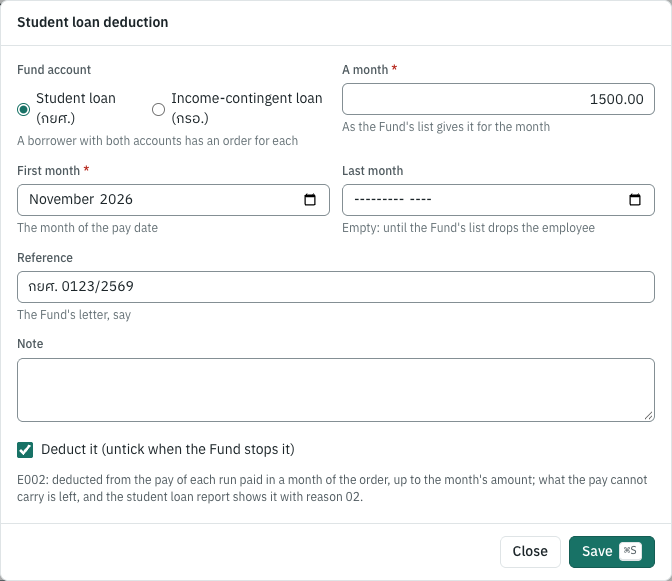
What a run deducts. Each run paid in a month of the order deducts the month's amount, less what the month's earlier posted runs deducted for it, so a weekly-paid borrower's first run of the month deducts all of it when the pay allows. The law puts it straight after the tax withheld, social security and the provident fund, and before your own deductions (a loan or an advance as Other deduction). When the pay left is not enough, the run deducts what it can: the draft shows the student loan with of the amount asked, and the month's report marks the borrower with reason 02; the Fund then collects the rest from the borrower. Your own deduction must fit in what the student loan leaves, or the draft is not saved.
The student loan does not change the tax: it is not an allowance, and the 50 ทวิ does not show it. The payslip lists it with the deductions. Posting credits it to Student loans payable in the payroll settings, by default 2137 เงินกู้ยืมเพื่อการศึกษาค้างนำส่ง (added to the chart on the first posting that needs it).
The student loan report#
The Student loans (กยศ.) tab of 8 Payroll → Deductions to remit lists a month's borrowers in the columns of e-PaySLF's list, from the posted runs whose pay date is in the month:
| Column | In e-PaySLF | What it is |
|---|---|---|
| ID number | เลขประจำตัวประชาชน | The employee's tax ID |
| Asked | — | What the orders asked of the month |
| กยศ., กรอ., Amount | จำนวนเงิน กยศ., จำนวน กรอ., จำนวนเงิน (บาท) | What was deducted, for each account and in all |
| Deducted on | วันหักเงินเดือน | The last pay date that deducted |
| Not deducted / reduced | ไม่ได้นำส่งเงิน/ปรับลดจำนวนเงิน | Y when the month's posted pay deducted less than was asked, or the employee has left; before the month's run is posted the row says Not paid yet |
| Reason | รหัสสาเหตุ | 01 when the employee has left, 02 when the pay left was not enough; for another reason choose its code in e-PaySLF |
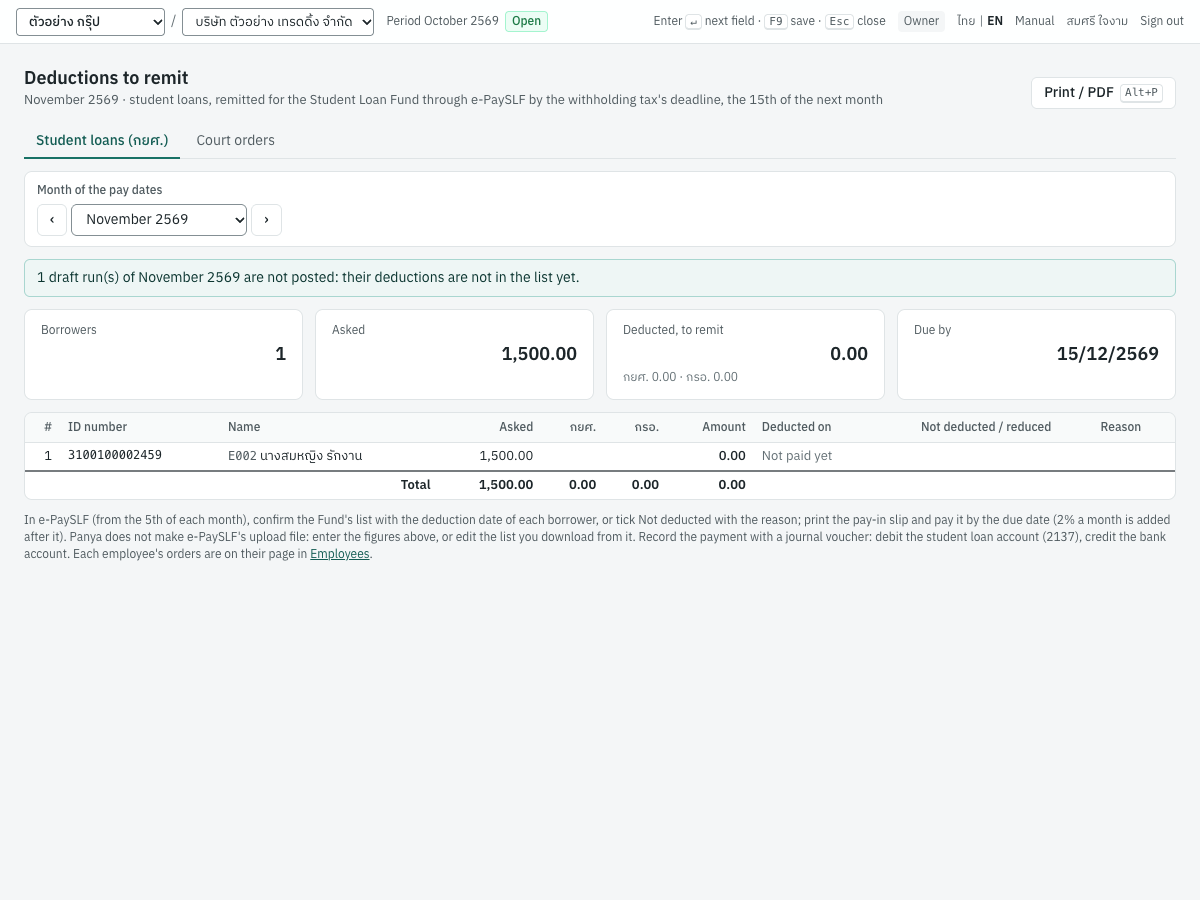
Due by is the online date of the head office's ภ.ง.ด.1: the 15th of the next month, moved off a weekend or a public holiday, or the extension's date when one applies. From the next day the Fund adds 2% a month (its Board notice of 30 September 2567, clause 34). A posted run's Pay to the authorities card shows its student loans with the same date.
Remitting. In e-PaySLF, under ยืนยันตรวจสอบข้อมูล, confirm the month's list: give each borrower's deduction date, or tick ไม่ได้นำส่งเงิน with the reason (or download the list as Excel or CSV, fill in those columns and upload it). Then print the pay-in slip and pay it at a bank or online by the due date. Panya does not make e-PaySLF's upload file: the Fund publishes its columns but not their format, and the file is its own list, edited. Record the payment with a journal voucher (debit 2137, credit the bank account) and, on the report, record the remittance with the date paid, the amount and the pay-in slip's reference; Undo removes it. Recording a remittance needs the Enter documents permission.
Court orders (อายัดเงินเดือน)#
When a judgment against an employee is enforced, the Legal Execution Department's execution officer can attach the employee's pay. You receive a notice of attachment (form อ.1/1): it forbids paying the attached part to the employee and tells you to remit it to the Legal Execution office (Civil Procedure Code ss.316–321). An employee's pay is exempt up to 20,000 baht a month, and severance, gratuity and other pay on leaving up to 300,000 baht, unless the officer sets another amount (s.302(3) and (4)). The Department's practice (its order 502/2560) attaches the salary above what is left to the employee, at most 30% of overtime, diligence pay and other occasional pay, and at most 50% of bonuses; it does not attach the provident fund.
The order. On the employee's page, click Add order and choose Ordered by A court: attachment of the pay:
| Field | ภาษาไทย | What it is |
|---|---|---|
| Case no. | หมายเลขคดีแดง | The red case number on the notice. |
| Court | ศาล | The court of the case. |
| Legal Execution office | สำนักงานบังคับคดี | Where the attached pay goes. |
| Left to the employee a month | เหลือให้ลูกหนี้เดือนละ | 20,000 unless the notice says otherwise: the salary and wages above it are attached. |
| At most % of the salary | ไม่เกินร้อยละของเงินเดือน | Only for an order the officer reduced to a percentage of the salary. |
| Overtime and occasional pay % | ค่าล่วงเวลาและเงินได้เป็นครั้งคราว (ร้อยละ) | As the notice asks, 30 at most; 0 when it does not attach them. |
| Bonus % | เงินโบนัส (ร้อยละ) | As the notice asks, 50 at most. |
| Attaches pay on leaving | อายัดเงินที่จ่ายเพราะออกจากงาน | Tick it when the notice attaches severance and gratuity, with the amount left to the employee: 300,000 unless it says otherwise. |
| Debt | จำนวนหนี้ | When the notice states it: the order stops attaching once it is collected. |
| Reference | เลขที่อ้างอิง | The Legal Execution Department's Ref No., say. |
The months and Deduct it are as for a student loan: untick Deduct it when the officer withdraws the attachment (form อ.9) or the debt is paid.
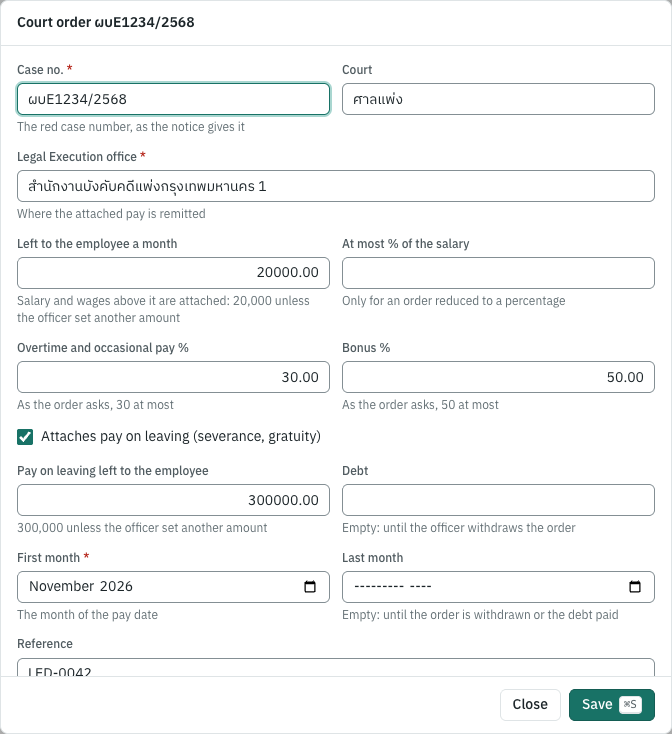
What a run attaches. The attachment is measured on the pay before the tax, social security and provident fund (the notice: "ก่อนหักรายจ่ายอื่น"):
- the salary and wages of the month so far (the salary and the other income paid every month, of the month's earlier posted runs and this one) above what the order leaves, less what the month's earlier runs attached: a semi-monthly or weekly employee's first payments of a month attach nothing until the month's pay passes 20,000;
- the order's percentage of the month's overtime and other income paid now and then, less what the month's earlier runs attached;
- the order's percentage of the bonus;
- when the order attaches it, the pay on leaving (statutory severance and other pay on leaving) above what it leaves.
A second order on the same employee shares what the first leaves, never the 20,000 (later creditors share through the court, s.326). The attachments come out of the pay left after the tax, social security and provident fund, before the student loans and your own deductions; when that pay is not enough, the run takes what it can and the draft shows of the amount asked. The attachment does not change the tax: the employee is taxed on all the pay. The payslip lists it with the deductions, and posting credits Attachments payable in the payroll settings, by default 2138 เงินอายัดค้างนำส่ง.
For example, an employee paid 50,000 a month has two orders, the first reduced to 15% of the salary: the first attaches 7,500, the second 22,500 (the rest above 20,000). An employee paid 25,000 with 4,000 of overtime, on an order attaching 30% of occasional pay: 5,000 + 1,200 = 6,200.
The court order report#
The Court orders tab of 8 Payroll → Deductions to remit shows each order with the month's attachments by pay date, under the kinds of pay of the Legal Execution Department's remittance list (salary and wages, occasional pay, bonus, pay on leaving), and Remit by: ten days after the pay date (form อ.1/1: "ภายใน ๑๐ วัน นับแต่วันถึงกำหนดจ่ายเงิน"), moved to the next working day when it falls on a weekend or a public holiday. A note says what to tell the office: The employee has left (tell it in writing), or The pay is below what can be attached (an obstacle, เหตุขัดข้อง).
Remit each order to the office it names, with the remittance form อ.3, or through the Department's e-remittance system (web2.led.go.th) once you have registered with it. Panya does not make that system's upload file: the Department publishes its columns but not their format. Record the payment with a journal voucher (debit 2138, credit the bank account) and, on the order, record the remittance with the date paid, the amount and the reference; Undo removes it.
The Workmen's Compensation Fund#
The Workmen's Compensation Fund (กองทุนเงินทดแทน) compensates employees injured at work, and the employer alone contributes to it, a year at a time (Workmen's Compensation Act B.E. 2537, s.5 and ss.44–46 as amended in 2561). The contribution is the rate of your business type, 0.20% to 1.00%, on each employee's wages for normal working time, at most 20,000 baht a month and 240,000 baht a year (the Labour Ministry's announcement of 21 February 2562, clause 11). From the fifth year you contribute, the Social Security Office adjusts the rate by your loss ratio (the compensation paid against your contributions): from −50% to +50% of it, and from 2570 from −70% to +50%. A new table of rates applies from 1 January 2570 (the announcement No. 2 of 11 September 2569): 452 business types pay less and none more.
The business type. In Payroll settings, in the Workmen's Compensation Fund card, type the five-digit code the Social Security Office gave you (on the registration form สปส.1-01, or in its e-Rate service), or a word of its name, and choose it. The card then shows its rate today and, when it changes, its rate from 2570. Without a business type, runs accrue no contribution.
What a run accrues. Each run counts each employee's salary and the other pay paid every month, within what the month's and the year's earlier posted runs left of 20,000 a month and 240,000 a year, and accrues the contribution at the year's rate: debit Workmen's compensation expense (5213 เงินสมทบกองทุนเงินทดแทน), credit Workmen's compensation payable (2139 เงินสมทบกองทุนเงินทดแทนค้างจ่าย). Overtime and bonuses are not counted: the Act counts the pay for normal working days and hours. An employee paid 30,000 a month at 0.20%, for example: 20,000 counted, 40.00 accrued.
The year. 8 Payroll → Workmen's compensation shows a calendar year's contribution and its dates:
| Step | Form | By |
|---|---|---|
| The Social Security Office assesses the year's estimate | กท.26ก | Sent in December |
| Pay the estimate | 31 January | |
| Report the year's wages (the employees on 31 December and the wages counted) through e-Wage | กท.20ก | The end of February of the next year |
| Pay the difference the Office bills, or receive the refund | กท.25ค | 31 March of the next year |
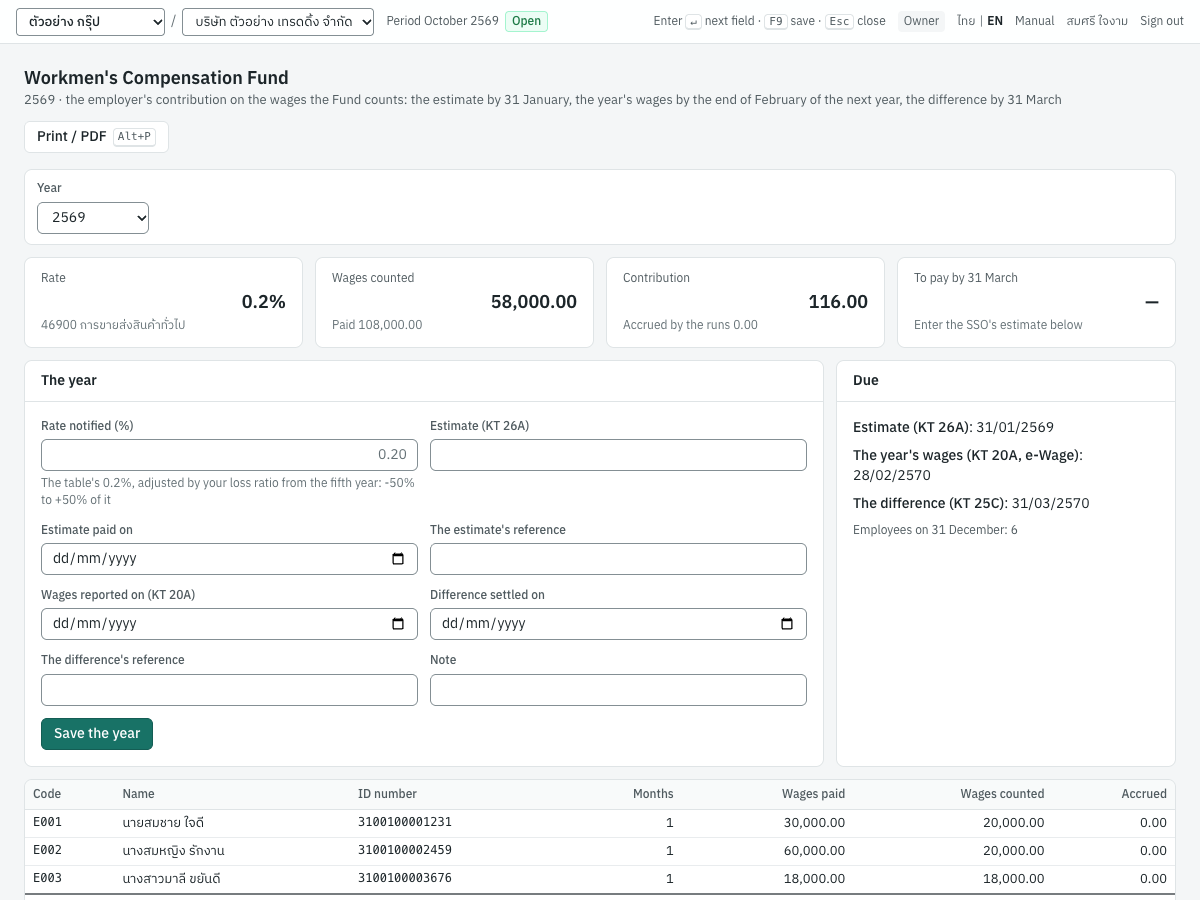
The page lists each employee's wages paid and counted in the year, counted month by month from the posted runs whatever they accrued; the year's contribution (the counted wages × the rate, to the baht: 50 satang or more count as a baht); the employees on 31 December; and the dates. In The year, enter the rate the Office notified when it is not the table's (the experience rating; it must be within the range), the estimate, when you paid it, when you reported the wages and when the difference was settled: the page then shows the difference to pay or to be refunded. After a deadline the Office adds 2% a month (s.46).
Record each payment with a journal voucher: debit 2139, credit the bank account (a refund the other way). The contribution the runs accrued, each at its run's rate, and the year's can differ a little: move the difference between 5213 and 2139 with a journal voucher.
Payslips, the social security report and the 50 ทวิ#
Payslips#
Payslips on a run opens one payslip (ใบแจ้งเงินเดือน · Payslip) per employee. Like other printed documents, a payslip keeps Thai and English side by side, whatever the screen language. Print / PDF (Alt+P) prints each payslip on its own page. Each one shows:
- your company's name, address and tax ID; the month, the period's first and last day, the pay date and the run's number;
- the employee's code, name, tax ID and bank account;
- รายได้ Earnings: salary (for a part period, with the days paid and the full period's salary), and overtime, bonus, other income, statutory severance and other pay on leaving when there are any; รวมเงินได้ Total earnings;
- รายการหัก Deductions: social security, provident fund, withholding tax and other deductions; รวมรายการหัก Total deductions;
- เงินได้สุทธิ Net pay, in figures and in Thai words;
- ยอดสะสมทั้งปี Year to date: income, tax and social security, this run included;
- นายจ้างสมทบ Employer contributions;
- two signature lines, ผู้รับเงิน Received by and ผู้จ่ายเงิน Paid by.
A draft run's payslips are marked ร่าง · DRAFT (not valid), a cancelled run's ยกเลิก · CANCELLED.
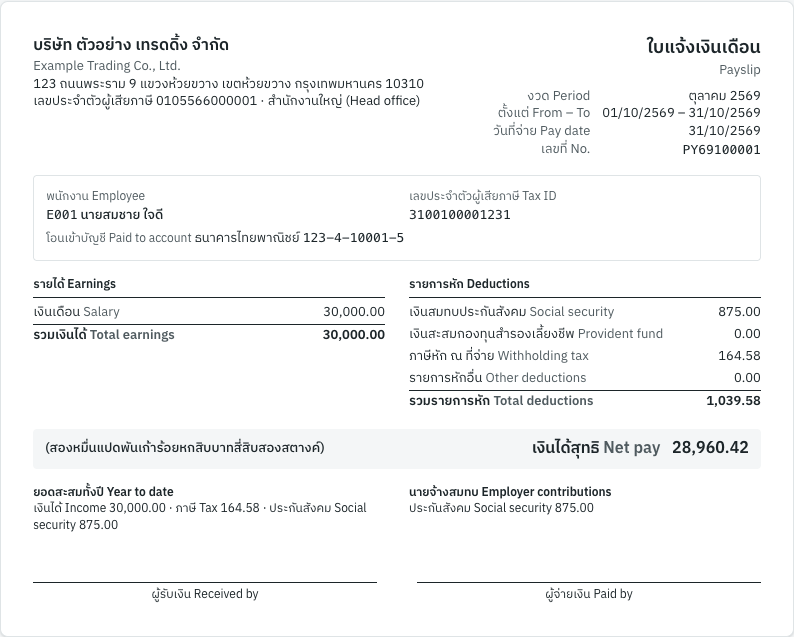
Employees with self-service see their own payslips of posted runs there, and get an email when a run that pays them is posted (see Employee self-service); their 50 ทวิ are there too.
The social security report#
8 Payroll → Social security report lists the contributions of the posted runs paid in the month, monthly, semi-monthly and weekly, for the contribution list สปส.1-10. Choose the Wage month with the arrows or the list, and, with several workplaces, the Workplace: one branch's list, or All workplaces. The page shows:
- the number of insured employees, the wages for contributions, both contributions and the due date in force, with where it moved from (a weekend or a holiday), an extension's note or the e-Payment date under it;
- one row per insured employee: code, name, ID number, wages paid, wages for contributions (after the minimum and the ceiling), the employee's and the employer's contribution, and their total;
- the totals row;
- the rate in force for the month, with the area rate's note when one applies.
With All workplaces and contributions at several of them in the month, a table above the rows gives each workplace's branch number, province, insured employees, wages, contributions and its own due date, with Download file for its file; the rows show the branch they were paid for. Each branch files its own list (or the head office files them together on the สปส.1-10/1).
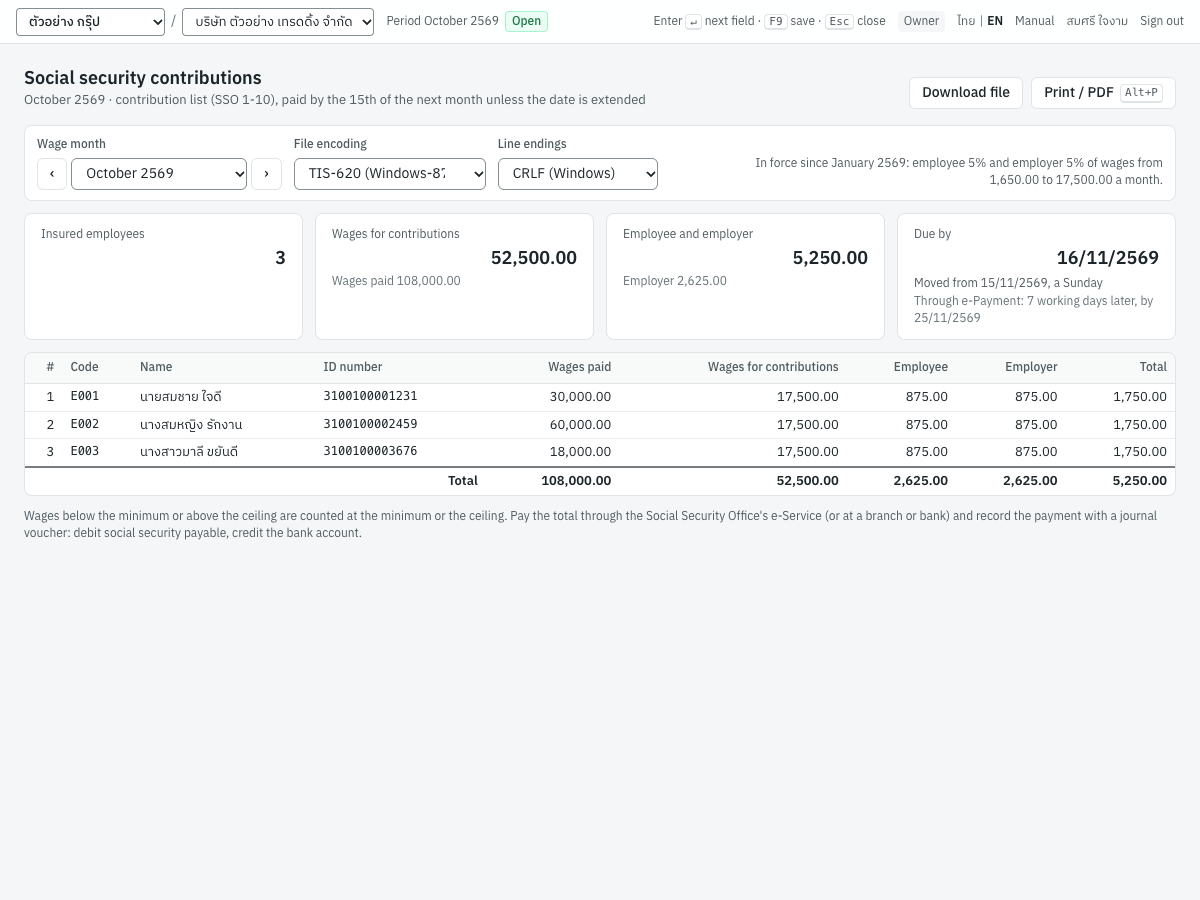
Print / PDF (Alt+P) prints the list with the company heading.
The contribution file#
Download file on the social security report gives the contribution file to upload in the Social Security Office's e-Service, one for each workplace: SSO_256910.txt for the head office's October 2569, SSO_256910_000001.txt for branch 000001. Each is a header record with your employer account, the workplace's branch number, the pay date, the rate of the workplace's province and the totals, then one record per insured employee with the ID number, name, actual wages and contribution, in the SSO's 135-character layout. Two choices next to the month set how the file is written:
| Choice | ภาษาไทย | Options |
|---|---|---|
| File encoding | การเข้ารหัสไฟล์ | TIS-620 (Windows-874), the default: one byte for each Thai letter, as the SSO's own program writes it. UTF-8 on request. |
| Line endings | การขึ้นบรรทัดใหม่ | CRLF (Windows), the default, after every record. LF (Unix) on request. |
The SSO does not publish the encoding or the line endings; the defaults are those of its own SSO Media program. Keep them unless the e-Service refuses the file. Panya refuses the file, and says why, when the Employer account no. of Payroll settings is empty, when the month has no posted run, when an insured employee has no tax ID, or when contributions were paid at several workplaces and none is chosen.
The employee's 50 ทวิ#
On the employee's page, 50 ทวิ for the year opens the annual withholding tax certificate (หนังสือรับรองการหักภาษี ณ ที่จ่าย) for the year chosen. It is the same Revenue Department layout as a payment's certificate (see Finance), filled in for a salary:
| Part | Shows |
|---|---|
| เล่มที่, เลขที่ | The Buddhist-era year, and the employee's code |
| ผู้มีหน้าที่หักภาษี ณ ที่จ่าย | Your company |
| ผู้ถูกหักภาษี ณ ที่จ่าย | The employee's name, address and tax ID |
| ในแบบ | ภ.ง.ด.1ก ticked: the annual return on which the employee's income is reported |
| Row 1 (มาตรา 40 (1)) | The year's pay and tax from the posted runs, with the last pay date |
| กองทุนประกันสังคม, กองทุนสำรองเลี้ยงชีพ | The employee's social security and provident fund contributions of the year |
| ผู้จ่ายเงิน | (1) หัก ณ ที่จ่าย |
Print 3 copies (Alt+P) prints copies 1 and 2 for the employee (copy 1 goes with their tax return) and copy 3 for you. Give it by 15 February of the next year, or within a month after an employee leaves. For a year without a posted run, the page says No payroll posted for this employee in this year.
Cancelling a run#
A posted run cannot be edited. To correct it, cancel it and run the month again:
- Open the run and click Cancel payroll. You need the Reverse documents permission.
- Enter the Reason (required; it is kept in the audit trail) and the Reversal date (on or after the pay date; by default the pay date, or today when that is later), then confirm.
Panya posts the reversing entry and reverses the withholding tax records, and the period is free for a new run. A run cannot be cancelled while a later period of the same frequency and year is posted: cancel the later one first.
Cancel a run only before you have paid and filed. Once the tax of a month is filed, correct the difference in a later month's run, so that the filed return stays as filed.
Limitations#
- Every employee of a frequency is paid on the run's pay date: a daily-paid employee is paid for the days of the run's period, not day by day; HR's unpaid leave and absence come off, other days are yours to count. Hourly and piece rates are not supported.
- From HR: only the monthly runs take a cut-off; overtime of emergency or continuous work is not told apart; a daily-paid employee's normal hours beyond 8 a day (paid at least 1.5× under Ministerial Regulation No. 13) and the security guards' rates (1.25×, 2.5×) are not computed; a piece-rate employee's leave pay (s.60) is not; lateness is never deducted; a 31-day month with one unpaid day deducts a day's wage (÷ 30), as the Department's opinion รง 0504/00683 does.
- The minimum wage is kept from 1 January 2568, without the hotel announcement of 27 March 2567 (four-star hotels with 50 employees in ten named areas, to 30 June 2568), and is checked against the rate on file, not the wages paid for each day: it is a warning.
- An opening balance covers what the earlier program paid with the salary (codes 1 and 2): pay on leaving taxed apart before the switch, and the months' salaries for the average of a leaver's final salary, are not brought in. The opening balance's income is on the employee's income code (2 when approved for 3%, otherwise 1).
- Part periods are paid by the days employed (a month counting 30 days), not by working days.
- Pay on leaving: service with an earlier employer counts only when you type the years; pay on leaving from another employer in the same year is not added to yours; and a gratuity computed like the civil service's has no column of its own (as other pay on leaving its deductions are capped, which can only withhold more). The average salary for the final salary's limit is the posted salaries of the 12 months before leaving.
- Public holidays are kept to the end of 2570, without the days declared for some provinces only.
- Workplaces: the PND.1 report and its RD Prep file are the company's: a workplace that files its own ภ.ง.ด.1 gets its due date on the run, but its employees' rows are not split out of the report. The combined contribution list (สปส.1-10/1) is not printed: each workplace has its own report and file. An employee's workplace is the one on the employee when the run is saved: a move within a month is not split.
- Overtime is taxed in the month it is paid, like a bonus. Only the salary and other income marked Every month count as wages for social security.
- The tax of a month already withheld is not refunded: an employee who paid too much claims it back on their own return.
- Insured persons under section 39 (who left a job and keep their insurance) and section 40 pay the Social Security Office themselves, not through an employer, so payroll has nothing to do for them.
- Student loans: the month's amount is the order's, typed from the Fund's list (Panya does not read e-PaySLF's list or make its upload file); one remittance is recorded a month for the company, and a reason other than 01 and 02 is chosen in e-PaySLF. The Fund states no duty to deduct the rest of the loan from the final pay, and Panya does not.
- Bank transfers: the file is Panya's own CSV, not a bank's upload format, and it pays every transfer on the run's pay date from one account; the account lengths warned of are KBank's table, not the banks' own.
- The Workmen's Compensation Fund: one business type for the company (unrelated businesses the Office rates apart are not modelled); the loss ratio is the Office's to compute, so enter the rate it notifies; instalments (กท.36: four a year after a 25% deposit) are not modelled; the wages counted are the salary and the other pay paid every month, without overtime and bonuses, which the Office states no rule on; the year's wages of every workplace are reported together by the head office.
- Court orders: one remittance is recorded a month for each order, though each pay date has its own 10 days; the 20,000 left to the employee is applied to the month of the pay dates; an order for a fixed amount a month, a child or spousal support order of the Juvenile and Family Court and the Official Receiver's notices in bankruptcy are not modelled (enter them as Other deduction); Panya does not make the e-remittance upload file, and an employee who leaves is reported to the office by letter.
- A salary in a foreign currency is the salary only (the other pay is in baht), at one rate a run; the employee's own tax return converts income brought in from abroad otherwise, which is not the payer's. The Social Security Office states no rule for wages in a foreign currency: Panya counts the baht paid.