Recruiting · การสรรหาบุคลากร
Recruiting in the HR menu (9 HR) follows each position you need to fill from the job opening to the new employee: the candidates and their CVs, where each application stands, the interviews with every interviewer's scorecard, the offer, and the hire, which makes the employee in 8 Payroll and in the HR records without typing anything again. It keeps the candidates' personal data the way the Personal Data Protection Act asks: what they were told, how long their data is kept, and its deletion.
This chapter covers:
- who sees the recruiting: HR, the hiring manager, the interviewers;
- job openings, and the wording Panya warns about;
- candidates: what Panya keeps and what it never asks, the notice, the consent for future openings, CVs;
- an application through its stages, rejection and withdrawal;
- interviews and scorecards;
- offers and their pay;
- hiring;
- how long a candidate's data is kept, and deleting it;
- what Panya does not do yet.
The organisation the recruiting uses (departments, positions, employees, reporting lines) is in HR.
The recruiting menu#
| Menu item | ภาษาไทย | Use it to |
|---|---|---|
| Job openings | ตำแหน่งงานที่เปิดรับ | Open a position to fill, follow its candidates stage by stage, close it. |
| Candidates | ผู้สมัครงาน | Keep each candidate's details and CV, see their applications and until when their data is kept, delete it. |
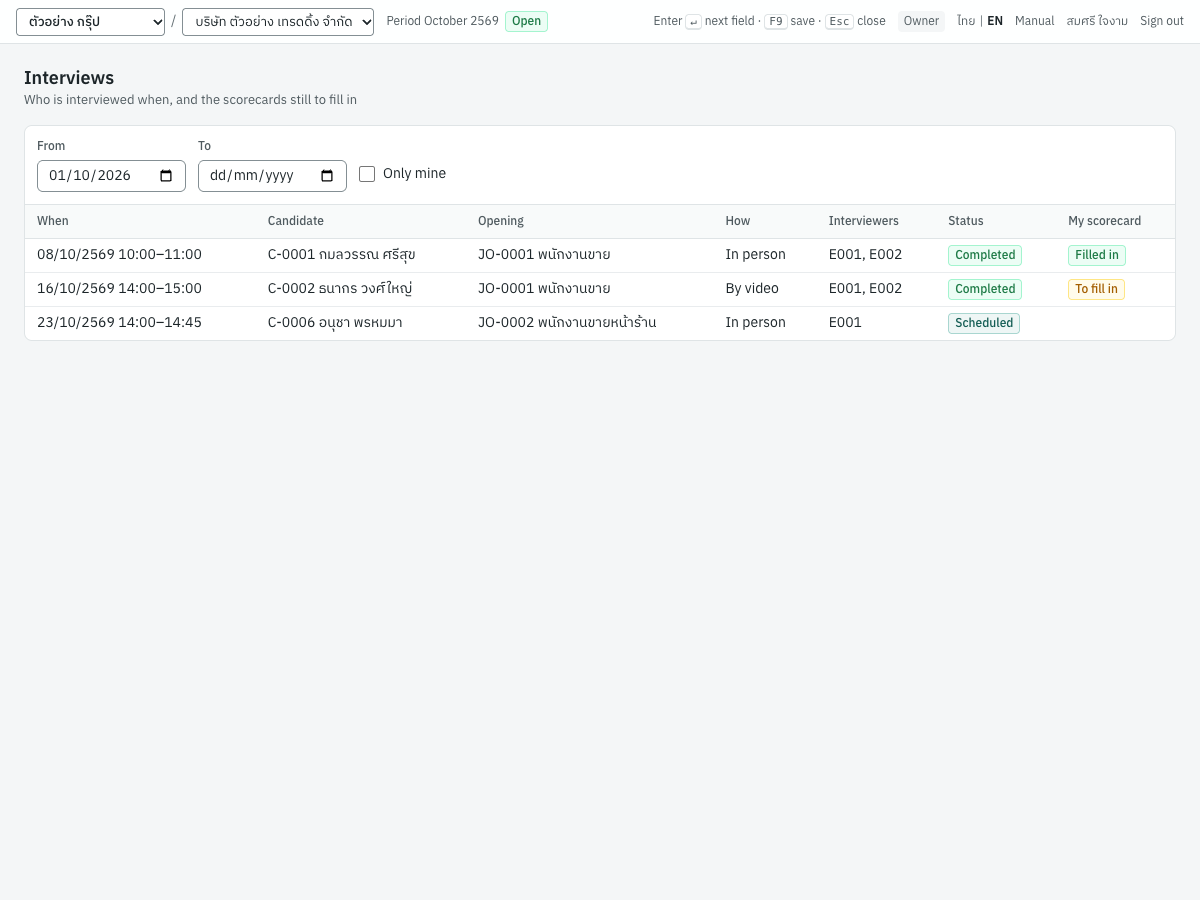
| Interviews | การสัมภาษณ์ | See the interviews of a period, and the scorecards you still have to fill in. |
All applications (on the Job openings page) lists every opening's applications by stage, and Personal data settings (on the Candidates page) holds the retention period and the notice.
Who sees the recruiting#
Candidates' details are personal data, so the recruiting has two permissions of its own:
| Permission | ภาษาไทย | Allows |
|---|---|---|
| View recruiting | ดูการสรรหาบุคลากร | Every job opening, candidate, CV, interview, scorecard and offer. The offered pay only with View payroll as well. |
| Manage recruiting | จัดการการสรรหาบุคลากร | Opening and closing positions, adding candidates, moving applications, scheduling interviews, making offers, deleting a candidate's data. |
| Who | Sees | Does |
|---|---|---|
| Owner, Admin | Everything (the pay too) | Everything, and hires |
| HR manager (HR access) | Everything except the pay | Everything, and hires |
| HR officer (HR access) | Everything except the pay | Everything except hiring: the hire makes an employee, which needs Manage HR |
| The hiring manager of an opening | That opening, its candidates' contact details and CVs (not a file kept for HR only), every scorecard, the history, the offers (no pay) | Moves its applications between stages and rejects them; fills in their own scorecard when they interview |
| An interviewer | The applications they interview: the candidate's contact details and CV (not a file kept for HR only) | Fills in their own scorecard; does not see the other interviewers', the application's overall rating, why it ended or the offer. Once their interview is cancelled, the application is no longer theirs |
| Accountant, Staff, Read-only | Nothing | — |
The hiring manager and the interviewers are employees. They see the recruiting once their employee record is linked to their Panya user (the Panya user field of the HR record, see HR): Job openings and Interviews then appear in their 9 HR menu, with only their own. Accountants do not see candidates: payroll needs none.
Job openings#
9 HR → Job openings lists the openings, the newest first, with how many are hired of those to fill and how many applications are in progress. Closed ones are greyed.
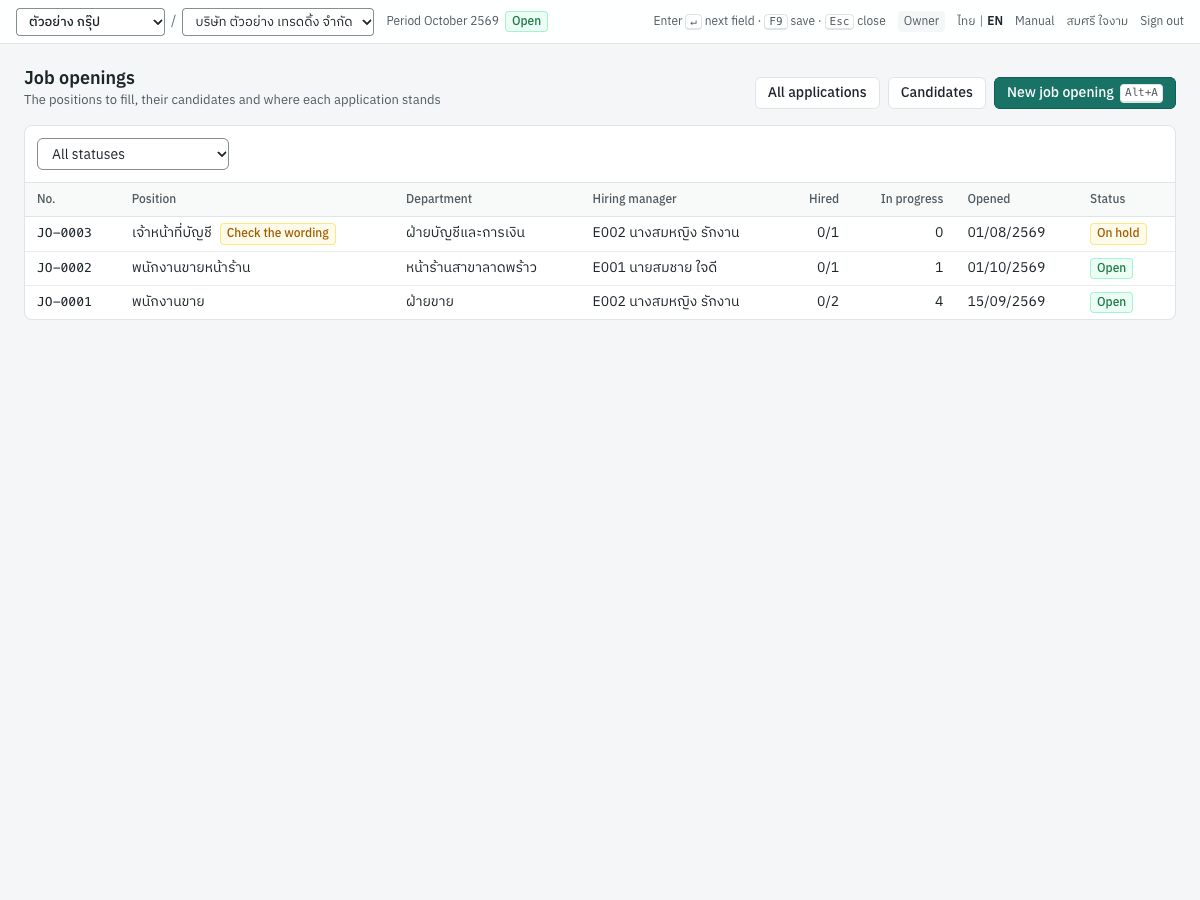
To open a position, click New job opening (Alt+A):
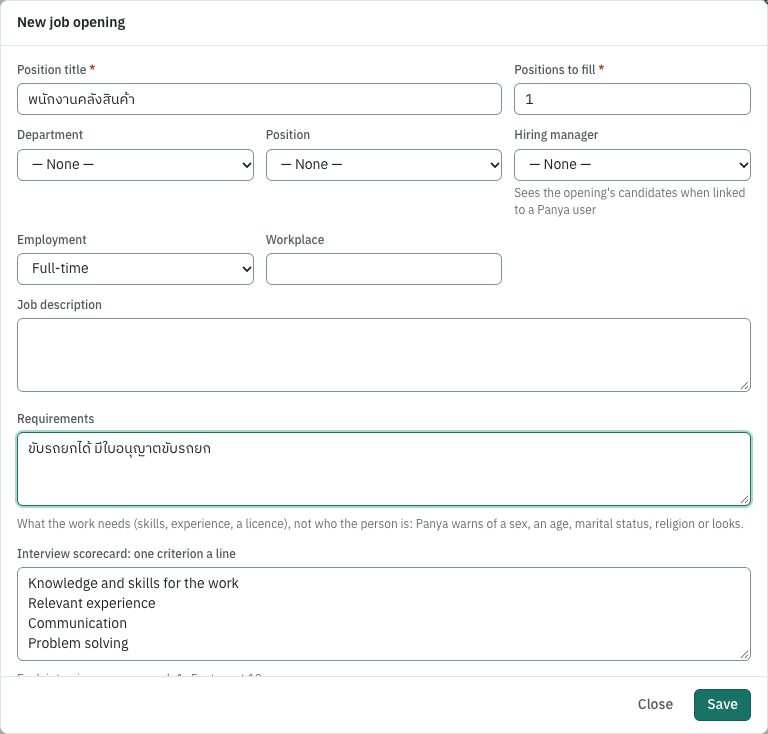
| Field | ภาษาไทย | What to enter |
|---|---|---|
| Position title | ชื่อตำแหน่งที่รับสมัคร | The job, as the advert names it. |
| Positions to fill | จำนวนที่รับ | How many people you hire for it (1–999). |
| Department, Position | แผนก, ตำแหน่งในผังองค์กร | Where the new employee goes; the hire puts them there. |
| Hiring manager | ผู้จัดการที่รับสมัคร | The employee who decides with HR. When linked to a Panya user, they see the opening's candidates. |
| Employment | ประเภทการจ้าง | Full-time, part-time, temporary or an internship. |
| Workplace | สถานที่ทำงาน | Where the work is. |
| Job description, Requirements | ลักษณะงาน, คุณสมบัติที่ต้องการ | The work, and what it needs: skills, experience, a licence. |
| Interview scorecard | เกณฑ์ประเมินการสัมภาษณ์ | One criterion a line, at most 10: what every interviewer scores from 1 to 5. Panya suggests four; keep them about the work. |
The opening's number (JO-0001) is given in order.
The wording Panya warns about#
Men and women are treated equally in employment unless the work itself does not allow it (Labour Protection Act s.15), and no practice of an employer may discriminate unfairly between the sexes (Gender Equality Act B.E. 2558 s.17) or against persons with disabilities. When an opening's title, description, requirements or scorecard ask for a sex, an age, marital status, religion or looks, its page warns you:
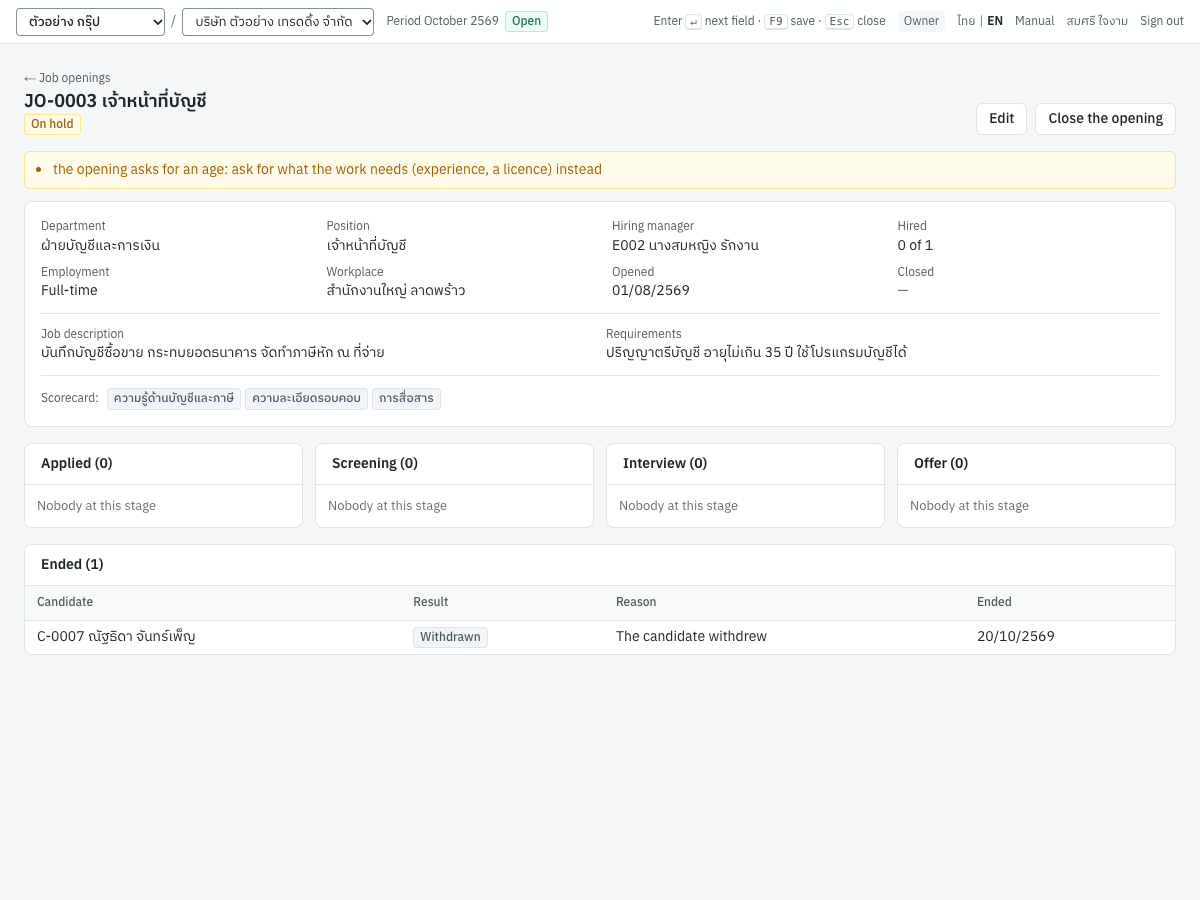
It is a warning, not a refusal: some work does need a sex (a role in a changing room, an actor). Ask for what the work needs instead, such as "two years' sales experience" rather than "aged 25–35". No Thai law forbids age limits in private hiring, but an age says nothing about the work; religion is sensitive personal data.
An opening's page#
Click an opening to see its candidates by stage. Each card opens the application; those that ended are listed under it with the reason.
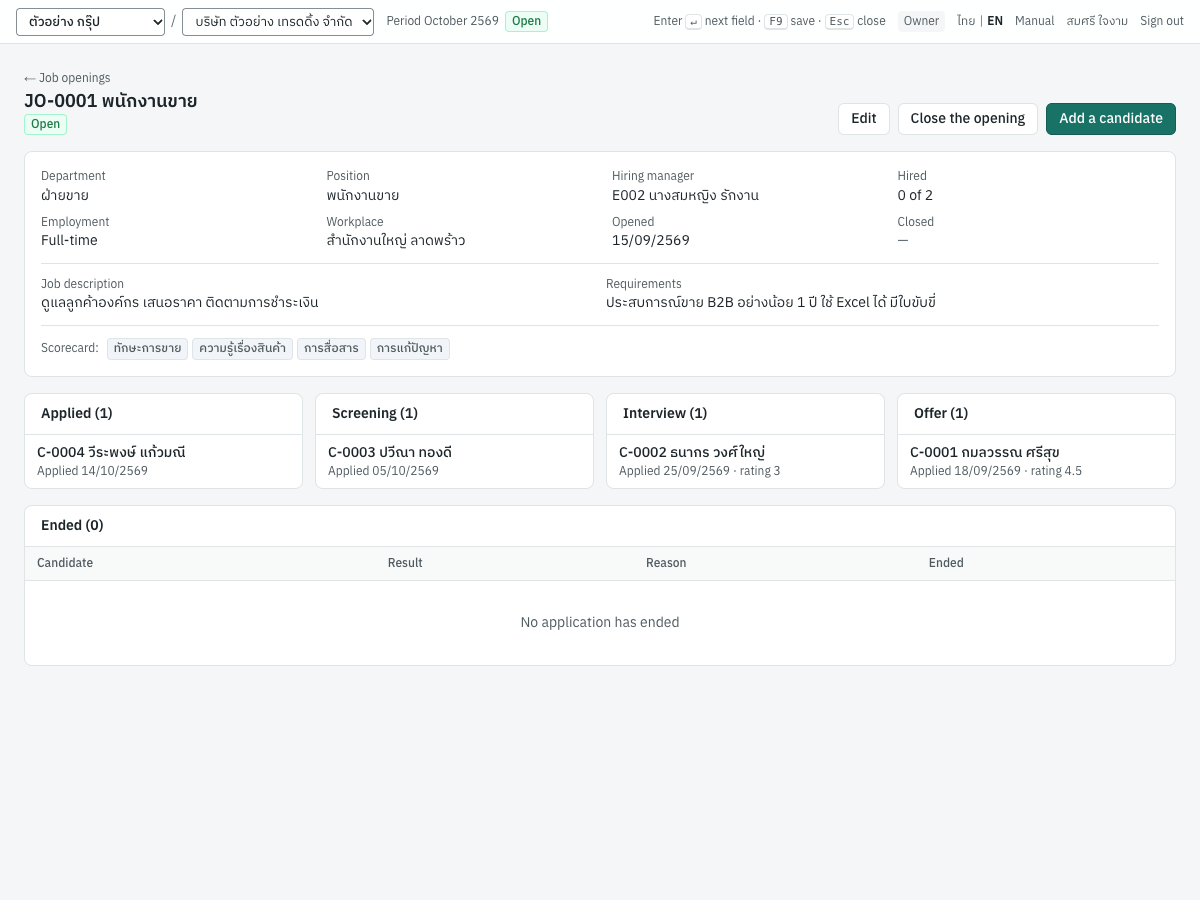
| Button | Does |
|---|---|
| Edit | Changes the opening; Status puts it On hold (no new applications, the others move on) or back to Open. |
| Add a candidate | Adds a candidate who applies to this opening. |
| Close the opening | Closes it, filled or no longer needed. Applications still in progress must end first, or tick Reject the applications still in progress to reject them with the reason The opening closed. A closed opening's applications can only be rejected or withdrawn. Reopen opens it again. |
Candidates#
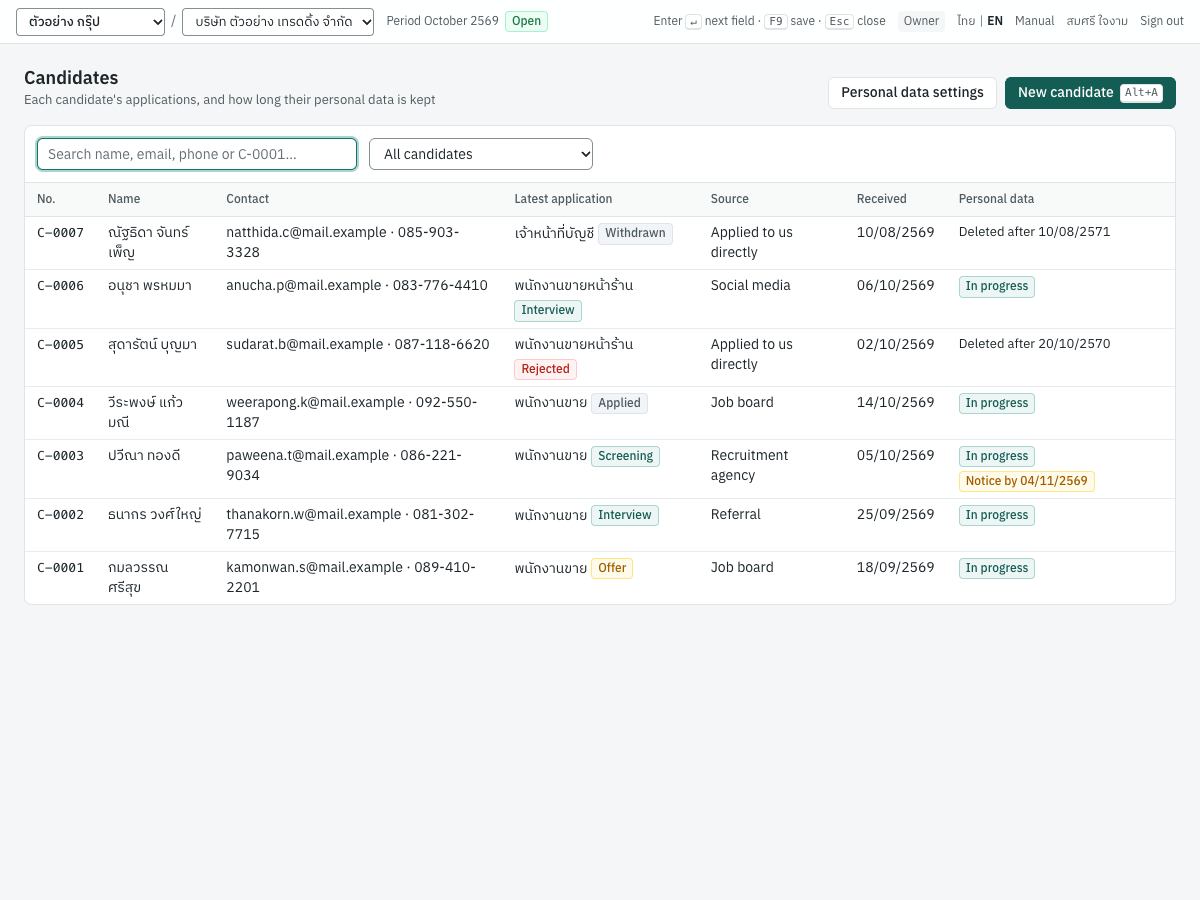
9 HR → Candidates lists the candidates with their latest application and, in Personal data, how long their data is kept: In progress while an application is, Deleted after a date once none is, Employee once hired. A candidate from an agency or a referral who has not been given the notice shows the day it is due.
What Panya keeps, and what it never asks#
Click New candidate (or Add a candidate on an opening):
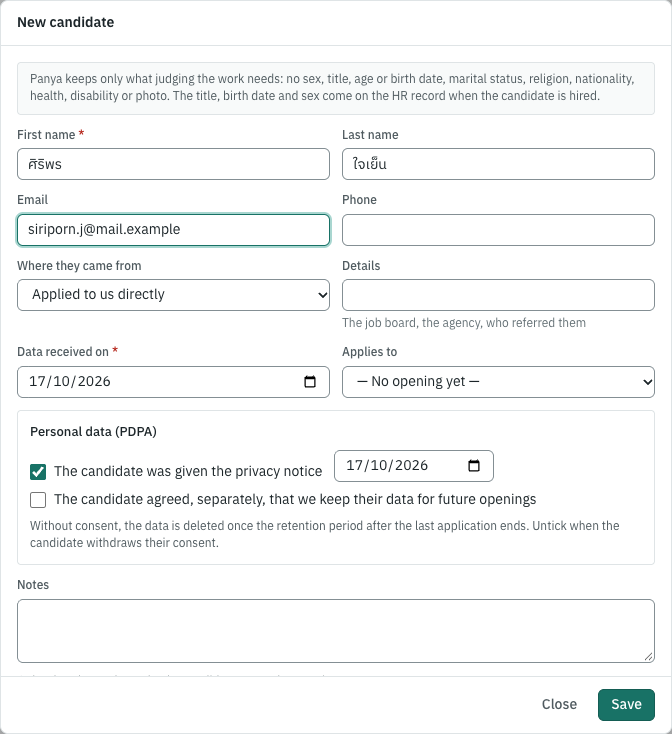
| Field | ภาษาไทย | What to enter |
|---|---|---|
| First name, Last name | ชื่อ, นามสกุล | As the candidate writes them. |
| Email, Phone | อีเมล, โทรศัพท์ | How to reach them. A second candidate with the same email is pointed out. |
| Where they came from | ที่มาของผู้สมัคร | Applied directly, a job board, social media, a referral, a recruitment agency. |
| Details | รายละเอียด | Which job board, which agency, who referred them. |
| Data received on | วันที่ได้รับข้อมูล | When you received their application or CV. |
| Applies to | สมัครตำแหน่ง | The open opening they apply to (they can apply to more from their page). |
| The candidate was given the privacy notice | แจ้งประกาศความเป็นส่วนตัวแก่ผู้สมัครแล้ว | Tick it, with the date, once they have your notice (see the notice). |
| The candidate agreed, separately, that we keep their data for future openings | ผู้สมัครให้ความยินยอมแยกต่างหาก… | Only with their own, separate consent, and its date. Untick it when they withdraw it. |
| Notes | หมายเหตุ | Only what the work needs: the candidate may ask to see it. |
Panya has no field for the candidate's sex, title (นาย, นาง, นางสาว), age or birth date, marital status, religion, nationality, health, disability or photo. None of them is needed to judge the work: asking invites discrimination, and religion, health and disability are sensitive data under the Personal Data Protection Act (s.26). The title, the birth date (the minimum age of 15 is checked) and the sex are entered on the HR record once the candidate is hired. Do not ask for an ID card copy, a criminal record or a health check before hiring unless a law requires it for the job.
A candidate's page#
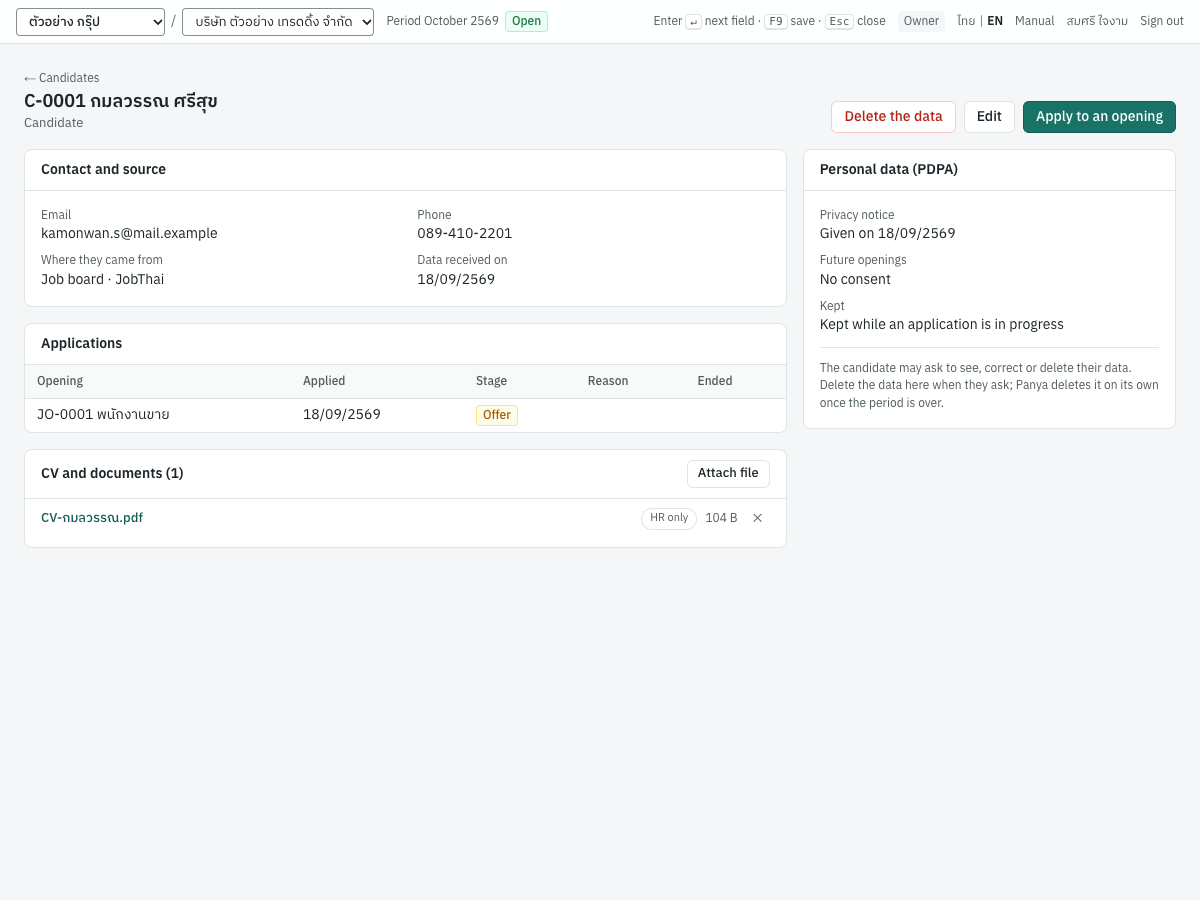
It shows their contact details, their applications, their CV and documents (drop a PDF, Word file or scan on the card), and Personal data (PDPA): when the notice was given (or by when it is due), the consent for future openings, and until when the data is kept. Apply to an opening adds an application; Delete the data is described below.
The CV is seen only by HR, the hiring manager of an opening the candidate applied to, and their interviewers. A file only HR should see, such as an offer letter with the salary, a reference or a copy of an ID card, is marked HR only on the card (click the label beside the file; click again to share it with the hiring team): the hiring manager and the interviewers then neither list nor open it. The audit log records that a file was attached, marked or downloaded, and by whom, with the candidate's number, never the file's name.
An application through its stages#
| Stage | ภาษาไทย | Means |
|---|---|---|
| Applied | สมัครแล้ว | Received, not looked at yet. |
| Screening | คัดกรอง | Being checked against the requirements. |
| Interview | สัมภาษณ์ | At interview (an interview scheduled moves it here). |
| Offer | เสนอการจ้าง | An offer is made (making one moves it here). |
| Hired | รับเข้าทำงาน | Hired: final. |
| Rejected | ไม่ผ่านการคัดเลือก | The company did not select them. |
| Withdrawn | ถอนการสมัคร | The candidate withdrew. |
Open an application from its opening, the candidate's page or All applications:
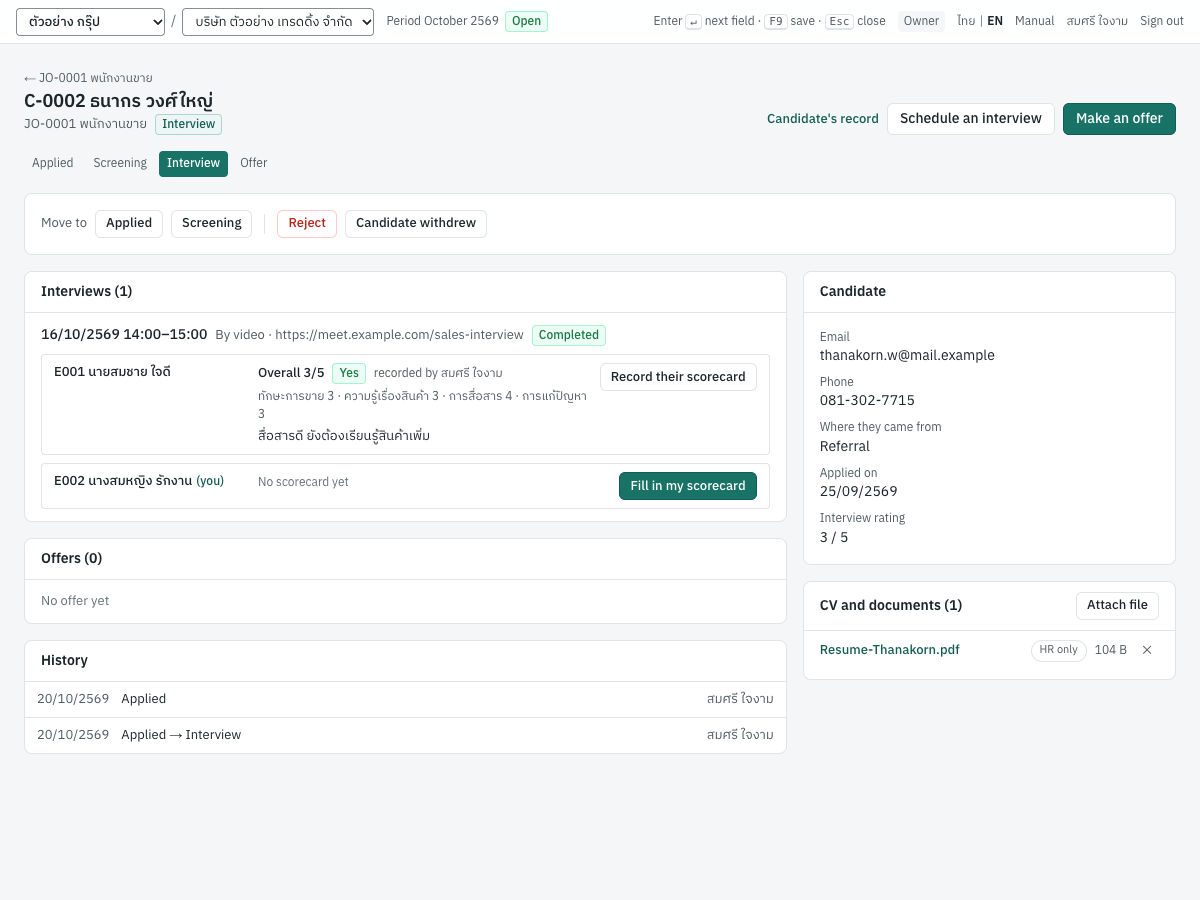
Move to moves it to any other stage in progress, forward or back. Reject asks for the reason, which can only be about the work; Candidate withdrew asks for the candidate's:
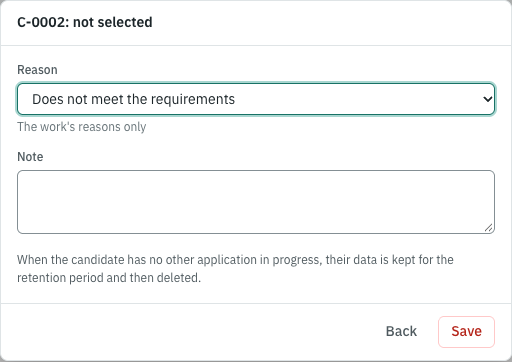
| Rejected because | Withdrawn because |
|---|---|
| Does not meet the requirements | The candidate withdrew |
| Did not pass the interview or test | The candidate declined the offer |
| Another candidate was chosen | The candidate stopped answering |
| Did not come to the interview | |
| The opening closed | |
| Other (explain in the note) | Other (explain in the note) |
An application that ended can be taken up again while its opening is not closed. While an offer is in force, record its answer or withdraw it before moving the application. History lists every move, with who made it.
Interviews and scorecards#
On an application, Schedule an interview (HR):
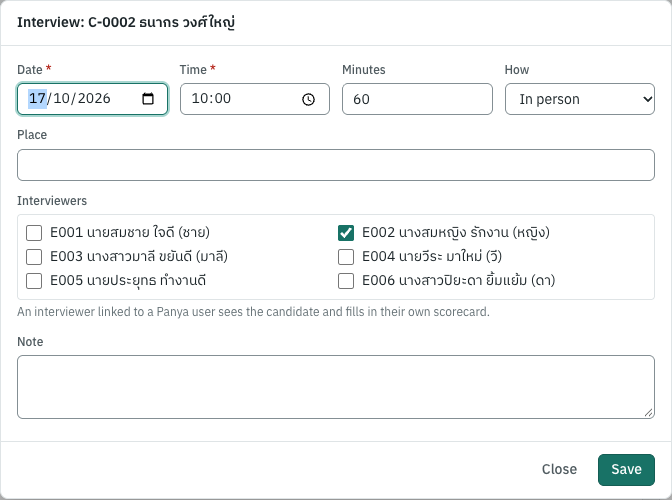
Enter the date, time and length, how (in person, by phone, by video) with the place or the link, and tick the interviewers: the hiring manager is ticked already. Panya warns when an interviewer has another interview at that time or is on leave that day. Change, Did not come and Cancel act on a scheduled interview.
Each interviewer fills in their own scorecard: Fill in my scorecard on the application (or from 9 HR → Interviews, where To fill in marks theirs).
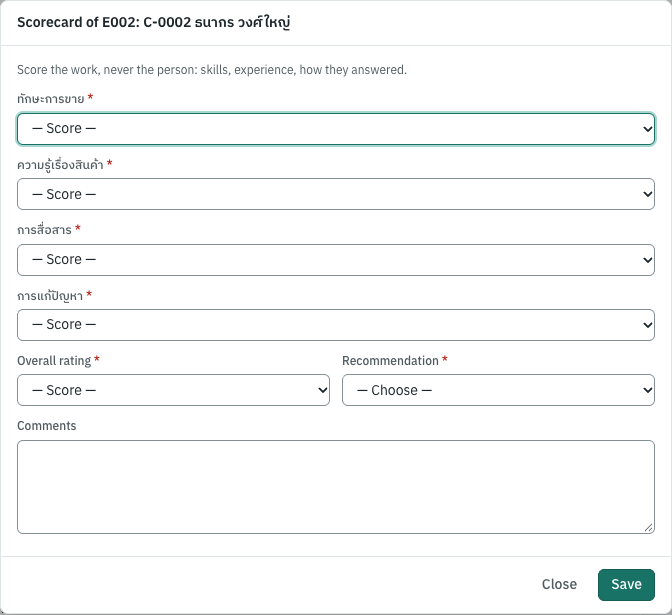
Score every criterion of the opening from 1 (poor) to 5 (excellent), give the overall rating and a recommendation (strong yes, yes, no, strong no), and comment on what you saw. Score the work, never the person. HR may Record their scorecard for an interviewer who filled one in on paper; it then says who recorded it. A scorecard can be changed while the application is in progress; filling one in marks the interview completed. The application's Interview rating is the mean of the overall ratings.
An interviewer sees who else is on the panel but not their scorecards; HR and the hiring manager see them all.
Offers#
Make an offer on an application (HR):
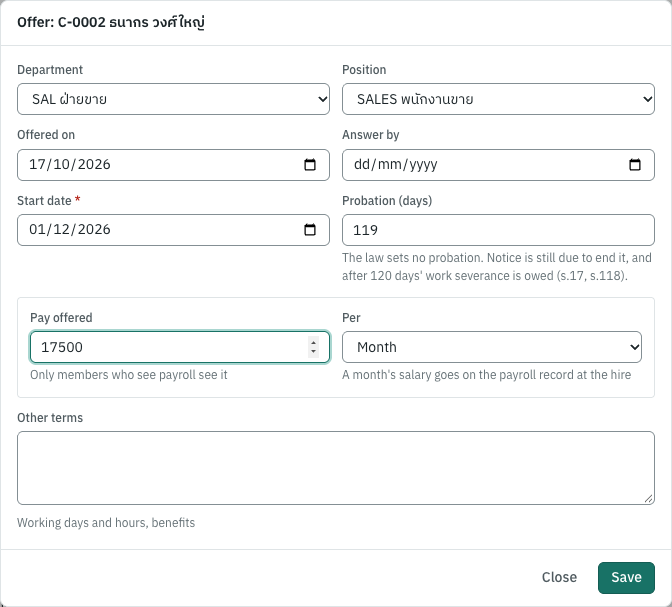
| Field | ภาษาไทย | What to enter |
|---|---|---|
| Department, Position | แผนก, ตำแหน่ง | The opening's, unless the offer is for another. |
| Offered on, Answer by | วันที่เสนอ, ตอบรับภายใน | When it was made and until when it stands. |
| Start date | วันเริ่มงาน | The first day of work. |
| Probation (days) | ทดลองงาน (วัน) | 0 for none. |
| Pay offered, Per | ค่าจ้างที่เสนอ, ต่อ | The salary a month, or the wage a day. Only members who see payroll (owners, admins, accountants) see and enter it. |
| Other terms | เงื่อนไขอื่น | Working days and hours, benefits. |
The law sets no probation period, and a probation contract is a contract of indefinite term: ending it still needs written notice (s.17), and after 120 days of work an employee dismissed without fault is owed severance pay, probation or not (s.118). Panya warns of a probation of 120 days or more.
An HR officer or manager without View payroll makes the offer without the pay and sees only whether one is recorded; an owner, admin or accountant adds it. The audit log never records the amount.
When the candidate answers, click Accepted or Declined; Withdraw takes a pending or accepted offer back, with the reason. A declined offer leaves the application at Offer: make another, or record that the candidate withdrew.
Hiring#
When the offer is accepted, Hire (it needs Manage recruiting and Manage HR):
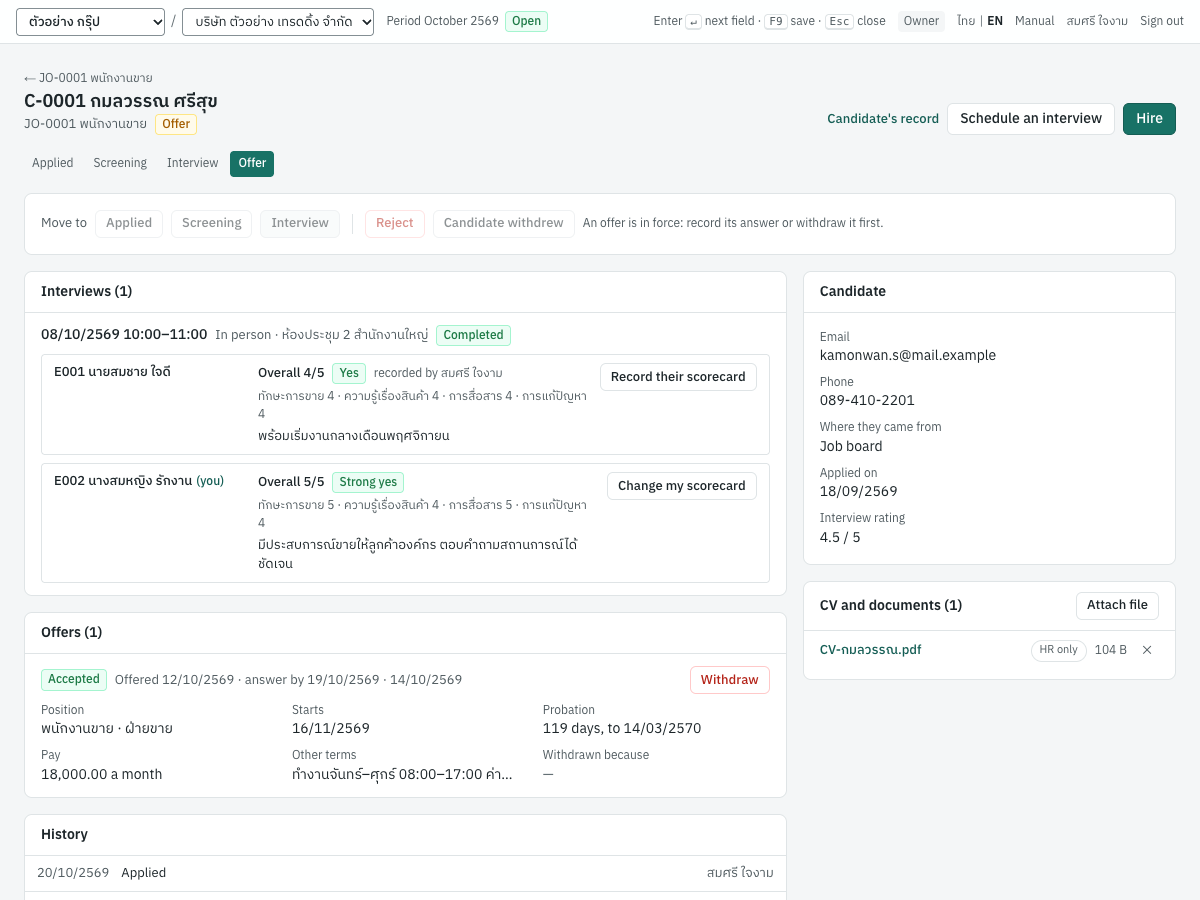
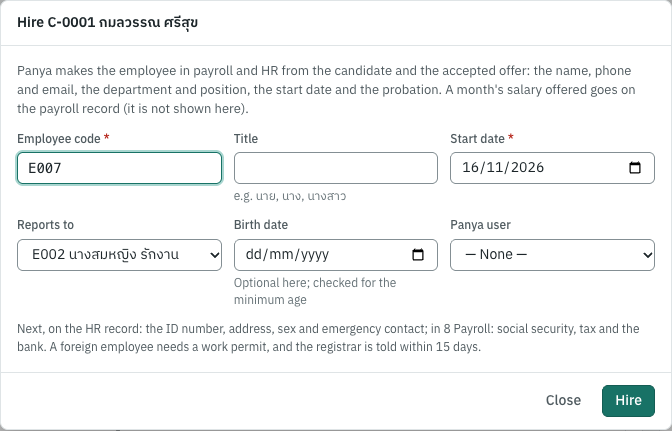
Enter the employee code (Panya suggests the next one), the title, the start date (the offer's), whom they report to (the hiring manager), the birth date if you have it (under 15 on the start date is refused, s.44) and, if they use Panya, their user (choosing it needs payroll access, as on the HR record). Panya then makes, without typing again:
- the payroll employee in 8 Payroll with the code, title, name and start date, and the offered pay: a monthly salary, or a day's wage with the employee paid by the day (check their work week there; Panya says so on hiring only to those who see payroll);
- the HR record with the department and position of the offer, the manager, the candidate's phone and email, the birth date and the end of probation (from the offer's days).
The HR record opens: complete the ID number, address, sex and emergency contact, then social security, tax and the bank in 8 Payroll. A foreign employee needs a work permit, and the registrar is told within 15 days of hiring. The application is Hired, and the candidate's data is now the employee's record: it is no longer deleted with the unsuccessful candidates'. When an opening's positions are all filled, Panya tells you to close it.
The notice and the retention period#
Candidates → Personal data settings:
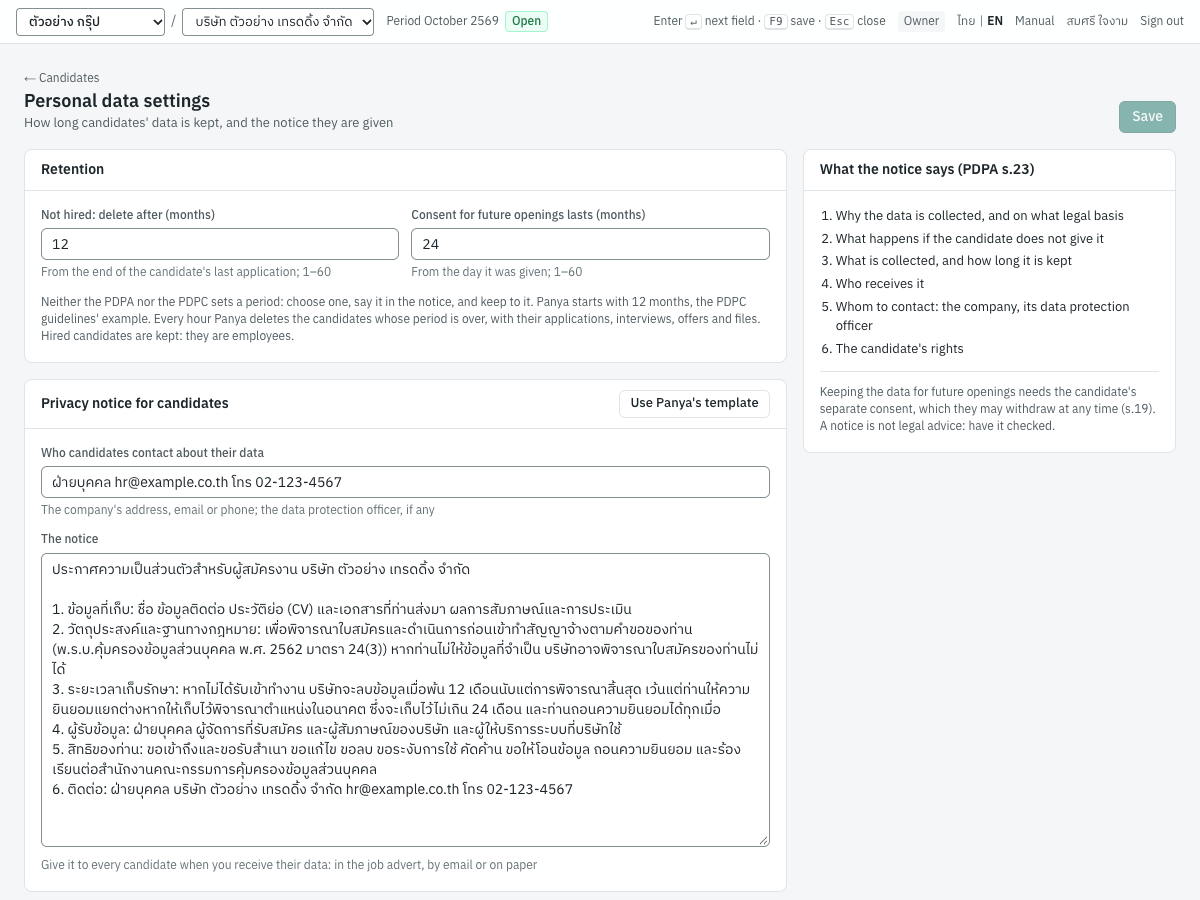
| Setting | ภาษาไทย | What it does |
|---|---|---|
| Not hired: delete after (months) | ไม่ได้รับเข้าทำงาน: ลบเมื่อพ้น (เดือน) | How long an unsuccessful candidate's data is kept after their last application ended (or after it was received, with none). 1–60; Panya starts with 12. |
| Consent for future openings lasts (months) | ความยินยอมให้เก็บไว้พิจารณาในอนาคต (เดือน) | How long a consent to keep the data for future openings lasts from the day it was given. 1–60; Panya starts with 24. |
| Who candidates contact about their data | ช่องทางติดต่อเรื่องข้อมูลส่วนบุคคล | The company's address, email or phone; its data protection officer if it has one. |
| The notice | ข้อความประกาศ | The privacy notice you give every candidate. Use Panya's template fills one in with your company, periods and contact. |
The Personal Data Protection Act asks you to tell candidates, before or when you collect their data, why you collect it and on what basis, what happens if they do not give it, what you collect and for how long, who receives it, how to contact you, and their rights (s.23). A job application is data the candidate gives for the steps they ask for before a contract (s.24(3)): no consent is needed for it. Keeping it for future openings is another purpose, for which Panya asks the candidate's separate consent, which they may withdraw at any time (s.19). Data that came from someone else (an agency, a referral) needs the notice within 30 days (s.25). Give the notice in your advert, by email or on paper, and record the date on the candidate.
No law or PDPC rule fixes how long to keep unsuccessful candidates' data: choose a period, say it in the notice, and keep to it. The PDPC's guidelines use 12 months after recruitment ends as their example.
Every hour, Panya deletes the candidates whose period is over: an unsuccessful candidate's data the day after Deleted after, with their applications, interviews, scorecards, offers and files. Nothing is deleted while an application is in progress, and a hired candidate is an employee. A consent for future openings keeps the data until it lapses, if that is later.
Deleting a candidate's data#
A candidate may ask you to delete their data (s.33; within 90 days at most). On their page, Delete the data:
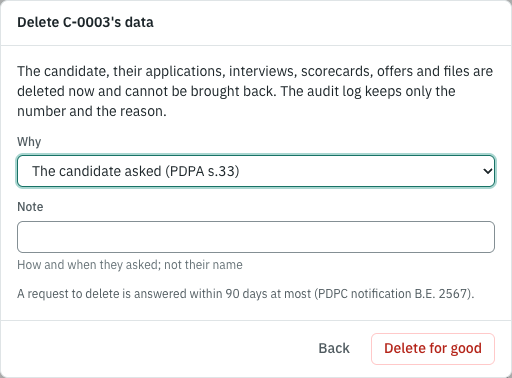
Choose why (their request, or no longer needed), note how and when they asked, without their name, and Delete for good. Everything goes at once and cannot be brought back. A hired candidate's data is not deleted here: it is the employee's record.
The audit log names candidates only by their number (C-0012) and files without their names, so a deletion leaves nothing behind. The candidate may also ask to see or correct their data: their page and files show everything Panya keeps.
What Panya does not do yet#
- A public page where candidates apply themselves. Panya leaves it out on purpose: its protection against abuse limits the requests of each network address but has no bot check, attached files are not scanned for viruses, files sent by anyone would fill your organization's storage, and Panya keeps no anonymous route into a company's data. Receive applications by email or through a job board and add them here.
- Emails to candidates (invitations, rejections) and printed offer letters.
- A download of a candidate's data for an access request (s.30): read it on their page.
- The quota of employees with disabilities (1 per 100 employees from 100, the Persons with Disabilities Empowerment Act s.33).
- Reference and background checks.