Performance reviews · การประเมินผลงาน
Performance reviews in the HR menu (9 HR) run your company's reviews: a template with a rating scale and the sections each review is scored on, a review cycle over a period with the employees in it, each employee's goals (KPIs), the employee's self-assessment, the manager's assessment, HR's final rating and the employee's acknowledgement, with optional feedback from colleagues, a report of how far the cycle has gone and how the ratings fall, and, for those who see payroll, a recommended raise or bonus. Panya never changes anyone's pay from a review.
This chapter covers:
- who does what in a review;
- review templates: the scale and the weighted sections;
- review cycles: who is in them, starting and closing them, the report;
- a review step by step: goals, the self-assessment, the manager's assessment, peers' feedback, HR's final rating, the acknowledgement;
- recommending a raise or bonus;
- what the law and the courts say about reviews;
- what Panya does not do yet.
The reporting lines and the link between an employee and their Panya user are set on the HR record (see HR).
The reviews menu#
| Menu item | ภาษาไทย | Use it to |
|---|---|---|
| Performance reviews | การประเมินผลงาน | Make review cycles, put employees in them, follow their progress, read the report, close them (HR). |
| My reviews | การประเมินของฉัน | Open your own review, your team's (as reviewer), the feedback asked of you, and for HR the reviews waiting to be finalised. |
| Review templates | แบบประเมินผลงาน | Set up the rating scales and the sections (HR). |
Who does what#
Reviews are personal data. They have two permissions of their own:
| Permission | ภาษาไทย | Allows |
|---|---|---|
| View reviews | ดูการประเมินผลงาน | Every review, the cycles, templates and the report. A recommended raise or bonus only with View payroll as well. |
| Manage reviews | จัดการการประเมินผลงาน | Templates and cycles, setting goals, HR's final rating, and recording an assessment or acknowledgement on someone's behalf. |
Owners, admins and HR managers (HR access) have both; HR officers, accountants, staff and read-only users have neither. Everyone else takes part through their own employee record, once it is linked to their Panya user:
| Who | Sees | Does |
|---|---|---|
| The employee | Their goals and self-assessment; the manager's assessment and the final rating once HR has finalised | Reports progress on the goals, writes and submits the self-assessment, acknowledges the result |
| Their reviewer (their manager when the cycle started) | Their reports' goals, self-assessments once submitted, peers' feedback, the result | Sets the goals, asks peers, assesses, submits to HR or sends back to the employee |
| A colleague asked for feedback | The employee's name and their own feedback | Gives feedback before the manager assesses |
| HR (Manage reviews) | Everything | Everything above on anyone's behalf, and the final rating; never on their own review |
Nobody assesses, finalises or recommends pay for their own review: an HR manager who is in the cycle has their review finalised by someone else. Nor do they choose its reviewer, record feedback on it or take it out of the cycle. On their own review an owner, admin or HR manager sees what any employee sees: the manager's assessment once finalised, never the peers' feedback or the history; and the cycle's list does not show them a raise or bonus recommended for them. An employee without a Panya user takes part on paper, and HR records their self-assessment and acknowledgement for them.
Review templates#
9 HR → Review templates lists the templates. Click New template, or a template to change it:
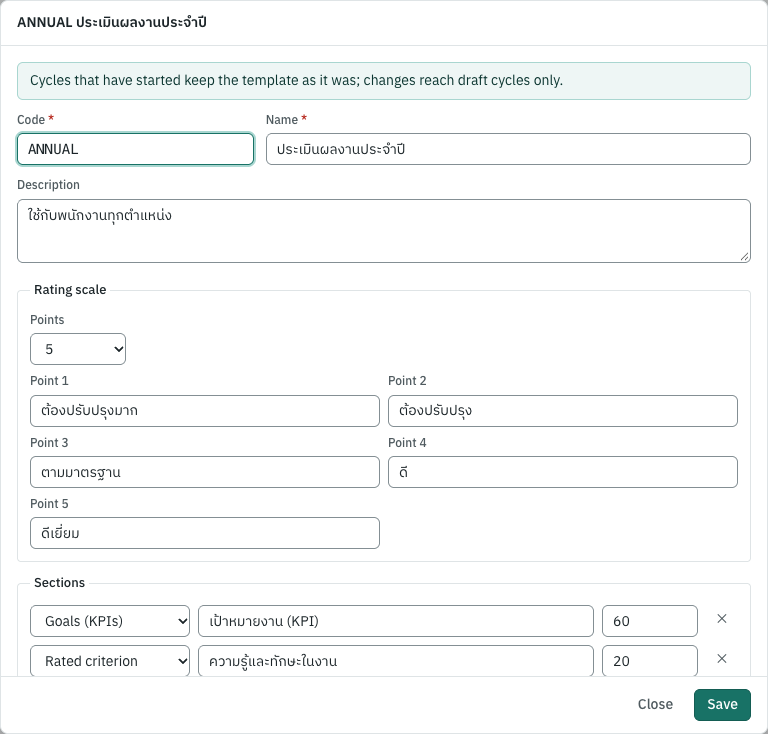
| Field | ภาษาไทย | What to enter |
|---|---|---|
| Code, Name | รหัส, ชื่อ | How you call it. |
| Rating scale | เกณฑ์การให้คะแนน | 2 to 10 points, each with a label. Panya starts with five, from Needs much improvement to Outstanding. |
| Sections | หัวข้อประเมิน | What each review is scored on. Goals (KPIs): scored from the employee's own goals, each by its weight; one at most. Rated criterion: rated on the scale. Comments only: no score (a development plan). |
| Weight % | น้ำหนัก % | Each scored section's share of the score; together they make 100. |
| In use | ใช้งาน | Offered for new cycles. A template used by a cycle is made not in use rather than deleted. |
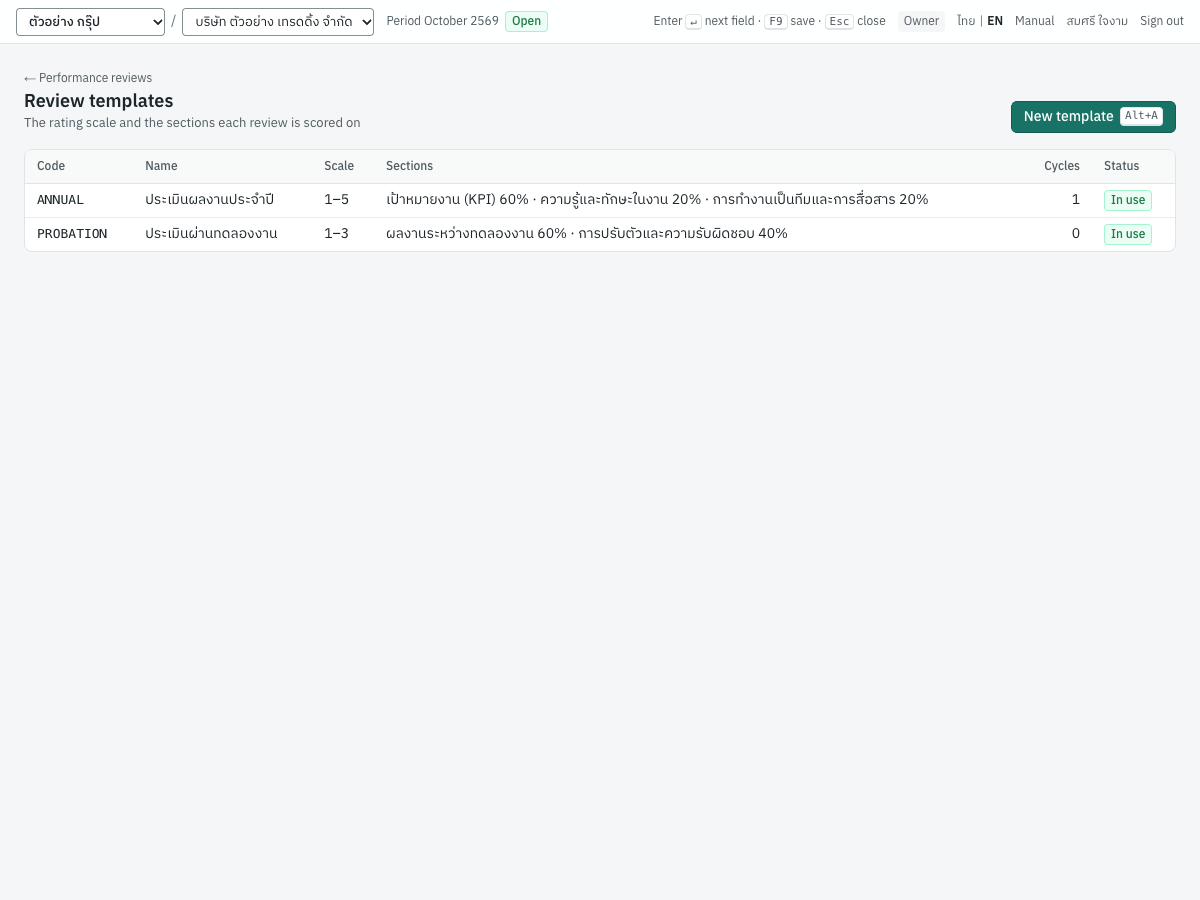
A cycle keeps the template as it was when the cycle started: changing a template changes the cycles still in draft only.
Review cycles#
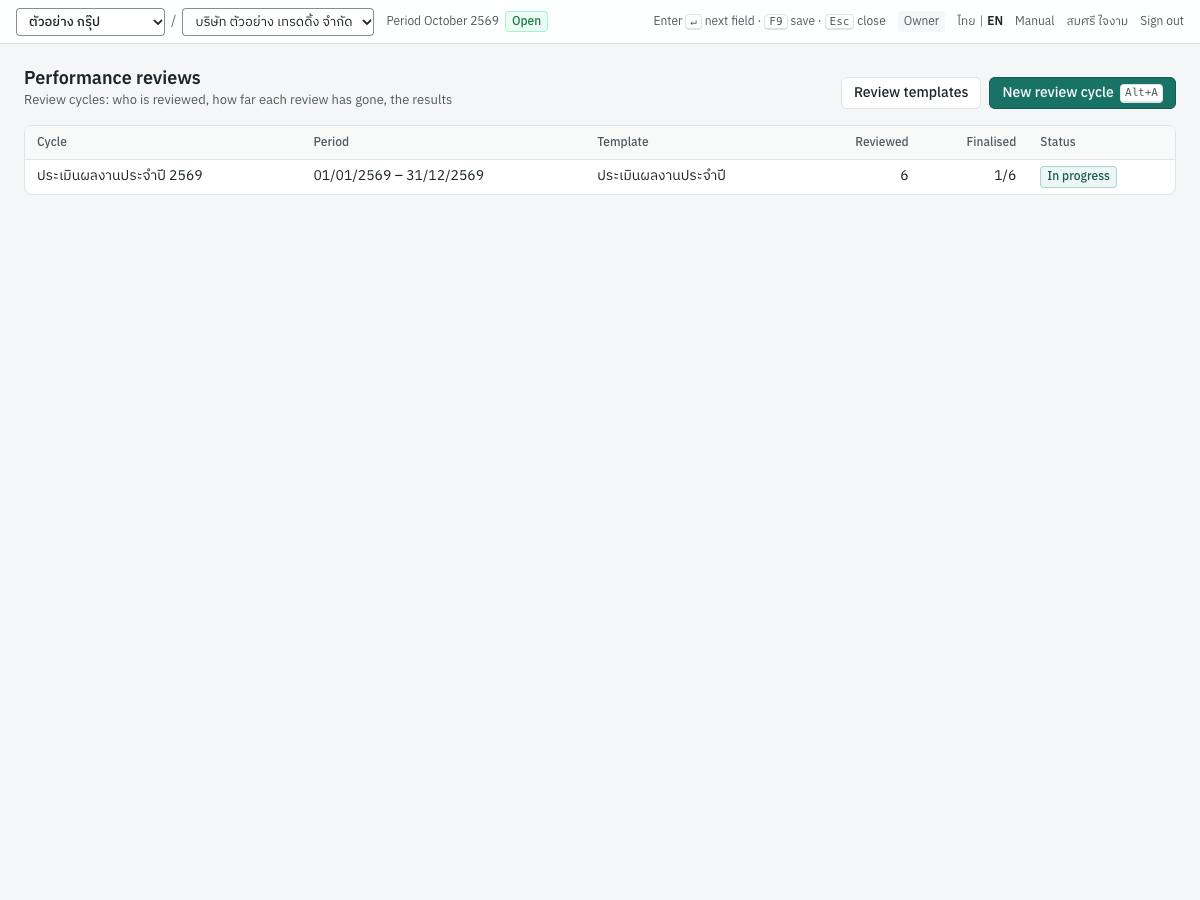
9 HR → Performance reviews lists the cycles with how many are reviewed and finalised. New review cycle:
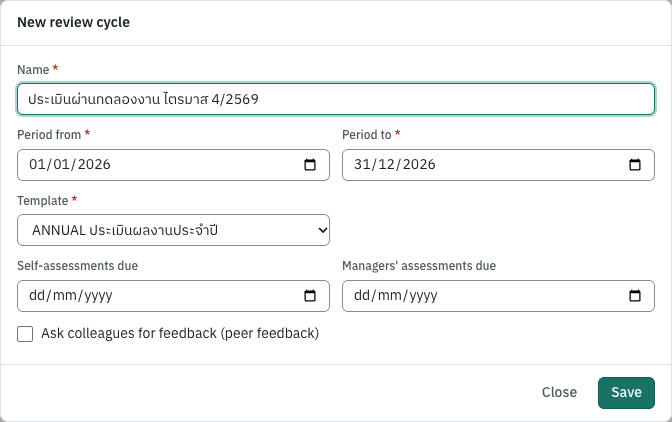
| Field | ภาษาไทย | What to enter |
|---|---|---|
| Name | ชื่อรอบการประเมิน | For example Annual review 2026. |
| Period from, to | ช่วงที่ประเมิน | The period the work is reviewed over (two years at most). |
| Template | แบบประเมิน | The scale and sections. |
| Self-assessments due, Managers' assessments due | ประเมินตนเองภายใน, หัวหน้าประเมินภายใน | Optional; late reviews are marked Overdue. |
| Ask colleagues for feedback | ขอความเห็นจากเพื่อนร่วมงาน | Lets reviewers ask peers. |
Starting a cycle#
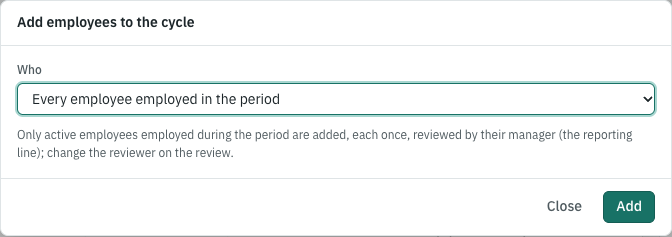
A new cycle is a draft that only HR sees. On its page, Add employees: every employee employed during the period, a department with its sub-departments, or the employees you tick. Each is added once, reviewed by their manager (their reporting line); change a reviewer on the review.
Start the reviews opens them: the template is kept as it is, and each employee can start their self-assessment. An employee comes out of a cycle only before their self-assessment is submitted. Close the cycle ends it: nothing in it changes afterwards, and the reviews that were not acknowledged stay as they are.
The cycle's report#
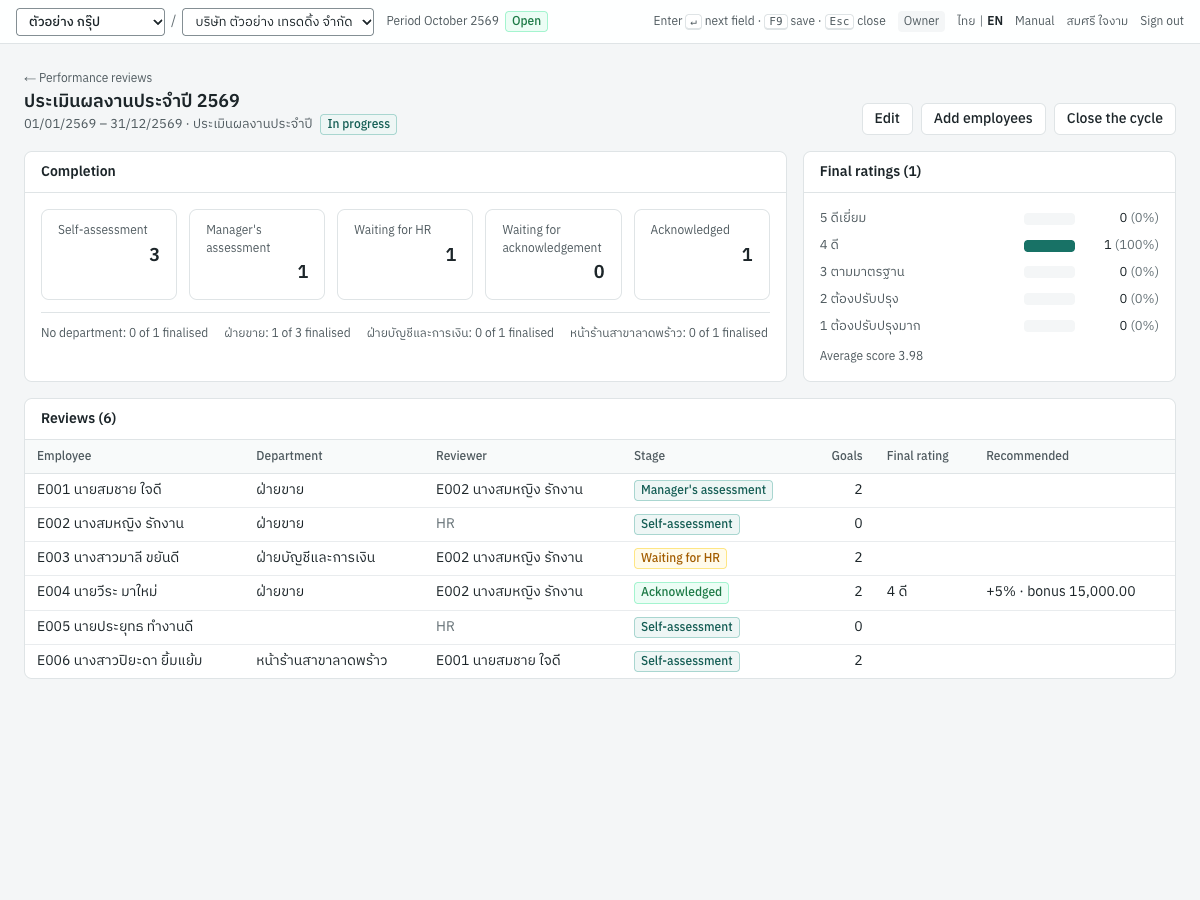
Completion counts the reviews at each stage, the overdue ones, and how many each department has finalised. Final ratings shows how many employees received each point of the scale, with the average score. The list below shows each employee's reviewer, stage and final rating; with View payroll also the recommended raise or bonus.
A review, step by step#
| Stage | ภาษาไทย | Waiting for |
|---|---|---|
| Self-assessment | ประเมินตนเอง | The employee |
| Manager's assessment | หัวหน้าประเมิน | The reviewer |
| Waiting for HR | รอฝ่ายบุคคลสรุปผล | HR |
| Waiting for acknowledgement | รอพนักงานรับทราบ | The employee |
| Acknowledged | รับทราบแล้ว | Done |
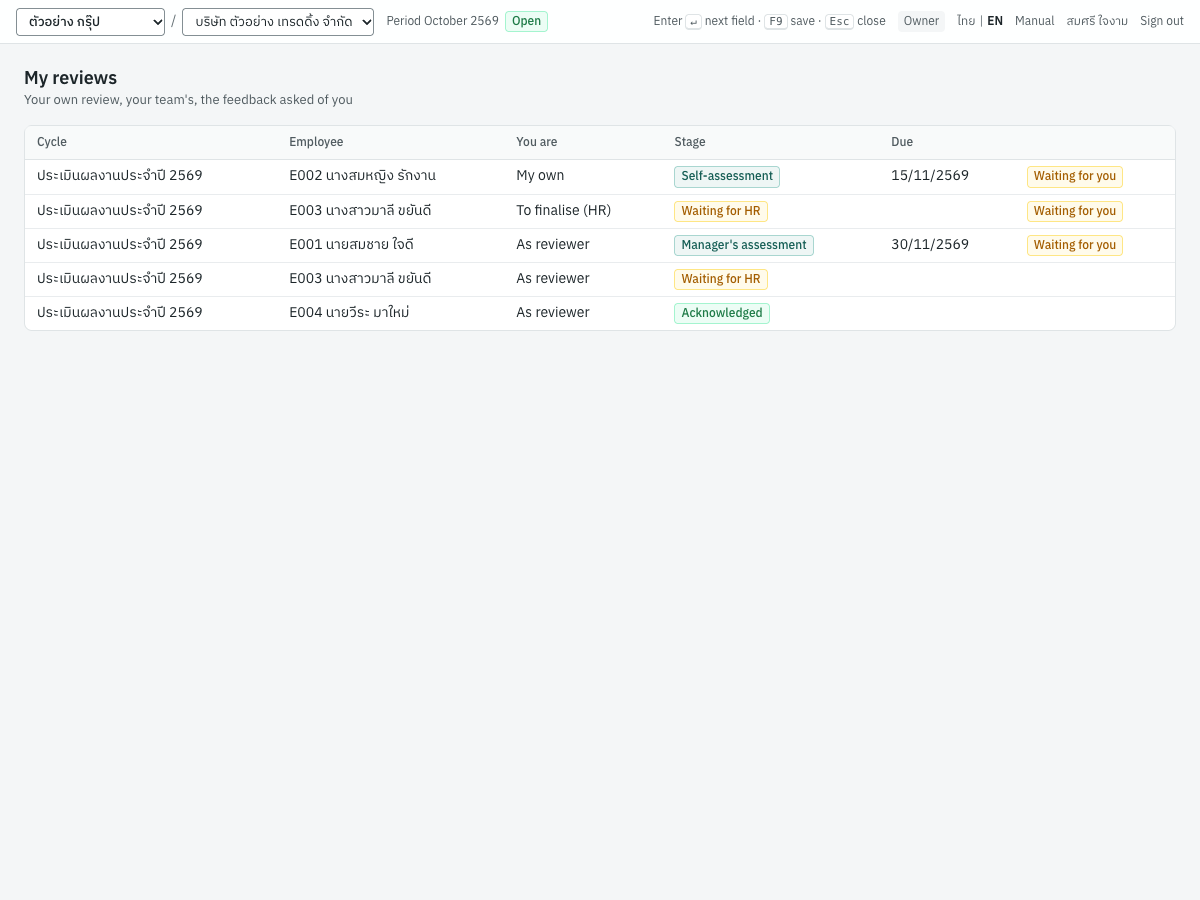
Open a review from My reviews (Waiting for you marks the ones that are) or from its cycle.
Goals#
The reviewer (or HR) clicks Set the goals, until the manager has assessed:
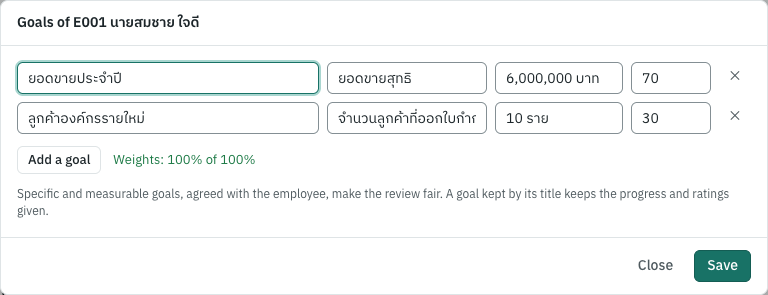
Each goal has a title, how it is measured (the KPI), the target and its weight; the weights make 100. A goal kept by its title keeps the progress and ratings already given. Specific goals, agreed with the employee at the start of the period, make the review fair.
The self-assessment#
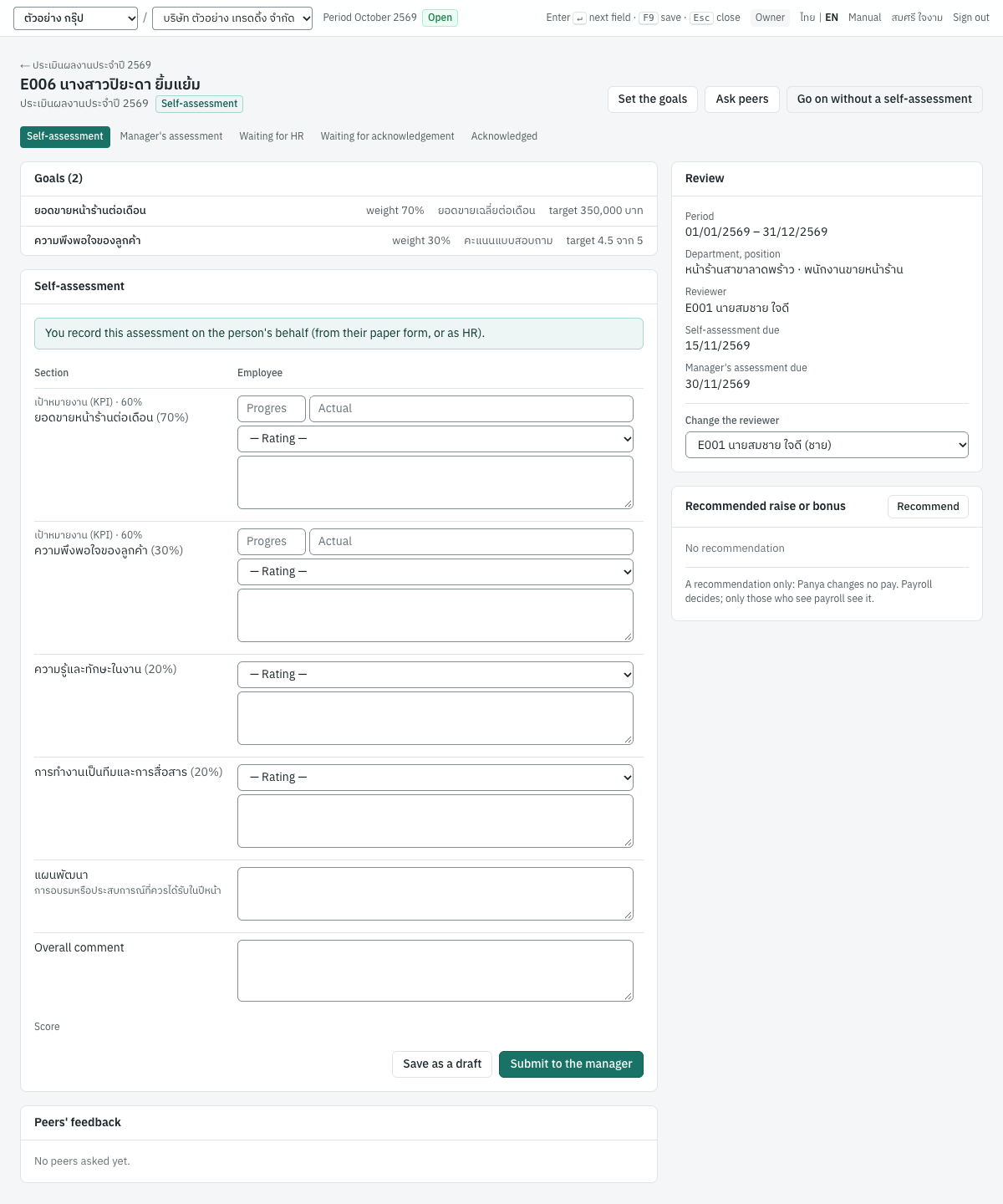
The employee rates each section and goal on the scale, reports each goal's progress (0–100%) and actual result, adds comments and an overall comment, and Saves as a draft or Submits to the manager. Everything rated must be rated to submit. Their reviewer does not see a draft.
HR may record a self-assessment given on paper (it then says recorded by HR), or Go on without a self-assessment with the reason (an employee on long leave, say).
The manager's assessment#
Once the self-assessment is in, the reviewer sees it beside their own column, rates each section and goal, comments and Submits to HR; the score is worked out from the weights. Send back to the employee returns the review with the reason.
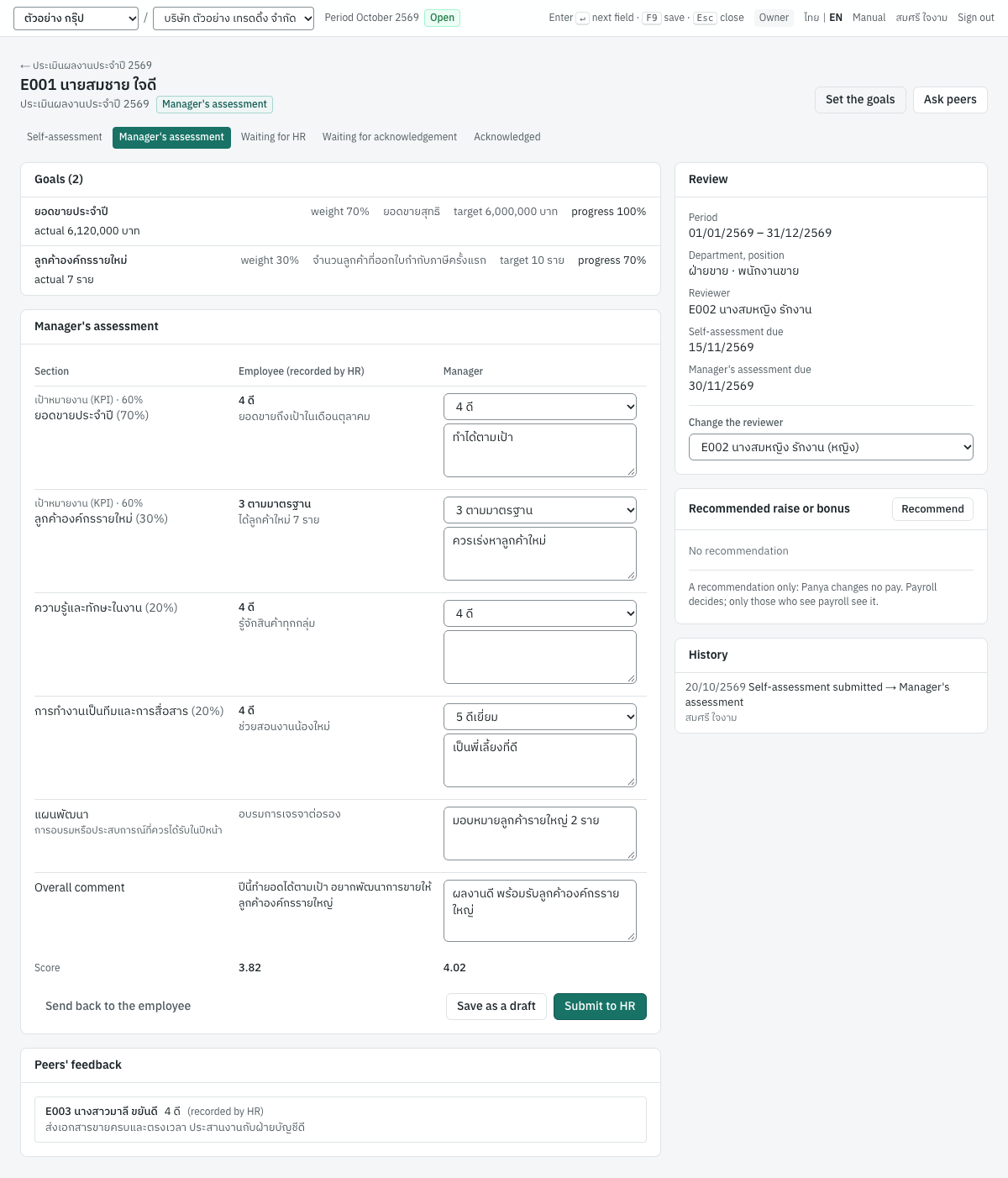
The score is each scored section's rating times its weight; a goals section counts its goals' ratings by their weights. For example goals rated 5 (70%) and 3 (30%) give 4.4; at 60%, with two criteria rated 4 at 20% each, the score is 4.4 × 0.6 + 4 × 0.2 + 4 × 0.2 = 4.24.
The employee sees nothing of the manager's assessment until HR has finalised.
Peers' feedback#
In a cycle with peer feedback, the reviewer or HR clicks Ask peers and ticks colleagues (not the employee or their reviewer; 10 at most). A colleague linked to a Panya user finds the review in My reviews, gives a comment and, if they wish, a rating; HR records the others'. Feedback is given until the manager assesses; HR and the reviewer see it, the employee does not.
HR's final rating#
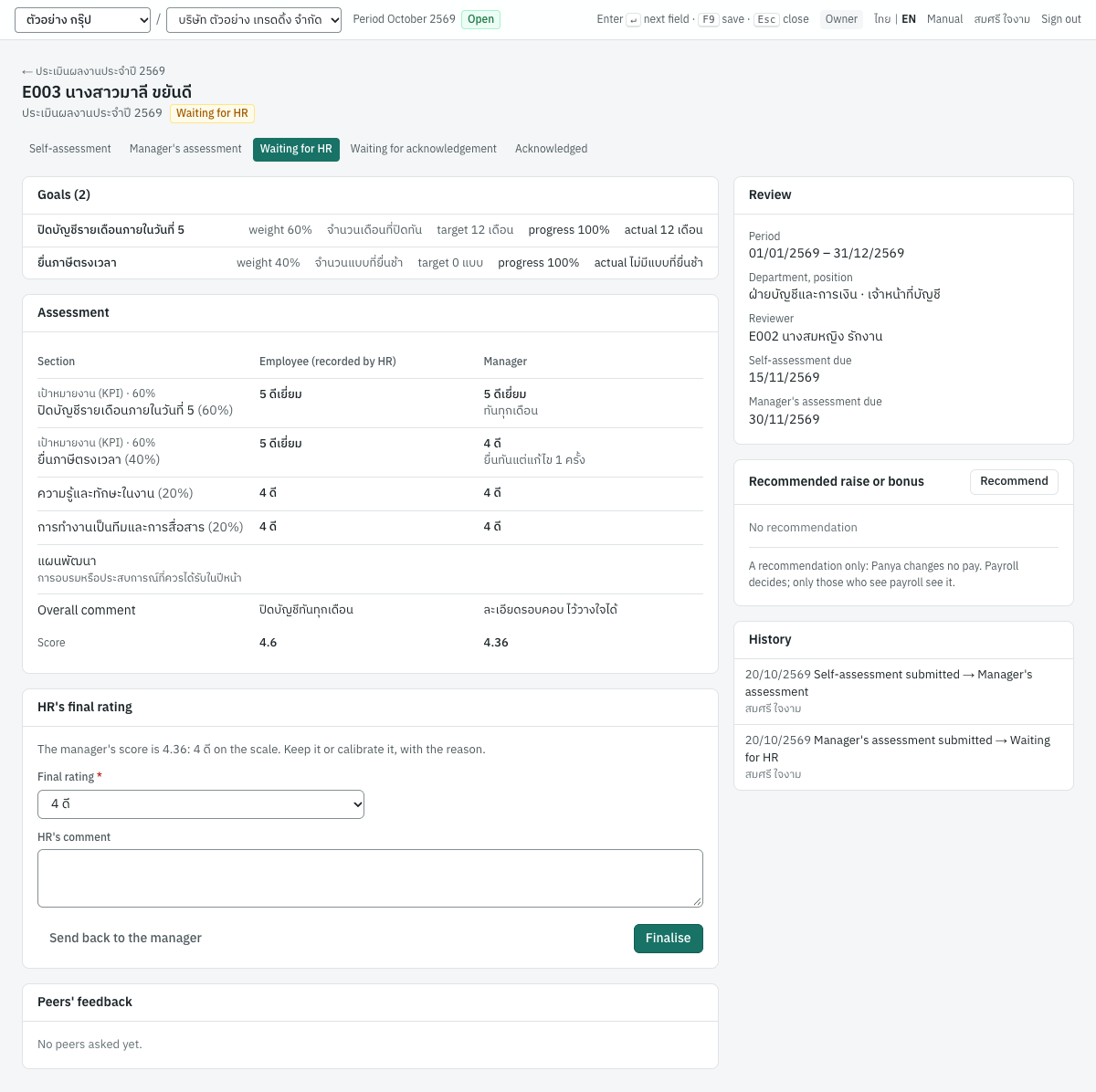
A review waiting for HR shows the manager's score and the point of the scale it rounds to (halves up). HR keeps or calibrates it, adds a comment and Finalises; Send back to the manager returns it with the reason. HR never finalises their own review.
The acknowledgement#
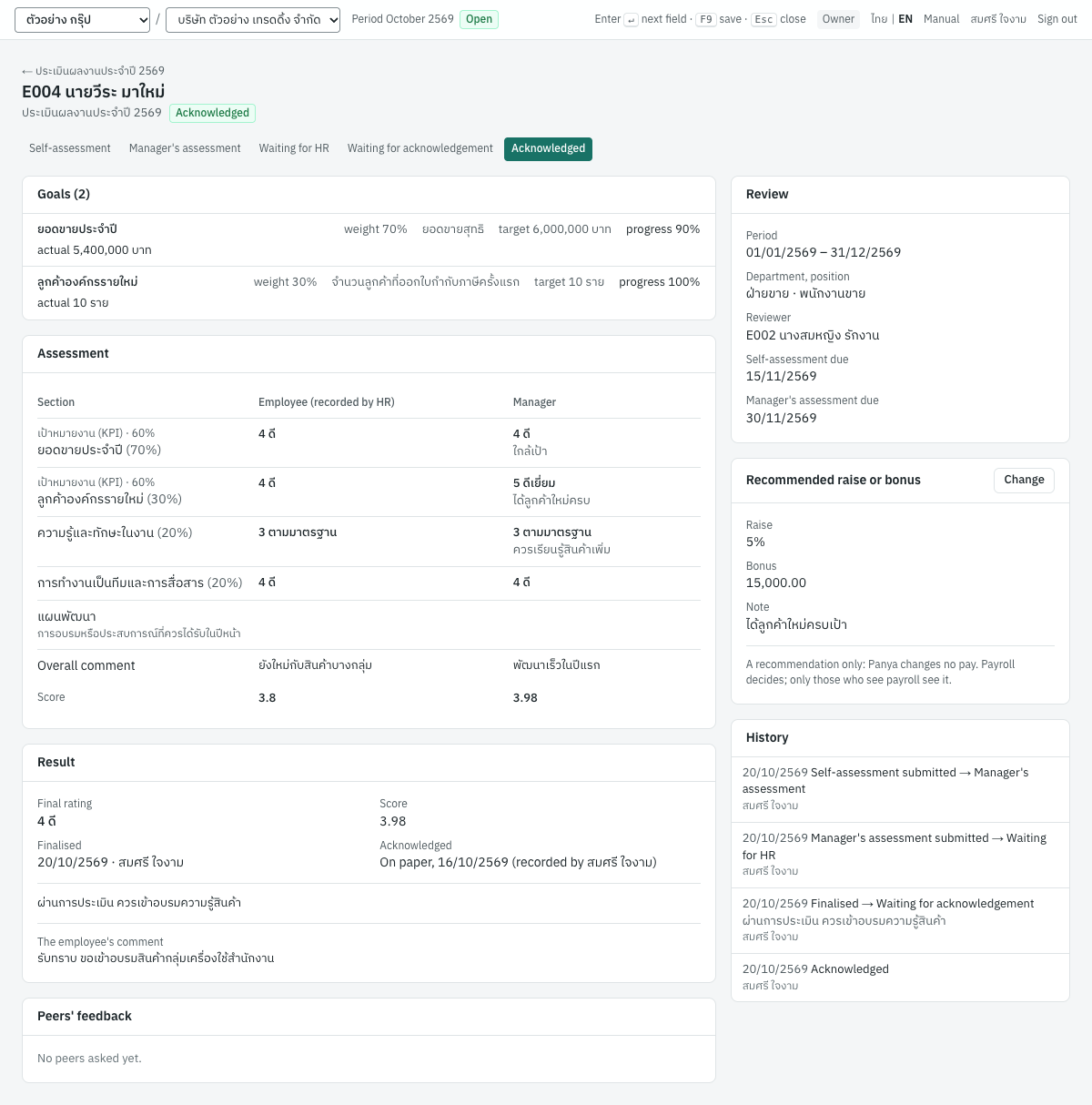
The employee now sees the manager's assessment, the final rating and HR's comment, and clicks Acknowledge, adding any comment, including what they disagree with: acknowledging is having seen the result, not agreeing with it, and the comment is kept with the review. For an employee who signs on paper, HR clicks Record a paper acknowledgement with the date it was signed.
Recommending a raise or bonus#
On a review, members who see payroll and manage reviews see Recommended raise or bonus: a raise as a percentage or an amount, a bonus, and a note.
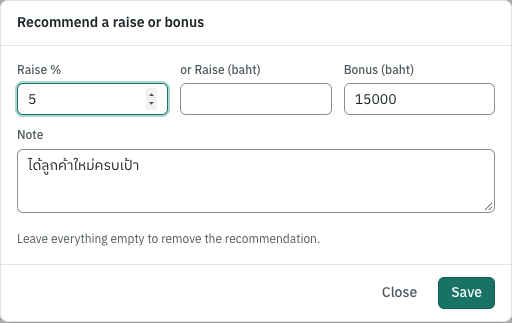
It is a recommendation only. Panya never changes a salary or pays a bonus from a review: payroll decides, in 8 Payroll. Nobody recommends their own; the employee, the reviewer and HR members without View payroll do not see it, and the audit log records that it changed, never the amounts.
What the law and the courts say#
No Thai law requires private employers to review performance or to give raises. What the law does say shapes how Panya runs reviews (see docs/reference/thai-labour-reference.md):
- Pay is not cut through a review. Lowering wages or a bonus condition needs the employee's consent (Labour Relations Act s.20; Supreme Court judgments 6135–6137/2555, 4519/2557), and nothing may be deducted from pay for a poor result (Labour Protection Act s.76). Hence a recommendation, never a change.
- Make it specific, and more than one person's. The Supreme Court found a dismissal for poor performance unfair when it rested on one person's appraisal of vague items with no review (5732/2560), and fair when written warnings went unheeded (3413/2561). Panya's reviews have set goals and criteria, the employee's own view, the manager's assessment and HR's finalisation, and keep every comment.
- Poor performance is not one of s.119's grounds: an employee dismissed for it is still owed severance. A written warning (s.119(4)) is a separate document, valid for one year from the offence.
- Probation is not set by law (see Recruiting).
What Panya does not do yet#
- A self-service sign-in for employees who are not members of the organization: they take part on paper, through HR, for now.
- Changing pay from a recommendation (by design: payroll decides).
- Calibration across a whole department, 360° reviews with anonymous peers, continuous feedback, written warnings.
- Reminders by email before the due dates.