API and AI agents · API และ AI เอเจนต์
With Premium, AI agents such as Claude and ChatGPT, and your own programs, can work in your books through the Panya API. You can ask an agent "how much do customers owe us?", have it turn a pile of supplier bills into drafts, or let a program record each day's online sales.
A program connects with an API key. A key acts as the member who made it: it sees the companies that member sees and does what their role allows, nothing more. Every check that applies in the app applies to a key too: permissions, closed periods, posting rules and the audit log.
This chapter covers:
- Premium and how to subscribe;
- making, using and revoking API keys;
- connecting an AI agent with the Panya skill;
- what a key can and cannot reach;
- the messages you may see.
Premium#
Premium · On Organization settings → Plan & usage and API & AI agents
Premium costs ฿199 a month for the whole organization, however many companies and members it has. It includes:
- the Panya API for every company of the organization;
- API keys for every member, read-only or with write access;
- the Panya skill, which teaches AI agents how to use Panya.
Your books, the app, exports and Panya AI do not need Premium. Panya AI used through the API spends AI credits as it does in the app; see Organization administration.
Only owners subscribe:
- Open Organization settings → API & AI agents (or the Premium card on Plan & usage).
- Click Subscribe · ฿199/month.
- Choose how to pay:
- Pay by card opens Stripe's checkout page, and Stripe charges each month;
- with Pay by PromptPay, Stripe emails an invoice with a PromptPay QR code, due in 7 days.
- When Stripe confirms the payment, the card shows Active and the date Premium renews.
Cancel Premium in Manage billing on the Plan & usage tab. It stays until the end of the month you paid for. If a payment fails, the card warns you, and the API keys keep working for 7 days. After that they stop until Premium is paid; none are deleted.
Note: A Panya installation that does not take online payment shows Confirm instead of the payment buttons, and Premium starts at once for a month. Panya On-premises includes the API in its licence: the card says Included in your Panya On-premises licence.
API keys#
คีย์ API · Organization settings → API & AI agents
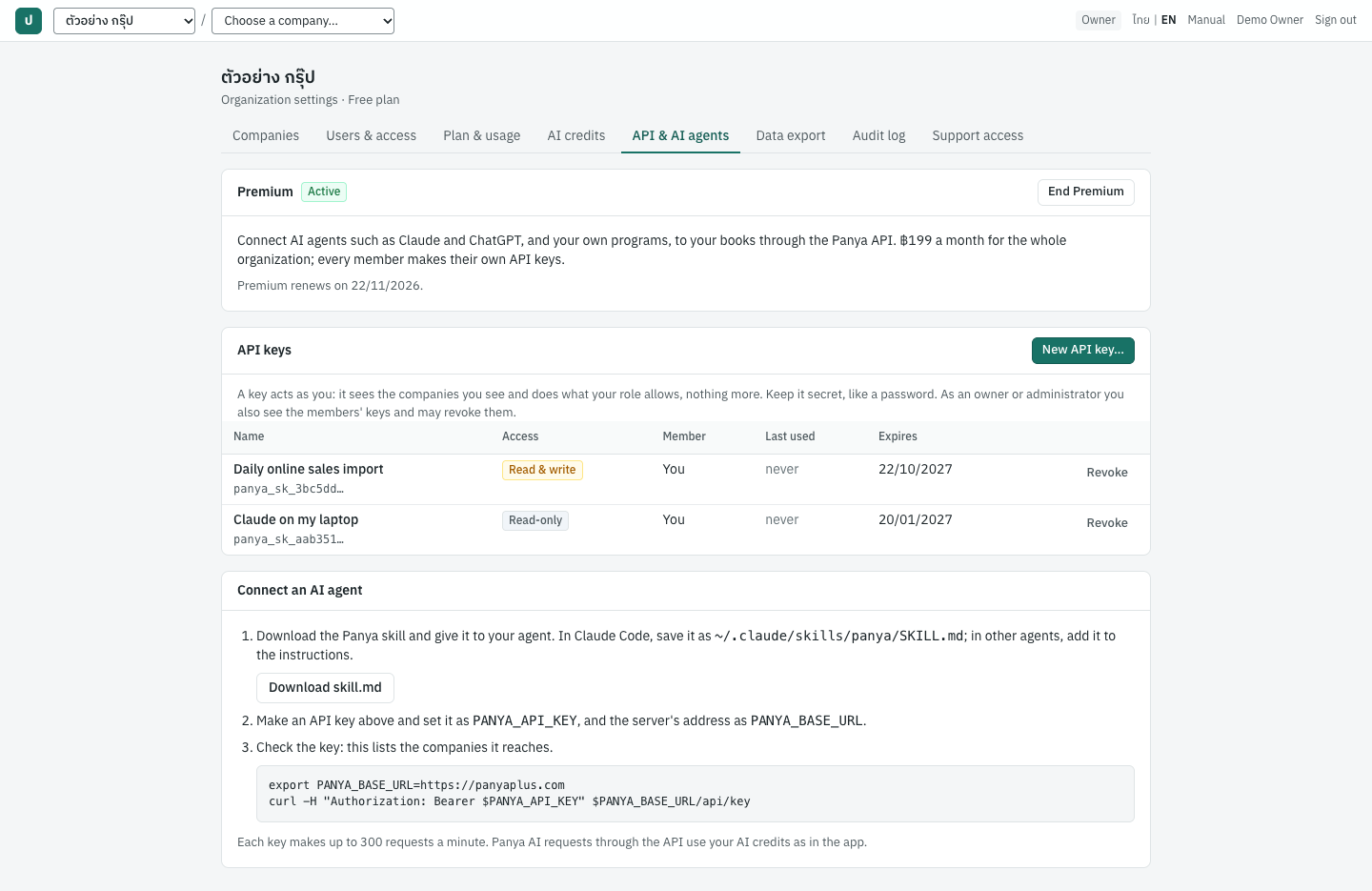
The API keys card lists your keys:
| Column | What it shows |
|---|---|
| Name | The name you gave the key, and its first characters, for example panya_sk_3f9a1c… |
| Access | Read-only or Read & write |
| Member | Owners and administrators only: whose key it is |
| Last used | When the key was last used, or never |
| Expires | The expiry date, never, or revoked with the date |
Members see their own keys. Owners and administrators also see everyone's keys, and may revoke them.
Making a key#
- Click New API key…. The button works once the organization has Premium.
- Enter a Name that says where the key will be used, for example Claude on my laptop.
- Choose the Access:
- Read-only: reports, documents, lists. This is the default, and is enough for questions and reports.
- Read & write: also make and post documents. The dialog warns that an agent can then make, post and cancel documents in your name.
- Choose when it Expires after: 30 days, 90 days, 1 year or Never.
- Click Make key.
The key is shown once, for example panya_sk_3f9a1c… followed by 64 letters and digits. Click Copy and store it safely, like a password. Panya keeps only a fingerprint of it, so neither you nor Panya support can see it again. If you lose it, revoke it and make another.
Each member may have up to 20 keys in an organization.
What a key can do#
A key does what you may do, never more:
- it reaches the companies you can open, with your role in each (see Roles and permissions);
- a read-only key only reads, even if your role may post;
- a key from a viewer's account cannot post, even with write access;
- payroll and HR data need the same permissions as on screen.
What a key does is in the audit log under your name, marked API key (see Organization administration).
A key reaches the books only. Signing in, members and invitations, the plan and billing, other API keys, data exports and support access stay in the Panya app.
Revoking a key#
Click Revoke on the key's row, and confirm. Anything using the key stops working at once. Revoked keys stay on the list, greyed out, for 30 days.
A key also stops working when:
- it expires;
- its member is removed from the organization (their keys there are revoked, even if they are added back later);
- its member's Panya account is disabled;
- the organization's Premium lapses (the key works again once Premium is paid).
Connecting an AI agent#
The Connect an AI agent card gives the three steps:
- Download skill.md. The skill teaches an agent how to use Panya:
- which lookups come first;
- to save documents as drafts and ask you before posting;
- what money and dates look like;
- the common tasks: sales, receipts, expenses, supplier payments with withholding tax, journal entries and reports.
In Claude Code, save the file as ~/.claude/skills/panya/SKILL.md. In other agents, add it to the agent's instructions or knowledge.
- Set your key as the environment variable
PANYA_API_KEY, and the server's address asPANYA_BASE_URL(https://panyaplus.comon Panya Cloud). - Check the key with the command on the card:
`` curl -H "Authorization: Bearer $PANYA_API_KEY" $PANYA_BASE_URL/api/key ``
It answers with your name, the organization and the companies the key reaches.
The skill is also at https://panyaplus.com/skill.md.
Good practice with agents:
- Start with a read-only key. Make a read & write key only for tasks that need it.
- Ask the agent to save drafts and show them to you. You can post them yourself on screen, or tell the agent to post.
- Check what the agent did in the documents' lists and the audit log.
For developers#
The API is the one the Panya app uses: JSON over HTTPS, under /api/companies/{company_id}/….
- Send the key as
Authorization: Bearer panya_sk_…. - Money is sent and returned as strings (
"642.00"). Dates areYYYY-MM-DDin the Christian era. - Creates accept an
Idempotency-Keyheader, so a retried request does not make a second document.
Each key may make 300 requests a minute. The skill file doubles as the API's reference: it lists the endpoints, the request bodies of the common documents and the error codes.
Messages#
| Message | What it means |
|---|---|
| the Panya API needs Premium: the organization's owner subscribes on the Plan & usage page | The organization has no Premium, or it lapsed. Keys are kept, and work again once it is paid. |
| the API key is not valid: it was revoked or has expired, or its user no longer has access | Make a new key. |
| this API key is read-only: make a key with write access to change data | The agent tried to change something with a read-only key. |
| an API key reaches the companies' books only: use the Panya app for this | The request was for something outside the books, such as members or billing. |
| your role (viewer) does not permit this action | The key's member may not do this; see Roles and permissions. |
| you have 20 API keys in this organization: revoke one first | Revoke a key you no longer use. |
| too many requests | More than 300 requests in a minute. The agent should wait a minute. |